

Table of Contents:
Copilot doesn’t create new data access problems. It surfaces the ones you’ve been ignoring.
If your SharePoint environment has been oversharing for years, here’s what Copilot exposes:
- Broken permission inheritance
- “Everyone except external users” groups with site-wide access
- Stale guest accounts that were never de-provisioned
- Unclassified sensitive files buried in shared libraries
The AI inherits your user permissions and makes them usable in ways they weren’t before. That’s the real governance problem.
70% of Fortune 500 companies have adopted Microsoft 365 Copilot, but only 6% have scaled beyond pilot. The bottleneck is always governance.
Nearly half of IT leaders lack confidence managing Copilot’s access risks. I recommend starting with Microsoft’s native stack and extending to third-party tools at scale.
Why Copilot Governance Is Different from Standard IT Security
Copilot governance is different because Copilot makes accessible data discoverable in ways that weren’t possible before.
Think about a typical overshared site: broken inheritance means three groups have access through three different paths. Users can’t see it, but Copilot indexes all of it.
A finance analyst asks for quarterly results and gets data from an HR site they never should have accessed. The architecture is the problem.
Three configurations that expose your data:
- “Everyone except external users” groups with site access: Copilot returns results to every user in your tenant
- Unclassified sensitive files in shared libraries: Copilot’s indexing pulls them into responses
- Stale guest accounts on project sites: Copilot surfaces internal strategy to contractors who were never de-provisioned
This isn’t theoretical: 73% of enterprises experienced at least one AI-related security incident in the past 12 months, with average breach costs of $4.8 million.
The governance work is structural. You’re finally forced to implement controls that should have existed in your permission estate all along.
| Tool / Framework | Best For | Key Capability |
|---|---|---|
| Microsoft Copilot Control System | First-time Copilot deployments | Centralized governance framework + measurement |
| SharePoint Advanced Management | Legacy permission sprawl | Data access audits + permission remediation at scale |
| Microsoft Purview | Regulated industries + compliance | Data classification + DLP for Copilot |
| Microsoft Entra ID | Identity-based access | Conditional Access + MFA enforcement for Copilot |
| AvePoint | Automated remediation + multi-tenant | Permission cleanup automation + workspace lifecycle |
| CoreView | License optimization + delegated admin | Virtual Tenants + governance visibility across teams |
Sign up for exclusive updates, tips, and strategies
The Tools and Strategies That Matter
This is the full stack: Microsoft’s native governance layer, extended by specialized tools when your environment demands it.
1. Microsoft Copilot Control System
The Microsoft Copilot Control System is Microsoft’s native governance framework for Copilot deployments. It’s the starting point for almost every organization.
It covers three pillars: security and governance (data protection, AI security, compliance), management controls (licensing, agent lifecycle, policies), and measurement and reporting (adoption, ROI).
It’s built into the Microsoft 365 Admin Center, so there’s no new platform to learn. If you’re already managing M365, you already have access.
Key features:
- Centralized Copilot settings in the Microsoft 365 Admin Center
- Per-user and per-group Copilot license assignment
- Conditional Access policy templates for Copilot (integrated with Entra ID)
- Copilot activity audit logs and analytics
- Data governance integration with Purview sensitivity labels
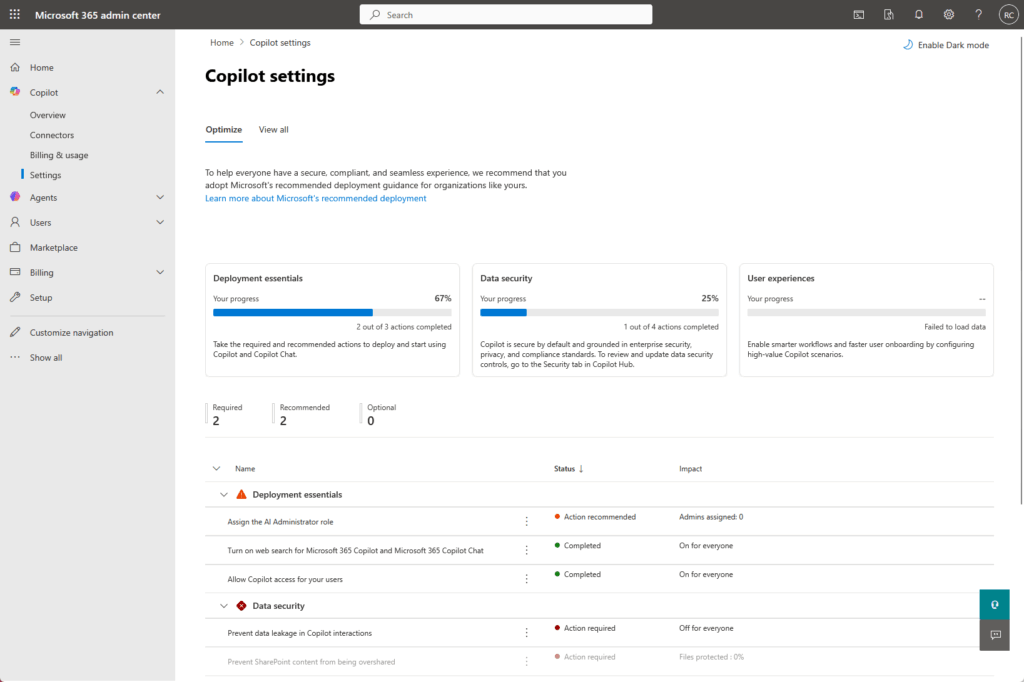
The system tells you exactly where Copilot is being used, who’s using it, and what data it’s accessing.
But here’s the catch: the control system identifies oversharing problems. It doesn’t always fix them at scale.
If you have thousands of sites with broken permissions, the control system will flag them in reports. Remediation? That’s on you or a specialized tool.
The three-phase approach works in practice:
- Pilot: 100 low-risk sites, limited users, heavy monitoring
- Deployment: validate oversharing controls before expanding access
- Operations: automated policies and continuous monitoring
I recommend this if you’re deploying Copilot for the first time. Most organizations use it as their foundation.
SharePoint Advanced Management is specifically built to fix the problem Copilot exposes: oversharing in your SharePoint permission estate.
Real talk: if your organization has a legacy SharePoint footprint (five years old or more), you have accumulated oversharing.
SAM surfaces and remediates exactly this: broken inheritance, permissions that no longer match their original intent, guest accounts never removed, and stale collaboration groups.
Key features:
- Data access governance reports identifying oversharing patterns
- Site access reviews flagging permission anomalies
- Restricted access control (prevents creation of “Everyone” links)
- Restricted content discovery (removes overshared content from Copilot indexing)
- Site lifecycle management and ownership policies
Here’s a common scenario: a site shared with “Everyone except external users” five years ago. The project ended but the access level never changed.
Copilot exposes overshared data. SAM identifies these permission anomalies via reports, allowing you to run reviews and confirm risks for remediation.
Then you apply Restricted Access Control to block future “Everyone” sharing and Restricted Content Discovery to exclude sensitive content from Copilot indexing on that site.
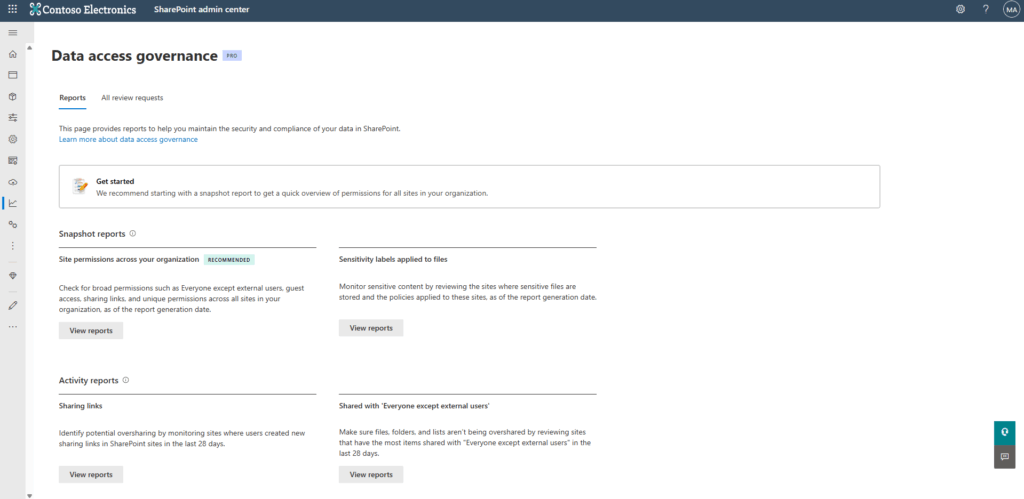
SAM requires an E5 or add-on license. For large estates, it pays for itself in risk reduction alone. It’s not optional if you have structural permission problems.
I recommend this if your organization has significant legacy SharePoint sprawl. It’s your first stop for permission remediation.
3. Microsoft Purview
Microsoft Purview is the data governance and compliance layer.
Its role in Copilot governance is subtle but critical: it classifies what data exists, marks what’s sensitive, and prevents Copilot from accessing regulated content.
Sensitivity labels are the crucial foundation for data. You easily mark content as “Confidential – Finance,” “Restricted – Legal,” or “Public.”
Copilot respects those labels. A finance analyst won’t see results from files labeled “Restricted – HR” because Copilot’s indexing honors the label.
The underlying permission is still there (maybe the analyst has access), but Copilot won’t surface it in responses.
Key features:
- Sensitivity labels and auto-labeling policies
- Data Loss Prevention (DLP) policies blocking Copilot from accessing PII or regulated data
- Data Subject Rights Requests and compliance workflows
- eDiscovery for Copilot interactions (audit what the AI saw and returned)
- Audit logs tracking all Copilot data access
The regulated industry angle matters here. If you’re in financial services or healthcare, you must implement Purview’s DSPM for AI (Data Security Posture Management).
It scans your M365 environment and flags sensitive files that Copilot could potentially access. Then you apply DLP policies to block Copilot’s indexing of those files.
The eDiscovery piece is underrated. When Copilot returns data in a response, that response is now a discoverable artifact in your compliance workflows.
Purview logs what Copilot accessed, what it returned, and when. That’s critical for regulatory audits and breach response.
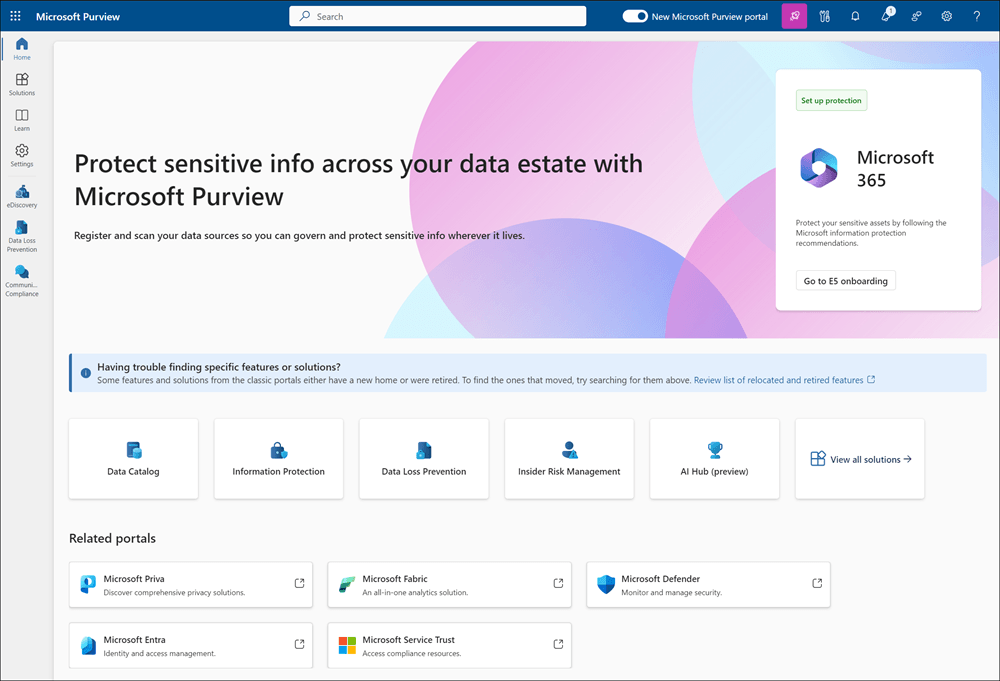
I recommend this if you operate in a regulated industry (finance, healthcare, legal) or have strict compliance obligations.
Purview is the compliance backbone that prevents regulatory violations through Copilot.
4. Microsoft Entra ID
Microsoft Entra ID governs who gets to use Copilot in the first place. It’s identity governance, not data governance, but it’s equally important.
Here’s the distinction: the tools above (SAM, Purview) control what data Copilot can access. Entra ID controls who can use Copilot and under what conditions.
Create conditional access policies specific to Copilot:
- Require phishing-resistant MFA (Windows Hello, FIDO2) for all Copilot users
- Require compliant devices (Intune-managed, patched, encrypted) to use Copilot
- Block access from high insider-risk signals (impossible travel, unusual data volume, etc.)
- Enforce specific sign-in requirements based on user role
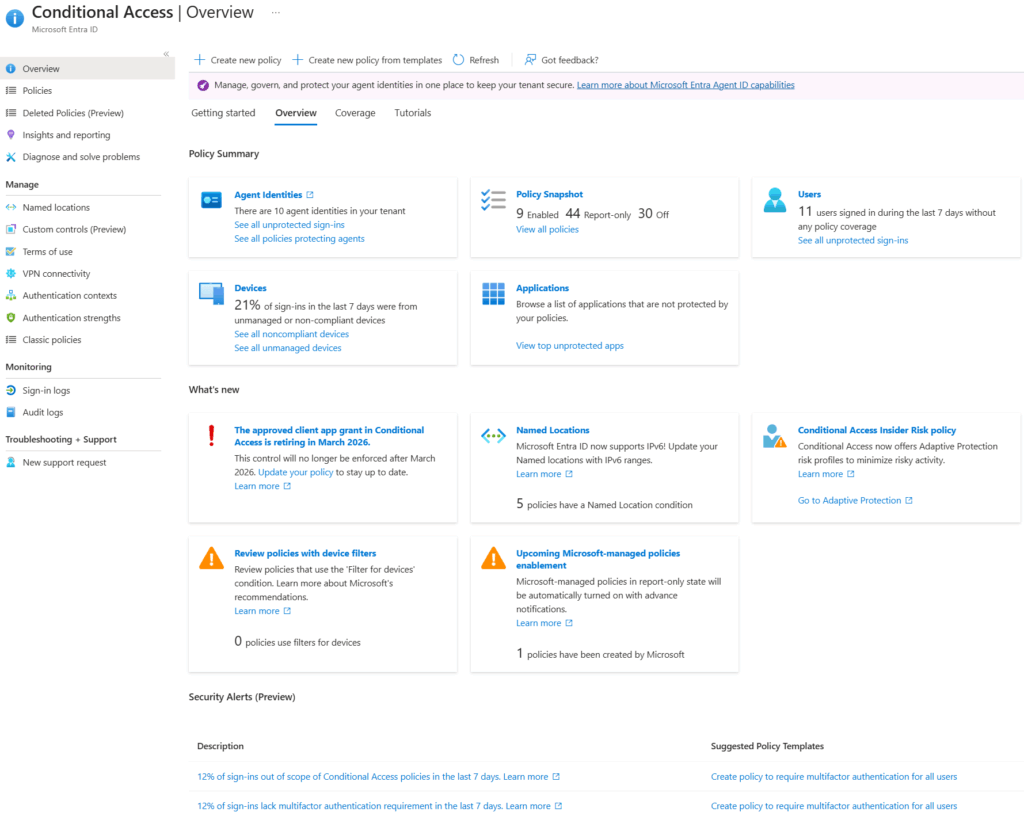
The insider risk piece is real: if a finance director suddenly logs in from six countries in one day and requests access to sensitive files, that’s a signal.
Entra ID’s Conditional Access can block Copilot access for that session until the anomaly is investigated. You’re not assuming the user is trustworthy just because they have a valid password.
The device compliance requirement matters: if someone uses Copilot from a personal laptop without disk encryption, Entra ID blocks it. Corporate devices only.
I recommend this if you want to enforce consistent authentication before users interact with Copilot. It’s your first line of defense.
5. AvePoint
When Microsoft’s native tools hit their limits, AvePoint enters the picture.
It’s a third-party governance platform that automates what SAM identifies but can’t remediate at scale.
AvePoint’s model breaks into three pillars:
- Data Preparation (content assessments, classification, redundancy removal)
- Data Security (risk assessments, permission cleanup, policy automation)
- Operations Optimization (workspace management, lifecycle automation)
Key features:
- Content assessments identifying oversharing and redundant content
- Automated permission remediation across thousands of sites
- Policy templates automating governance decisions (e.g., “archive sites inactive for 2 years”)
- Workspace lifecycle management and cleanup
- Multi-tenant support for managed services providers
Here’s where AvePoint shines: SAM tells you that 40% of your sites have oversharing and gives you a report.
AvePoint fixes it: it runs automated remediation workflows that clean up permissions in bulk, applies lifecycle policies to archive inactive sites, and prevents future oversharing through template-based governance.
For large environments, this is the difference between years of manual remediation and finishing in months. AvePoint handles the scale that manual reviews can’t.
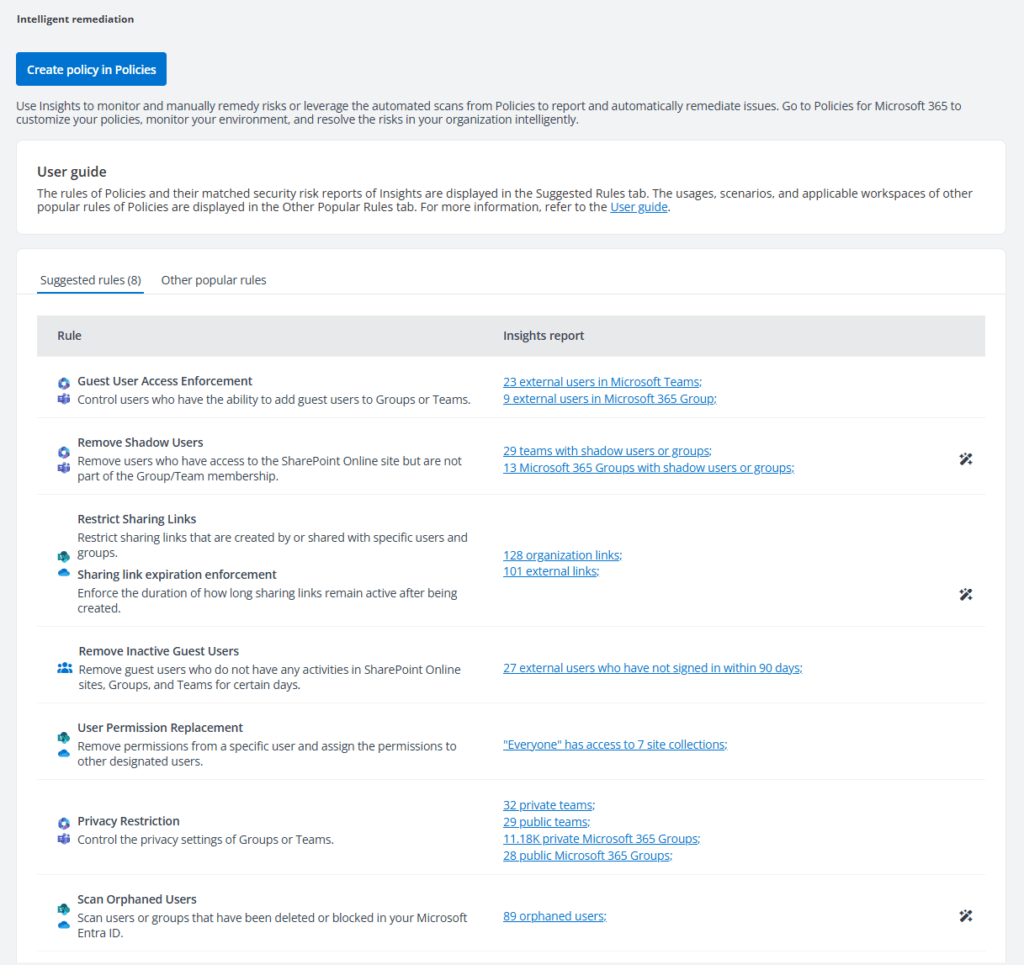
The multi-tenant piece matters if you’re a Microsoft partner or managed service provider managing multiple customer tenants.
You can’t manually govern each client’s permission estate. AvePoint’s multi-tenant console lets you manage governance policies across all customers at once.
I recommend this if your organization has significant permission sprawl, needs automated remediation at scale, or manages multiple M365 tenants.
6. CoreView
CoreView sits between governance and operations. It’s a unified platform for M365 management covering license optimization, delegated administration, security enforcement, and Copilot readiness reporting.
The “Virtual Tenants” feature is CoreView’s differentiator. It lets you delegate tenant administration to teams without giving them global admin access.
A department IT lead can manage governance for their 500-person division without seeing the rest of the organization’s data.
Key features:
- Virtual Tenants for delegated administration
- License management and optimization
- Permission visibility across M365
- Security policy enforcement and monitoring
- M365 deployment reporting and posture management
The license angle is often overlooked but critical. Copilot requires E5 or A5 licenses.
CoreView shows you exactly which users have them, which users need them, and where you’re over or under-licensed. That data directly impacts your deployment strategy.
The Copilot readiness reports walk you through everything: required licenses, Conditional Access policies, and sensitive content classification.
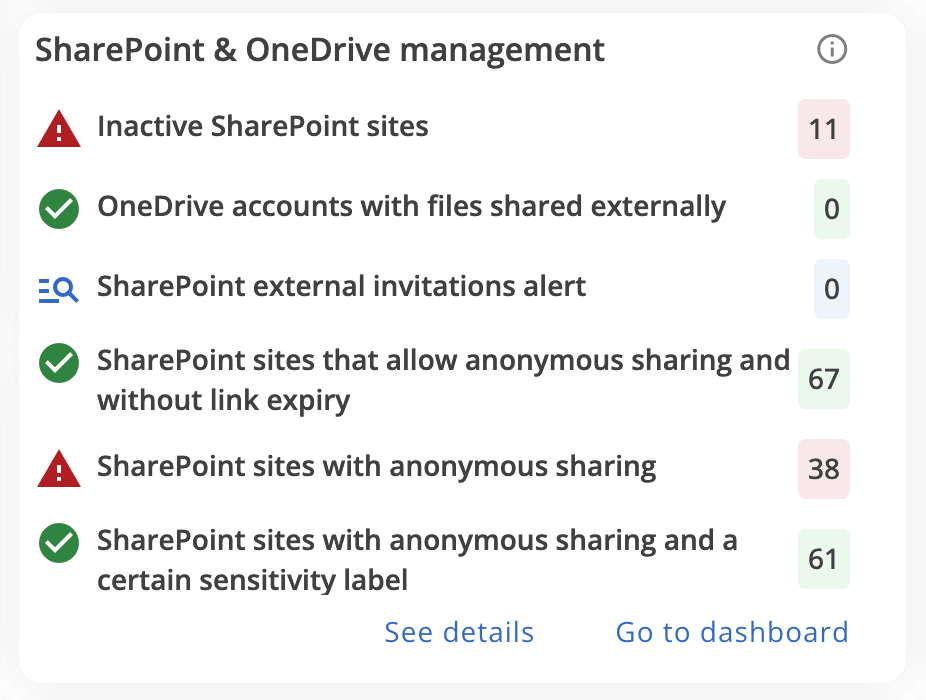
I recommend this if you need governance visibility and license management, or you’re delegating admin across multiple teams in a large organization.
Before You Deploy: The Governance Checklist
You don’t need to implement all six tools.
But you do need to cover the foundational governance work before pushing Copilot beyond a pilot.
Run through this checklist:
- Run a data access governance report (SharePoint Advanced Management or AvePoint) identifying all overshared sites
- Audit your permission estate and prioritize remediation by risk (SAM or AvePoint can do this at scale)
- Apply sensitivity labels to high-risk content (Purview) and verify that Copilot respects them in responses
- Audit sharing links and “Everyone” groups across SharePoint and Teams (restrict or remediate)
- Set Conditional Access policies for Copilot users (Entra ID): MFA, device compliance, insider risk signals
- Define Restricted Content Discovery exclusions for sensitive sites (SAM)
- Enable Purview DSPM for AI to identify sensitive files Copilot could access
- Run a pilot with ~100 low-risk sites and a limited user group, monitoring Copilot activity logs
- Verify that your remediation strategy actually reduces Copilot’s access to sensitive data (audit logs + activity reports)
- Only then expand to broader deployment
Governance isn’t a one-time setup. It’s continuous.
New sites get created, sharing behaviors shift, and Copilot’s index evolves. You need monitoring in place from day one.
Start with the Permission Estate, Then Scale
Organizations stuck in pilot mode are almost always stuck on governance. They know Copilot works.
70% of the earliest Copilot adopters said it makes them more productive. But they can’t scale because the permission estate is a mess.
Copilot is a forcing function: it makes you fix structural permission problems that have been accumulating for years. The work was always necessary.
Two steps before you scale:
- Do the foundational work: remediate oversharing, classify sensitive content, set identity controls
- Run a limited pilot and verify your governance strategy works
91% of organizations plan to expand Copilot deployment. The 6% stuck in pilot mode are almost always stuck on governance.
Struggling to get your Copilot governance in place before you go live? I help IT managers move from pilot to production with the right controls.




























