
Most teams comparing SharePoint and Asana are already Microsoft 365 subscribers. They’ve got Planner, Teams, and Power Automate sitting in their tenant.
Before you add another tool to the mix, here’s what you’re getting in this comparison:
- What SharePoint and M365 can already do for project management
- Where Asana genuinely wins
- How the real cost stacks up, including the seat-minimum gotcha most people miss
- A decision framework for picking the right setup for your team
For a lot of M365 shops, I’ve found the real answer is already sitting in their tenant. They’re paying for tools they haven’t configured.
This comparison cuts through the noise. You’ll see where Asana genuinely earns its cost and where SharePoint covers the same ground for free.
Most M365 teams underestimate what’s already there. The goal here is to help you figure out whether you actually need Asana at all.
SharePoint isn’t marketed as a project management tool.
That’s partly why I keep seeing teams miss how powerful it gets when you combine it with the rest of Microsoft 365.
Each tool in the stack handles one function. Put them together, and you’ve got a unified project system where documents, tasks, approvals, and communications all live in one place.
| Tool | Role |
|---|---|
| SharePoint | Document-centric hub |
| Microsoft Planner | Task management |
| Teams | Real-time collaboration |
| Power Automate | Workflow logic and automation |
Start with SharePoint Lists and the Board View. It’s a Kanban-style interface built directly into your SharePoint site, no extra tool required.
Board View gives you:
- Columns for task status, priority, owner, and due date
- Drag-and-drop task movement across swim lanes
- Conditional formatting so overdue items stand out visually
For most teams, that covers the basics. Planner integrates with Teams so your team creates tasks, sets deadlines, and sees everything without switching apps.
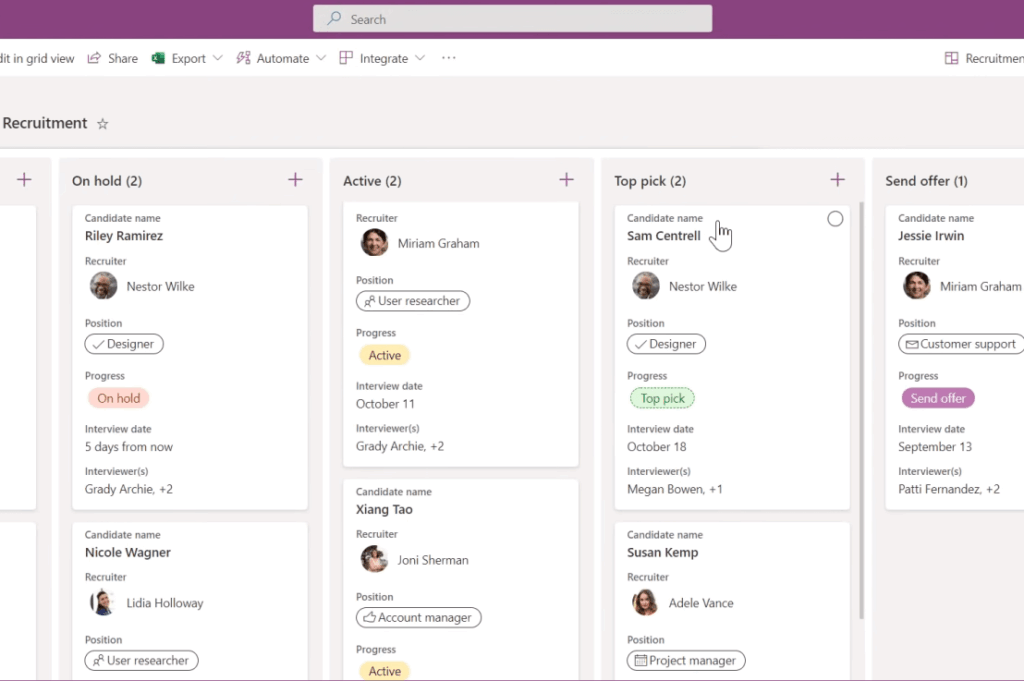
Tasks sync with Outlook so people see deadlines in their calendar. Notifications work natively across M365.
Add Power Automate workflows and you’ve got approval chains, automatic task routing, and escalation logic that runs without manual intervention.
When a project milestone gets marked complete, a flow can update a status list, trigger a notification to stakeholders, and generate a report that feeds into Power BI.
Microsoft includes a purpose-built Project Management site template with libraries, risk tracking, and web parts for timelines and dashboards. Standardizing on this template matters.
Microsoft Planner vs Planner Premium
Planner comes included with most Microsoft 365 business licenses (Business Basic, Standard, E3, and above) at no extra cost. Planner Premium adds additional capability tiers.
| Feature | Planner (included) | Planner Premium Plan 1 | Planner Premium Plan 3 |
|---|---|---|---|
| Kanban board view | Yes | Yes | Yes |
| Task assignment and deadlines | Yes | Yes | Yes |
| Outlook integration | Yes | Yes | Yes |
| Timeline/Gantt view | No | Yes | Yes |
| Task dependencies | No | Yes | Yes |
| Goals | No | Yes | Yes |
| Copilot in Planner | No | Yes | Yes |
| Microsoft Project access | No | No | Yes |
| Advanced resource management | No | No | Yes |
| Cost per user/month | Included | $10 | $30 |
For teams that need visual timeline management, Planner Premium Plan 1 ($10/user/month) brings Gantt views and task dependencies.
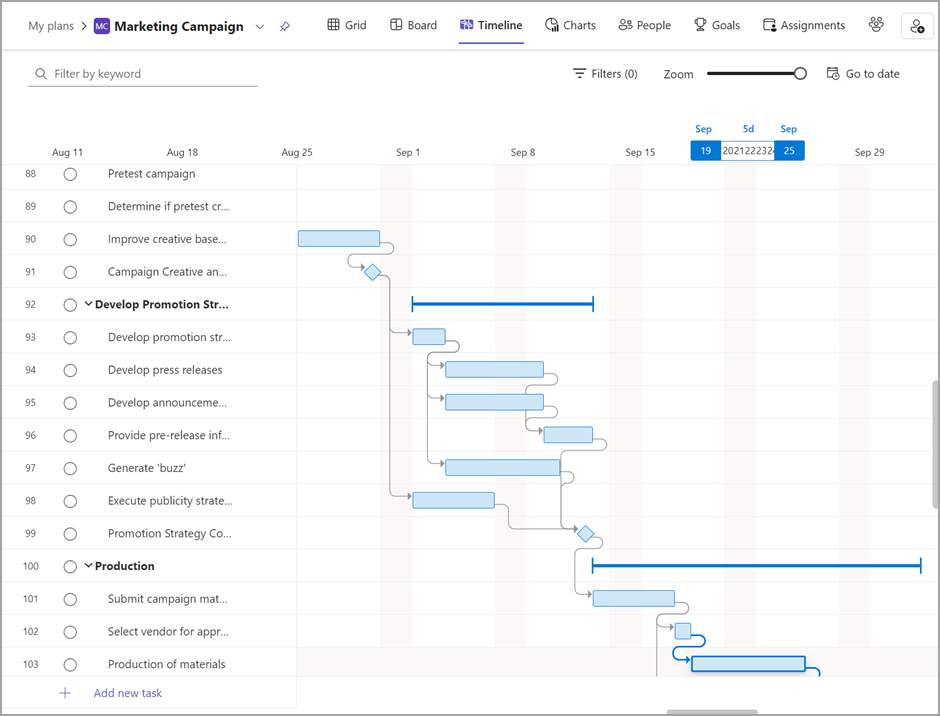
Plan 3 ($30/user/month) adds Microsoft Project access for enterprises managing complex portfolios and resource allocation.
Sign up for exclusive updates, tips, and strategies
What Asana Does Well
Asana is purpose-built for task and project management. You can tell.
I’ve always found onboarding is fast. The interface feels clean and intentional, especially if you’re coming from a tool cobbled together from M365 components.
Asana leads in a few specific areas:
- Task management flexibility: subtasks, dependencies, custom fields, and a rule-based automation builder that doesn’t need workflow syntax knowledge
- Timeline view more polished than Planner Premium’s Gantt, with visual dependency management and calendar-based scheduling
- Portfolio management with resource allocation, cross-project dependencies, and rollup reporting
That advanced feature sits behind the Advanced tier ($24.99/user/month) and requires a minimum team size. But it’s genuinely valuable for program-level oversight.
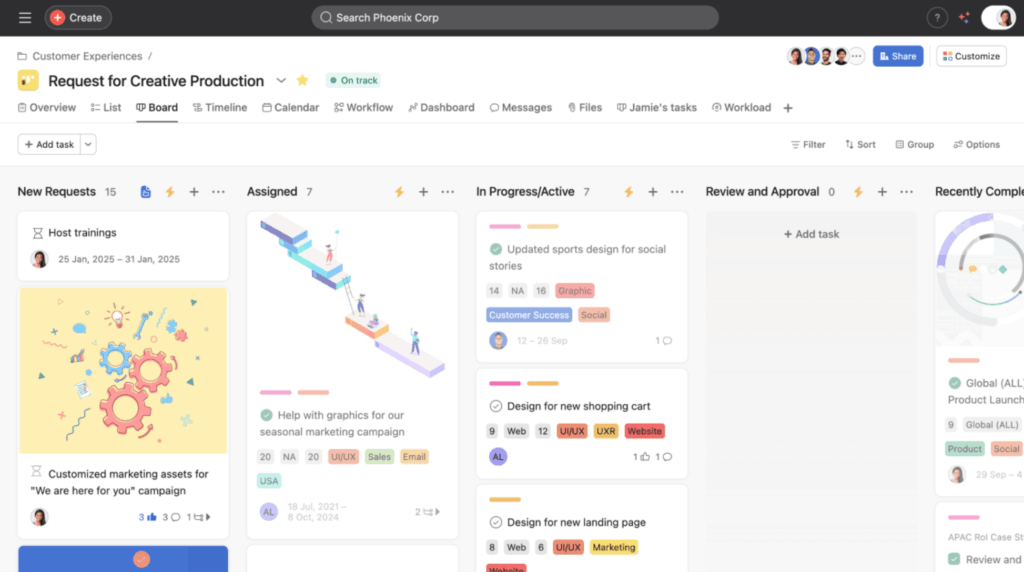
Source: https://help.asana.com/s/article/board-view?language=en_US
Asana was named a Gartner Leader in 2024 for Adaptive Project Management and Reporting. The template library is extensive, getting teams started faster on structured projects.
Here’s what I’ve noticed clients miss: Asana has native time tracking. SharePoint doesn’t, and if your teams log hours, Asana handles it without third-party integrations.
Both tools check most of the same boxes. The differences show up in integration depth, compliance controls, and how well they fit your ecosystem.
A few items in the table need more context. The notes below explain where checkboxes don’t tell the whole story.
| Feature | SharePoint + M365 | Asana |
|---|---|---|
| Kanban board view | Yes (Lists Board View) | Yes |
| Timeline/Gantt view | Yes (Planner Premium Plan 1+) | Yes |
| Task dependencies | Yes (Planner Premium Plan 1+) | Yes |
| Subtasks | Yes (Lists/Planner) | Yes |
| Custom fields | Yes (Lists) | Yes |
| Time tracking | No | Yes |
| Automation/workflows | Yes (Power Automate) | Yes (Rules) |
| Document management | Yes (native) | Limited (attachments) |
| Native M365 integration | Yes (deep) | Limited (one-directional) |
| Power BI reporting | Yes | No |
| Copilot integration | Yes | Partial (gaps in indexing) |
| Portfolio management | Yes (Project Plan 3) | Yes (Advanced tier) |
| Third-party integrations | Moderate | Extensive |
| Mobile app | Yes | Yes |
| AI-assisted workflows | Yes (Copilot) | Yes |
SharePoint stores every project file in a version-controlled library with metadata, retention policies, and permission controls.
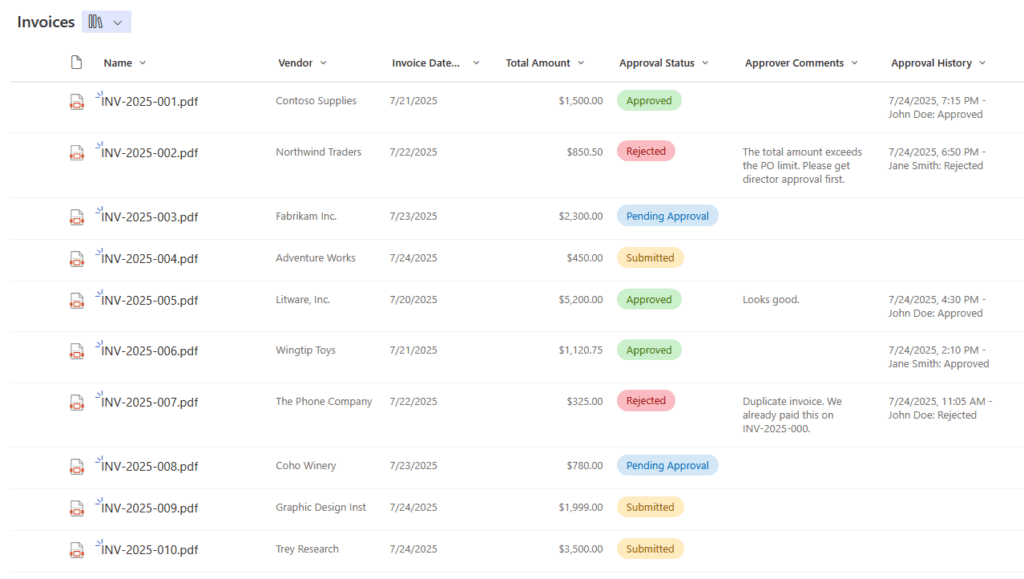
Asana stores attachments, which works for quick reference, but it doesn’t replace a proper content library.
Power BI reporting is another edge. When your project data lives in SharePoint Lists, it connects natively to Power BI dashboards.
You’re not exporting CSVs or relying on API connectors. That tight integration means your reports update automatically and span data across multiple projects without manual work.
Asana’s M365 integration has real gaps. The Copilot connector skips custom fields, Goals, and Portfolios. Permission updates lag. Mismatched emails require manual identity mapping.
The Cost Question
This is where I’ve seen the real decision get made. If you’re a Microsoft 365 customer with Business Basic, Standard, E3, or Enterprise licenses, you already own Planner.
No additional licensing cost. That baseline task and project management capability is already yours.
Asana starts at $10.99/user/month for Starter. Advanced is $24.99/user/month. Starter is only marginally more expensive than Planner Premium Plan 1 ($10/user/month).
| Plan | Published Rate |
|---|---|
| Planner (M365 included) | Free with existing subscription |
| Planner Premium Plan 1 | $10/user/month |
| Asana Starter | $10.99/user/month |
| Asana Advanced | $24.99/user/month |
But here’s the catch: Asana requires minimum seat purchases in predetermined blocks. You can’t just buy 12 licenses.
You have to buy in increments:
- 5 seats per block, up to 30 users
- 10 seats per block for 30–100 users
- 25 seats per block for organizations above 100
A team of 15 might need to buy 20 seats, and a team of 35 might need to buy 40. Average SMB Asana spend is $16,290 per year.
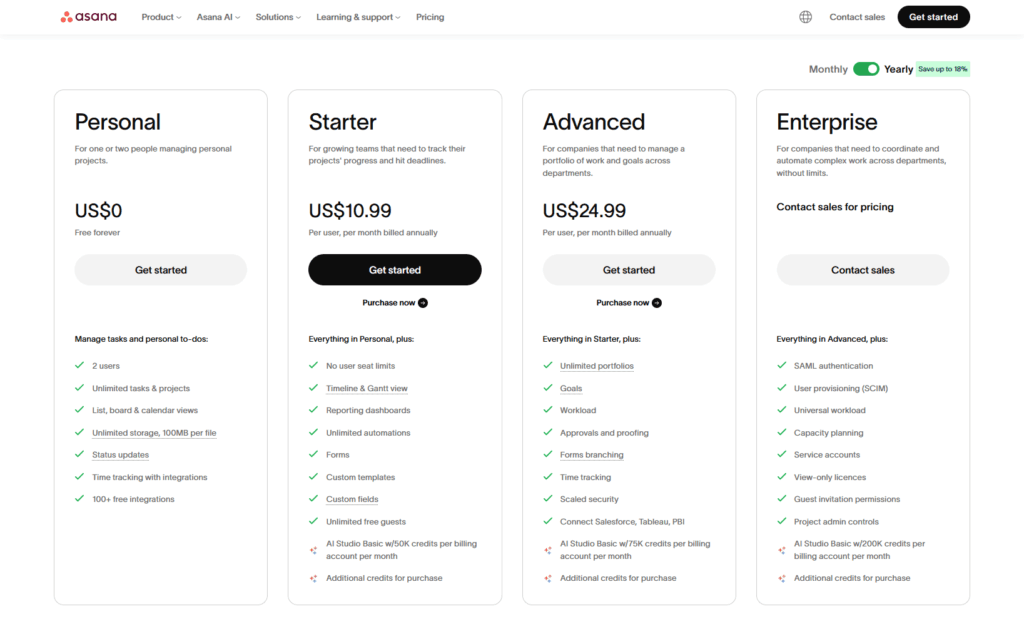
Source: https://asana.com/pricing
For a team of 20, Asana runs roughly $814 per person annually. Planner Premium Plan 1 covers the same 20 people for $2,400 per year with no minimums.
At enterprise scale, the math changes. Planner Premium Plan 3 ($30/user/month) adds Microsoft Project for complex resource management, portfolio optimization, and earned value analysis.
Both tools cost money at enterprise. For most SMBs, the cost difference between Asana Starter and Planner Premium Plan 1 is closer than it looks.
The real difference is whether you’re creating additional data silos (Asana) or keeping project data within M365 (Planner).
Where Asana Has the Edge
Asana wins in three clear scenarios.
- Non-Microsoft environments
- Speed to value
- Task-heavy workflows with native time tracking
Non-Microsoft environments. Asana was built for mixed systems, making it a better fit than M365 for Mac-heavy teams, Google Workspace shops, or multi-SaaS platforms.
Speed to value. Asana gets teams running faster. The template library is extensive, the learning curve is shallow, and SharePoint setup requires expertise you may not have in-house.
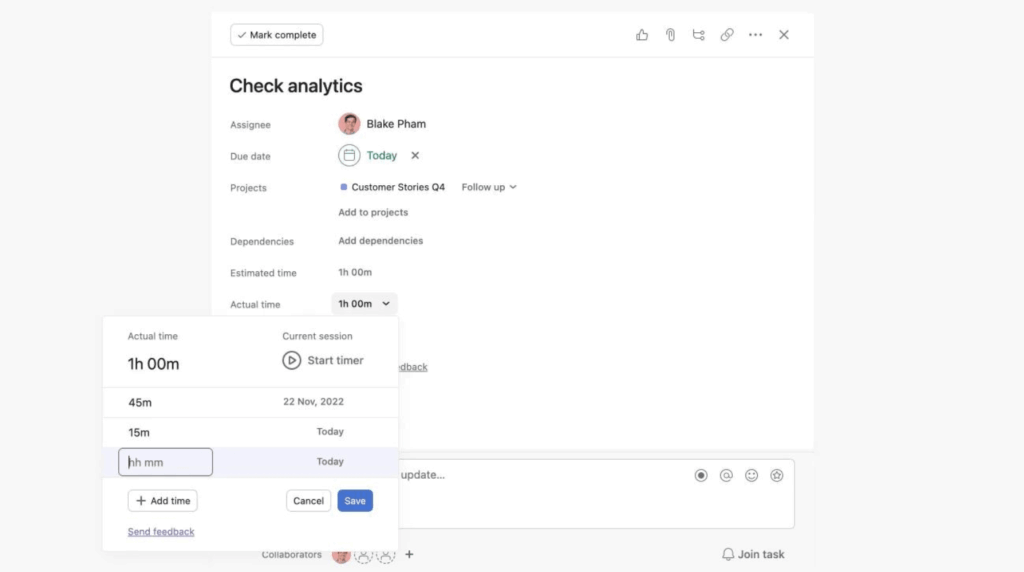
Source: https://help.asana.com/s/article/time-tracking-in-asana?language=en_US
Task-heavy workflows with time tracking. If your projects run on billable hours, task estimation, or resource leveling, Asana’s tracking and workload features are purpose-built for it.
Asana’s rule builder is more accessible to non-technical users than Power Automate. If your team needs to build workflows without IT, that difference matters.
SharePoint and M365 win when your organization is already deep in Microsoft 365 and your project work involves documents.
In my experience, real talk: if document management is central to your projects, SharePoint is unambiguous.
Your contracts, compliance artifacts, resource plans, and deliverables live in a version-controlled library with retention policies, sensitivity labels, and permission controls.
Asana doesn’t replace that.
You’d be managing documents in SharePoint and tasks in Asana, with specific integration gaps that don’t exist in a native M365 setup.
- Updates in Asana don’t flow to Power BI dashboards automatically
- Task deadlines don’t sync to the Outlook calendar the way Planner does
- Asana’s Copilot connector skips custom fields, Goals, Portfolios, and Insights
If your teams are already in Teams, Outlook, OneDrive, and Power BI, adding Asana creates friction. You’re managing integration points that simply don’t exist when everything lives in M365.
Copilot compatibility matters more as your organization adopts AI. Native M365 tools give Copilot full access to task status, dependencies, and project data.
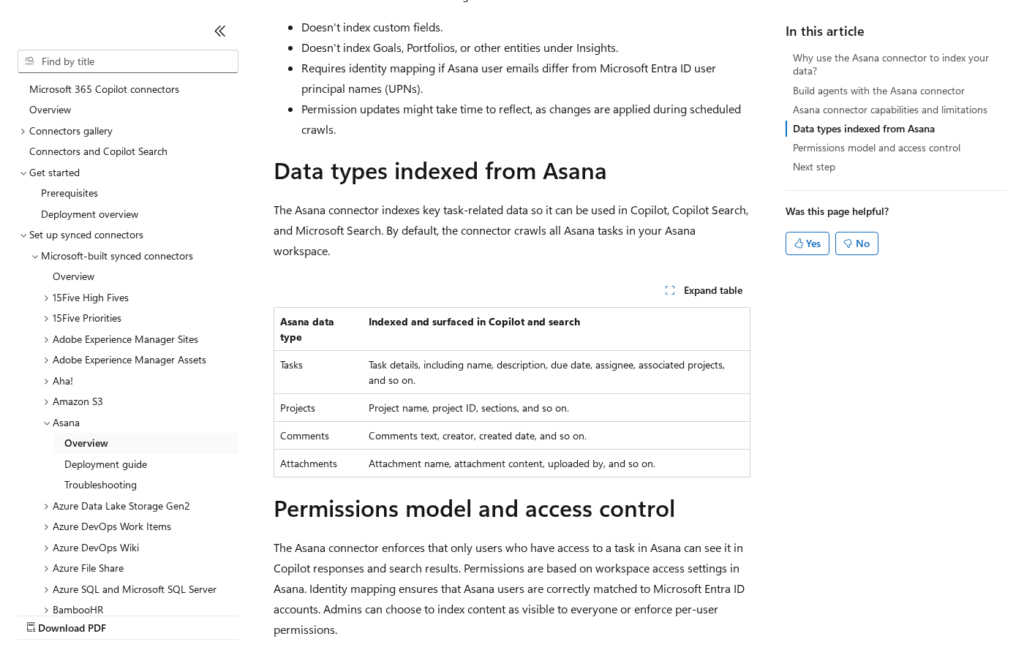
Source: https://learn.microsoft.com/en-us/microsoft-365/copilot/connectors/asana-overview
When your project data lives in SharePoint or Planner, it flows naturally into Power BI, Teams, Outlook, and organizational dashboards. That’s a competitive advantage that shows up every day.
The learning curve argument cuts both ways. Yes, Asana is easier to spin up.
But your teams already know Teams, Outlook, and SharePoint. You’re not introducing a new platform, just going deeper into what they already use.
How to Decide
Ask three questions:
Is your organization primarily living in Microsoft 365? If yes, the default answer is Planner or SharePoint Lists, unless you’re doing cross-platform work with Mac or Google Workspace teams.
You already have the licenses, integration is native, and data stays in one system.
Do you need specialized project management features that M365 doesn’t cover? Examples:
- Portfolio-level resource management
- Complex earned value analysis
- Native time tracking
- Rule-based automation that non-technical users can manage without IT involvement
If yes, Asana deserves evaluation, especially if you’re not already in M365.
What’s the actual cost delta? Calculate real spend: include seat minimums, Planner Premium cost if you need Gantt views, and actual Asana licensing.
Often the delta is smaller than people think. Here’s a simple framework:
| Team Profile | Recommended Tool | Why |
|---|---|---|
| M365-first, document-heavy projects | SharePoint + Planner | Native integration, document management, no licensing gap |
| M365-first, task-heavy, need timelines | Planner Premium Plan 1 | Gantt views, dependencies, stays in M365, $10/user/month |
| M365 enterprise, complex portfolio work | Project Plan 3 | Resource management, advanced analytics, enterprise scale |
| Mixed SaaS environment (non-Microsoft) | Asana | Cross-platform support, purpose-built for mixed systems |
| Need time tracking, task specialization | Asana | Native hours tracking, workload management, task customization |
Here’s the honest version from what I’ve seen:
M365 teams almost always benefit from going deeper with what they have. That’s the pattern from thousands of implementations.
Asana is genuinely good. But it’s good for organizations that aren’t M365-first, or that have genuinely specialized project management needs that M365 doesn’t cover.
Most teams in those first three rows pay seat minimums, manage two project systems, and lose data integration.
For those organizations, the real question isn’t whether Asana is good. It’s whether good justifies the cost and complexity.
Go Deeper Before You Add Another Tool
I’ve configured proper project management in SharePoint dozens of times – it takes expertise. A full configuration includes:
- SharePoint Lists with Board View for task tracking
- Planner Premium for timelines and dependencies
- Power Automate workflows for approvals and routing
- Power BI reporting for live dashboards
If your SharePoint setup is just unorganized team sites without metadata governance or templates, I get why Asana feels like an upgrade.
But that’s not a reason to add another tool. That’s a reason to fix what you already have.
Still paying for Asana while your team is already on Microsoft 365? I help organizations configure SharePoint and Planner so they stop paying for tools they already own.




























