

Table of Contents:
- What’s a SharePoint Governance Plan?
- Why an Effective SharePoint Governance Plan is Essential
- Step 1: Assemble Your Governance Committee
- Step 2: Governance in SharePoint Online vs. On-Premises
- Step 3: Architect Your Core Governance Policies
- Step 4: Integrate Governance Across Microsoft 365
- Step 5: Implement, Communicate, and Sustain Your Plan
- Common Governance Challenges and How to Solve Them
- Building a Future-Ready SharePoint Environment
Last Updated on August 4, 2025
Is your SharePoint environment sprawling out of control?
In this guide, I’ll show you how to create an effective SharePoint governance plan to bring order to the chaos.
Let’s get started.
A SharePoint governance plan guides an organization’s SharePoint usage through policies, roles, and processes.
It defines the rules of engagement for your digital workplace.
This framework typically includes:
- Policies for security and content management
- Roles and responsibilities for users and admins
- Processes for site creation and lifecycle
- Guidelines for using integrated apps like Teams
Far from being a restrictive set of IT-centric rules, modern SharePoint governance is a strategic enabler.
It offers smart guidelines to empower users, encourage innovation, and maximize Microsoft 365 ROI.
This plan is the key to transforming SharePoint from a simple file repository into a secure and highly productive platform.
Without it, even the most powerful collaboration tool can descend into unmanageable chaos. 😓
Sign up for exclusive updates, tips, and strategies
An effective SharePoint governance plan significantly benefits businesses by addressing key challenges.
Without a clear governance strategy, SharePoint environments invariably fall victim to common pitfalls, including:
- Uncontrolled content sprawl
- Inconsistent user experiences
- Complex and insecure permissions
- Low user adoption
A well-defined governance plan prevents these issues, ensuring the platform remains aligned with business goals.
It allows the environment to operate efficiently and deliver long-term value.
This governance is the bedrock of a successful and future-ready digital workplace.
From IT Control to Business Enablement (The Modern Definition)
SharePoint governance reflects a significant philosophical shift away from the historical model of IT control.
This old approach was often characterized by:
- A focus on locking down features
- Reactive problem-solving
- Positioning IT as a barrier to productivity
- Friction that stifled user adoption
Modern governance flips this paradigm.
That’s with a primary objective to enable users to collaborate and innovate effectively within a secure framework.
Instead of simply saying “no,” a modern governance committee actively evaluates business needs to enable them within proper constraints.
This recognizes that if policies are too restrictive, users will find workarounds, which increases organizational risk.
The core difference is a move from restriction to empowerment:
| Aspect | Old Approach (IT Control) | Modern Approach (Business Enablement) |
| Primary Goal | Prevent misuse by restricting features. | Enable productivity within safe guardrails. |
| IT’s Role | Gatekeeper and enforcer. | Strategic partner and enabler. |
| User Impact | Creates friction and encourages workarounds. | Fosters innovation and user adoption. |
| Outcome | Stifled collaboration and shadow IT. | Balanced empowerment and accountability. |
Enhance Productivity and Reduce Costs
With easily accessible resources, users spend less time searching and more time performing value-added work.
A strong governance plan achieves this through several key actions:
- Defining a clear site structure
- Implementing consistent navigation
- Mandating the use of metadata
- Automating content lifecycles
If you need more information on those actions, you can click on those links to read my articles about them. 🙂
Furthermore, managing site sprawl and reducing ROT (Redundant, Obsolete, and Trivial) data minimizes storage.
This directly lowers associated support costs for your IT teams by reducing helpdesk tickets.
Mitigate Security and Compliance Risks
A robust governance plan is your primary defense against costly data breaches and compliance failures.
Those are critical in an era of stringent regulations like GDPR and HIPAA (and, well, avoid a significant liability).
Your plan can mitigate these risks by establishing clear security controls, such as:
- Enforcing the principle of least privilege
- Defining secure external sharing policies
- Implementing data classification with sensitivity labels
- Automating retention and deletion of data
Proactive SharePoint governance protects data and manages access to sensitive information.
With the rise of AI tools like Microsoft Copilot, this has become an absolute prerequisite for safe deployment.
It’s important to prevent data leakage from an AI assistant, which inherits all flaws of your information landscape.
Step 1: Assemble Your Governance Committee
The creation of a governance plan is not a solo effort or a task to be delegated solely to the IT department.
This team is the engine that will define, implement, and evolve your organization’s SharePoint governance policies.
Building a Cross-Functional Team
A common mistake is creating a governance committee composed solely of IT personnel.
To be effective, the committee must be a “team sport,” with representation from across the organization.
A successful team includes members who can represent various perspectives, such as:
- Business leadership
- Departmental needs
- Technical administration
- Legal and compliance requirements
This ensures the governance policies are practical and aligned with real-world business processes.
An ideal governance committee is heavily weighted towards business stakeholders.
This guarantees the focus remains on enabling business needs, not just implementing technical controls.
Defining Key Roles and Responsibilities
Well, having clear role responsibilities for each member of the committee is important for accountability.
A successful committee typically includes a mix of strategic, technical, and business-focused roles.
| Role Title | Primary Responsibility | Department |
| Executive Sponsor | Champions the initiative and secures resources. | C-Suite / Leadership |
| Business Unit Lead | Represents departmental needs and drives adoption. | HR, Finance, Marketing |
| SharePoint Administrator | Implements technical configurations and manages platform health. | Information Technology |
| Compliance Officer | Ensures policies meet legal and regulatory requirements. | Legal / Compliance |
| End-User Champion | Provides feedback on usability and advocates for the platform. | Various Departments |
Establishing a Charter and Operational Cadence
To be effective, the Governance Committee requires a formal charter and a regular operational cadence.
The committee should establish a regular meeting schedule, such as quarterly or semi-annually, to:
- Review and approve policy changes
- Evaluate new Microsoft 365 features
- Assess key health and adoption metrics
- Report progress to executive sponsors
The charter should clearly state the committee’s vision, goals, and scope of authority.
This establishes the governance plan as a “living document” that will be continuously reviewed and updated.
SharePoint deployment is a foundational governance decision, reflecting control and responsibility.
The two main deployment models represent opposing philosophies:
- SharePoint On-Premises: A philosophy of absolute control over the entire technology stack.
- SharePoint Online: A philosophy of delegated trust in Microsoft to manage the infrastructure.
With On-Premises, your organization bears the full weight of managing hardware, security, and updates.
In contrast, SharePoint Online allows your governance focus to shift “up the stack” to what you can control.
Like your data, users, and access policies.
The following table provides a side-by-side comparison of the governance implications for each platform:
| Governance Area | SharePoint On-Premises | SharePoint Online |
| Security Model | Organization-Owned Responsibility: Your organization is fully responsible for physical server security, network security, patching, and configuration. | Shared Responsibility Model: Microsoft manages physical and platform security. You are responsible for data classification, access control, and identity. |
| Customization Policy | Unlimited Control: Allows for deep, server-side code customizations. Governance must manage the high risk and cost of these solutions. | Limited but Modern: Customizations are restricted to the SharePoint Framework (SPFx). Governance focuses on managing App Store solutions and Power Platform. |
| Update & Change | Predictable but Manual: You control the timing of updates, which requires significant IT effort for planning, testing, and deployment. | Evergreen & Continuous: Updates are rolled out automatically by Microsoft. Governance must include a robust change management process. |
| Cost Model | Capital Expense (CapEx): Requires large upfront investment in hardware, software licenses, and dedicated IT staff for maintenance. | Operational Expense (OpEx): A predictable, subscription-based model per user that reduces the infrastructure management burden. |
| Scalability | Limited & Manual: Scaling requires purchasing and provisioning new server hardware, which is a slow and costly process. | Elastic & Automated: Microsoft manages scalability. Organizations can easily add users and storage as needed. |
Step 3: Architect Your Core Governance Policies
This step is where you define the specific rules of engagement for your SharePoint environment.
An effective SharePoint governance plan requires several core components for platform structure, security, and management.
Information Architecture and User Experience
A well-planned information architecture is the foundation of a usable and scalable SharePoint environment.
The best practice for modern SharePoint is to adopt a “flat” architecture, which offers greater flexibility.
You can do it through these key principles:
- Create separate sites per function
- Use Hub Sites to connect related sites
- Prioritize metadata over folders
- Define clear purposes for site types
This approach dramatically improves findability and flexibility over rigid, nested folder structures.
Making content easier to discover directly enhances user productivity and adoption.
Clearly, a logical structure is the first step toward a successful user experience.
Security, Compliance, and Data Protection
SharePoint is a powerful data governance tool when configured correctly through a robust framework.
Your governance plan must establish clear policies for managing access and protecting data, including:
- Enforcing the principle of least privilege
- Defining secure external sharing policies
- Leveraging Microsoft Purview for sensitivity labels
- Implementing automated retention policies
These controls simplify administration and reduce the risk of accidental data exposure.
They’re essential for complying with regulations and protecting sensitive organizational data.
Properly configured security is non-negotiable for modern collaboration.
Site and Content Lifecycle Management
To avoid digital clutter, it’s important to control new SharePoint site creation and manage content over time.
An effective lifecycle strategy includes several key components:
- A controlled self-service site creation process
- A consistent naming convention for all resources
- The use of pre-configured site templates
- A clear policy for content review and deletion
This ensures that every new site starts from a governed baseline and has a clear purpose.
Lifecycle management organizes content and reduces security risks associated with unmanaged content.
Step 4: Integrate Governance Across Microsoft 365
SharePoint no longer operates in a silo.
It’s the core content service that underpins many other applications within the Microsoft 365 ecosystem.
Effective SharePoint governance, therefore, must extend across this integrated suite of tools to be truly comprehensive.
The relationship between SharePoint and Microsoft Teams is symbiotic and fundamental to modern governance.
First off, every Microsoft Team is automatically backed by a SharePoint site.
All files shared within a Team’s channels are physically stored in that site’s document library.
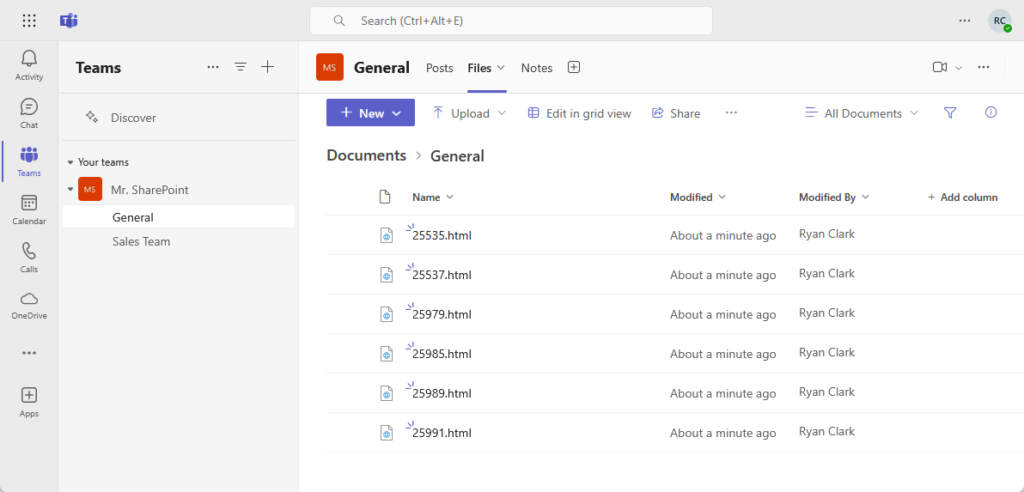

Your SharePoint governance policies for security, retention, and compliance automatically apply to your Teams files.
Governing the Power Platform and Viva
Citizen development on the Power Platform frequently uses SharePoint lists and libraries as a data source.
Implement Data Loss Prevention (DLP) policies in your governance plan to prevent sensitive data sharing via custom apps or flows.
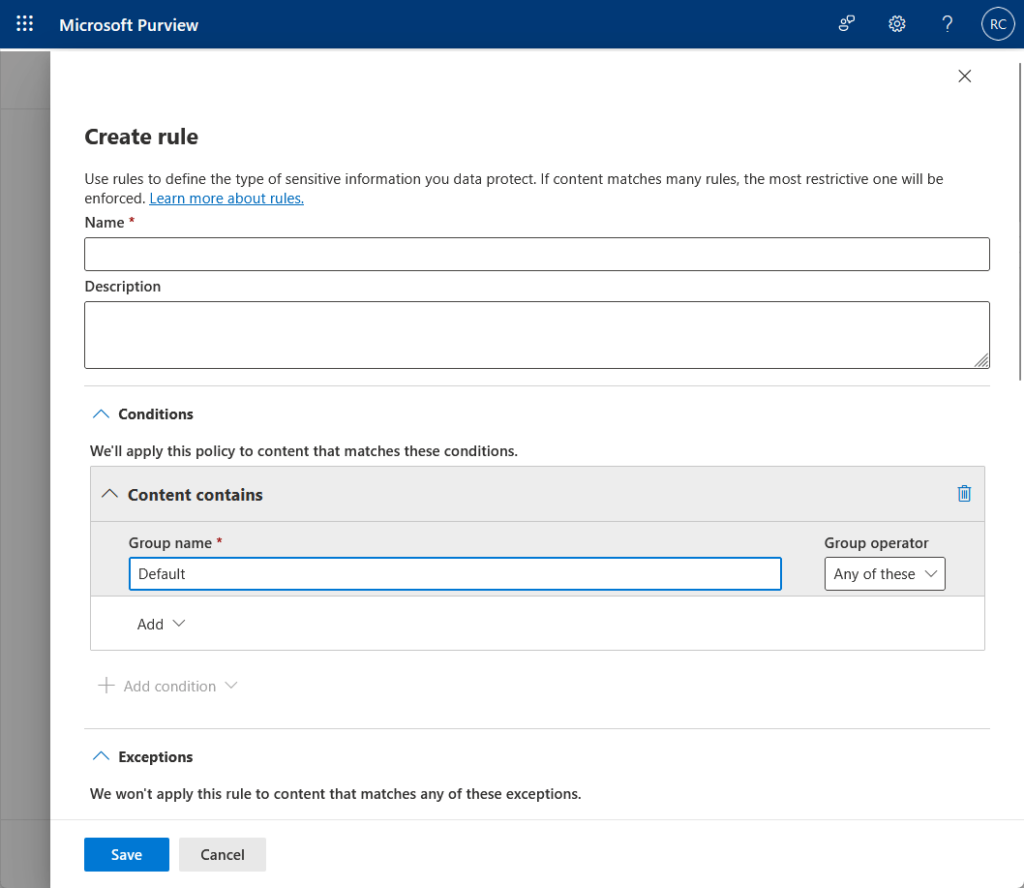
Similarly, the quality of the employee experience in Microsoft Viva is directly dependent on a well-governed SharePoint intranet.
That provides the content, navigation, and structure for services like Viva Connections.
Step 5: Implement, Communicate, and Sustain Your Plan
A written governance plan is only valuable when it’s put into action and sustained over time.
This final stage involves:
- Structured implementation
- Strong focus on change management
- Commitment to continuous improvement
Without proper adoption, even the best governance plan will fail.
Phased Implementation Roadmap
Translating the governance document into a functioning reality requires a methodical approach.
A successful implementation can be structured into a logical sequence of phases, as outlined in the table below.
| Phase | Key Activities |
| Phase 1: Foundation & Vision | Assemble the governance committee, secure executive sponsorship, and define the vision, goals, and success metrics. |
| Phase 2: Core Policy Development | Draft the core policies for information architecture, security, and lifecycle management. |
| Phase 3: Technical Configuration | Configure settings in the SharePoint, Teams, and Microsoft Purview admin centers. |
| Phase 4: Communication & Training | Formally launch the new policies and roll out role-based training programs to all users. |
| Phase 5: Monitor & Iterate | Begin the ongoing governance cycle of regular meetings to monitor metrics, gather feedback, and make adjustments. |
Driving Adoption with Communication and Training
A strong governance plan requires active user adoption; otherwise, it will fail, regardless of how well-made it is.
A successful change management strategy often includes several key communication and training elements:
- Creating a dedicated “Success Center” site
- Developing role-based training plans
- Ensuring training is continuous and accessible
- Leveraging a network of champions
This dedicated site on SharePoint can host user-friendly guides and policy information for people to find answers.
Tailoring training to different roles, like site owners versus site visitors, ensures the content is relevant and engaging.
Combine live sessions with on-demand resources for effective knowledge reinforcement.
Governance as a Continuous Process
Successful governance isn’t a project with an end date; it’s an ongoing process.
The digital workplace is constantly changing as new business requirements emerge and Microsoft introduces new features.
The committee must meet regularly to review key metrics, discuss user feedback, and adapt the governance plan accordingly.
This ensures your framework remains agile and continues to serve the organization effectively.
Common Governance Challenges and How to Solve Them
Even with a solid plan, you may encounter challenges.
The following table outlines common issues and strategies to address them.
These solutions can be applied proactively through your governance plan or reactively if problems arise:
| Challenge | Proactive Mitigation (in Governance Plan) | Reactive Solution (If It Happens) |
| Content Sprawl & ROT Data | Implement a controlled site provisioning process. Define and automate retention and deletion policies. Mandate and train users on metadata usage. | Conduct a content cleanup project to identify and remove ROT data. Use reporting tools to find large, old, or unused sites and contact owners. |
| Poor User Adoption | Develop a comprehensive, role-based training program. Invest in a user-centric Information Architecture. Ensure leaders actively use and promote the platform. | Launch a “re-engagement” campaign with new training and tips. Showcase success stories and departmental champions. Gather user feedback through surveys. |
| Inconsistent & Insecure Permissions | Mandate the use of SharePoint groups. Strictly limit the use of unique, item-level permissions. Schedule periodic access reviews by site owners. | Perform a tenant-wide permissions audit to identify and clean up inappropriate access. Consolidate individual permissions into groups. Re-educate site owners. |
| Ownerless Sites & Groups | Mandate a minimum of two owners for every site and Microsoft 365 Group. Integrate ownership checks into the employee offboarding process. | Run regular reports to identify ownerless resources. Work with department heads to assign new, appropriate owners. |
| AI/Copilot Misuse or Inaccuracy | Enforce the principle of least privilege across all content. Implement a comprehensive data classification scheme using sensitivity labels. | Refine site permissions to restrict access. Apply sensitivity labels to critical content. Exclude problematic sites from search indexing until remediated. |
An effective SharePoint governance plan is crucial for maximizing Microsoft 365’s value, security, and productivity.
A committee, clear policies, and ongoing improvement create a flexible governance framework.
This approach ensures your SharePoint environment is secure, productive, and future-ready.
Do you have any questions about creating your own SharePoint governance plan? Let me know.
For any business-related queries or concerns, contact me through the contact form. I always reply. 🙂




























