

Your team picked Trello because it was easy. A board, a few columns, and you were running in ten minutes.
Then one of these starts happening:
- The team grows and the workflows get more complex.
- IT asks why you’re paying for a separate tool when Microsoft 365 is on every desk.
- Someone needs document management alongside their task tracking.
- Automations start feeling like workarounds instead of real solutions.
That’s the moment this comparison actually matters. Both tools do visual Kanban, but they were built for different scales.
Here’s what I tell them: Trello gets you started, and SharePoint gets you scalable.
What Trello Does Well
Let’s give Trello its due, because it earns it. Its strengths are real and worth naming.
- Visual clarity. Cards, columns, drag-and-drop. You grasp a project’s state in about three seconds.
- Fast setup. Almost no learning curve, no consultant or rollout plan to get a team productive.
- A generous free tier. 10 boards, basic automation, room for a small team to run real work.
- Painless external sharing. Send a board link and they’re in, no account required.
That last point matters for agencies juggling clients and contractors. It’s a feature SharePoint can’t easily match.
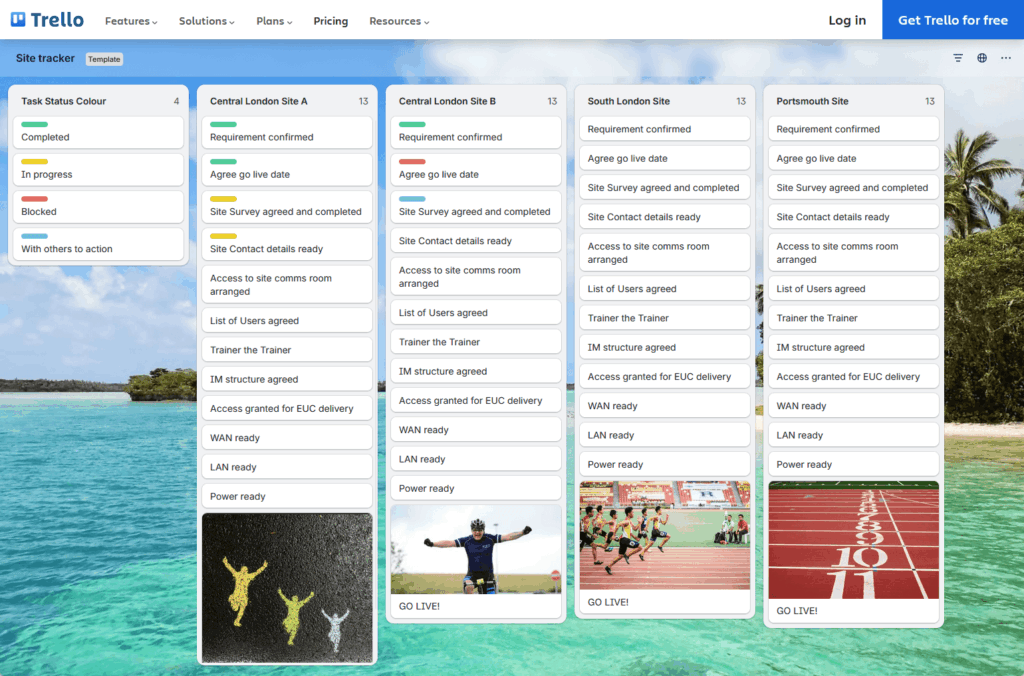
Sources: https://trello.com/templates/project-management
So Trello isn’t a bad tool, it’s a focused one that does its narrow job well. The trouble starts when those needs stop being simple.
Sign up for exclusive updates, tips, and strategies
Where Trello Runs Out of Road
Here’s what I’ve noticed working with teams that started on Trello and outgrew it. The friction is almost always the same set of ceilings.
- Free plan caps. You get 10 boards and 250 Butler automation runs per month. High-volume teams burn through that fast.
- Tiny attachments. File uploads cap at 10MB on free and 250MB on paid. That’s not document management. That’s a workaround.
- No real document handling. Trello tracks tasks. It doesn’t store, version, or organize the files those tasks depend on.
- Reporting is locked behind Premium. Dashboards, the actual reporting layer, only show up on the paid Premium plan.
- No task dependencies. There’s no native way to say “this card can’t start until that one finishes.” For multi-stage work, that hurts.
- Permissions are thin. Power-Up governance, controlling which integrations your team can install, is Enterprise-only.
These aren’t edge cases. They’re the same walls every growing team eventually hits.
Then there’s the security side. In 2024, a dark web listing exposed over 15 million Trello user records.

Sources: https://www.itpro.com/security/cyber-attacks/15-million-trello-users-have-been-exposed-in-a-data-breach-heres-what-you-need-to-know
That alone makes IT and compliance teams nervous.
To be clear, Trello did exactly what it was designed to do. At some point, your team’s needs just grew past it.
One vendor analysis put it plainly: it’s not a superb choice for company growth, and that’s the real ceiling.
Here’s the part most Trello users don’t realize:
SharePoint already does Kanban. SharePoint Lists includes a built-in Board View that turns list items into Kanban cards.
You define columns as workflow stages, drag cards between them, set WIP limits, and add swim lanes. The cards carry everything you’d expect:
- Descriptions and checklists
- Comments and color labels
- Due dates and file attachments
If that sounds familiar, it should. It’s the Trello experience, inside Microsoft 365.
But the difference is what sits underneath. A SharePoint list isn’t just a board, but a structured dataset.
You add custom columns for status, priority, or assignee, then slice that data through multiple views: Board, Gallery, Calendar, even Gantt.
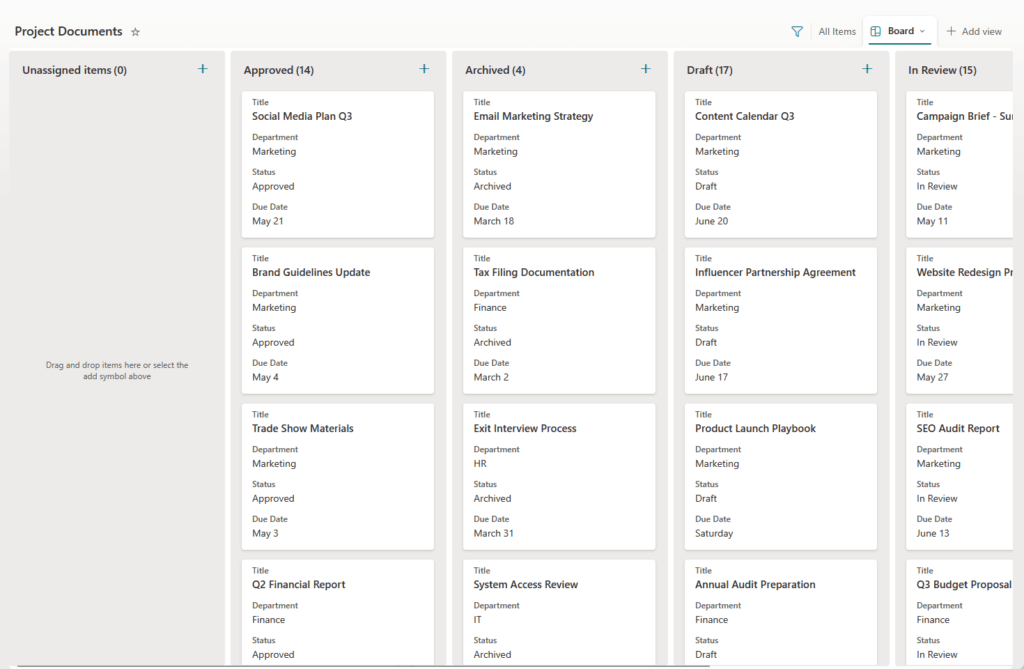
The Kanban view is just one window into the work.
And because it’s SharePoint, your tasks live next to your files. No 10MB ceiling, no separate file tool, full version history on every document.
Power Automate: Automation Trello Can’t Match
This is where the gap gets wide. SharePoint connects to Power Automate, a real automation platform.
You build flows three ways:
- Automated flows triggered by an event
- Scheduled flows that run on a clock
- Instant flows you fire on demand
There are 100+ pre-built SharePoint templates to start from, plus over 1,000 connectors to other systems.
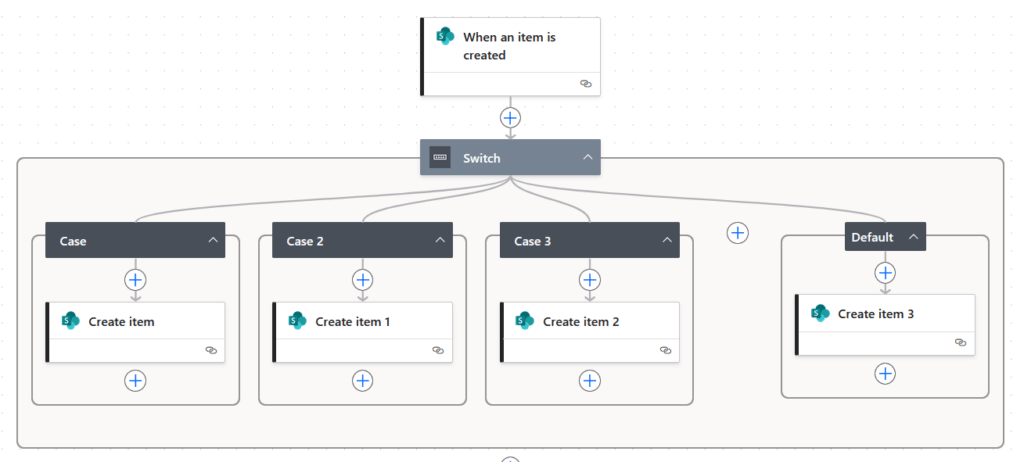
In practice, that means approval routing, onboarding checklists, status notifications, and permission changes all happen automatically. No Butler run cap, no artificial ceiling on what you can connect.
That kind of reach adds up fast. Forrester found Power Automate delivered a 248% ROI over three years, with payback in under six months.
Head-to-Head: How They Compare
When a client asks me to compare them directly, I strip away the marketing. Here’s how they stack up on what matters, drawing on published ratings.
| Dimension | Trello | SharePoint + Power Automate |
|---|---|---|
| Ease of use | 5/5, minimal learning curve | 4/5, steeper setup, worth the investment |
| Workflow customization | Basic (column names, labels) | Deep (custom fields, views, filtered lists) |
| Automation | Trello-boards-only rules; unlimited on Premium, capped on Free/Standard | Cross-system workflows via Power Automate; 1,000+ app connectors |
| Document management | 10–250MB attachments only | Full document library, version history |
| Permissions & security | Basic; Power-Up governance is Enterprise-only | Granular, item-level permissions, AAD, DLP |
| Reporting | Dashboards (Premium only) | Native views + Power BI integration |
| Microsoft 365 integration | Third-party connector needed | Native: Teams, Outlook, OneDrive, Planner |
Trello wins on ease of use, and I won’t pretend otherwise. It’s faster to learn and faster to launch.
But look at every other row: customization, automation, document management, permissions, reporting. SharePoint isn’t winning by a little, it’s winning because it was built for scale.
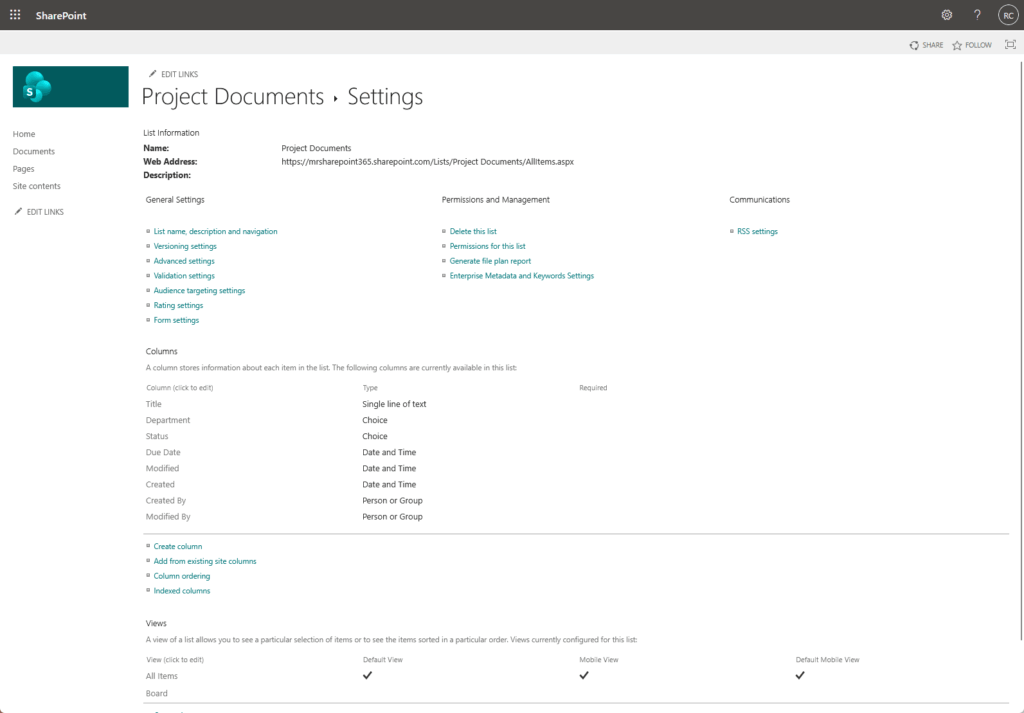
The integration row is the one I’d circle. If your company already runs Microsoft 365, SharePoint plugs into Teams, Outlook, and OneDrive natively.
Trello needs a third-party connector to do the same thing. That connector is one more point of failure to manage.
So yes, the trade is real. You give up a bit of day-one ease, but you get a platform that grows with you instead of capping you.
Here’s the part that usually surprises people. SharePoint is barely more expensive, and that comparison isn’t even fair to SharePoint.
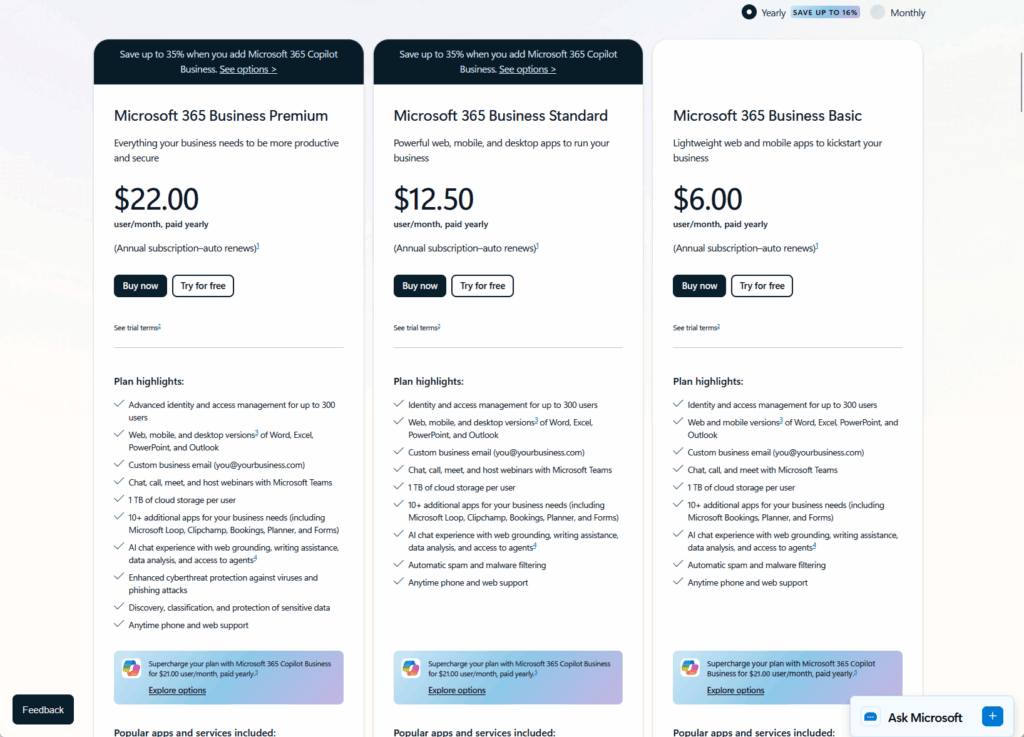
Trello Premium runs $10 per user per month. Microsoft 365 Business Standard is $12.50.
Run the math on a 50-person team:
- Trello Premium: $500/month, or $6,000/year, for task tracking alone.
- M365 Business Standard: $625/month, or $7,500/year, for an entire productivity stack.
- The delta: $125/month more, and M365 replaces several tools you’re probably already paying for separately.
That $2.50 difference gets you a lot. Trello Premium buys you Trello.
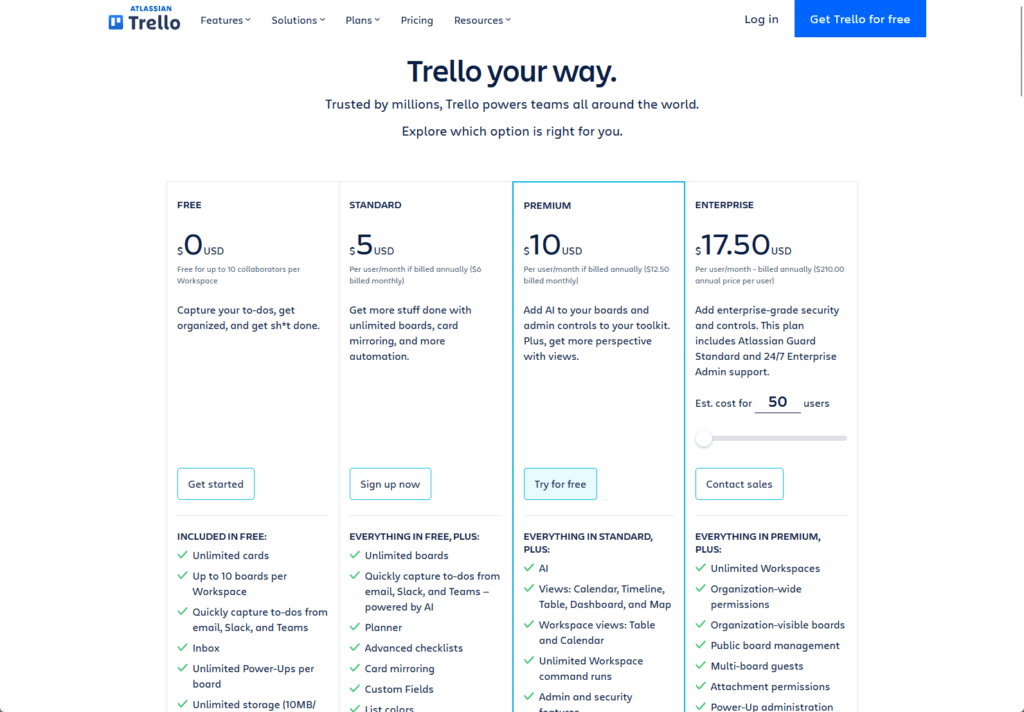
Sources: https://trello.com/pricing
Microsoft 365 Business Standard buys you SharePoint, Teams, Outlook, OneDrive, Planner, Power Automate, and the full Office suite. And this plays out in the real world.
Staffing firm Prialto rebuilt their work management on Microsoft Lists for a one-time $8,000 build and cut $120,000 a year in software costs.
That’s not a one-off story. Forrester’s broader study on M365 for business found a 223% ROI over three years for small and midsize organizations.
When you already pay for Microsoft 365, running a separate tool for Kanban is paying twice for one job.
When Trello Is Still the Right Call
I’m not going to tell you to rip out Trello on principle. Sometimes it’s genuinely the better fit, and a good consultant says so.
Stick with Trello if you check most of these boxes:
- Your team is under 15 people with straightforward workflows.
- You’re not on Microsoft 365 and have no plans to be.
- You collaborate constantly with external people who don’t have M365 accounts.
- You only need task tracking, with no document management attached.
Those last two points carry real weight. SharePoint needs guest accounts for external sharing.
For agencies juggling clients and contractors, that friction adds up fast. Trello’s “share a link” model is just smoother for that use case.
If that’s your reality, Trello is doing its job. Don’t fix what isn’t broken.
But here’s the pattern I keep seeing. Teams hang onto Trello well past the point it stopped serving them, because switching feels like a project.
It usually isn’t.
If several of these describe your situation, it’s time to make the move:
- You already pay for Microsoft 365, so SharePoint is sitting there unused.
- You need document management and task tracking in the same place, not two tools.
- You have enterprise permission and IT governance requirements Trello can’t meet.
- Your automations are getting complex: approvals, notifications, cross-system updates.
- Your headcount is growing and your workflows have multiple stages.
- Security and compliance teams need control and audit trails.
That first bullet is usually the one that lands. You’re already paying for SharePoint.
When I sit down with a client still on Trello, the question almost answers itself: you’re already paying for SharePoint, so why run a second tool that does less?
Migration is more manageable than people fear. You rebuild your boards as SharePoint lists and set up your views.
Wire in a couple of Power Automate flows and you’re done. The board your team knows still works.
It just has an entire platform behind it now.
Use What You Already Own
Trello got your team moving, and that counts for something. But tools are built for a moment, and most teams outgrow that moment faster than they expect.
Here’s what the move actually gets you:
- Visual workflow management that works exactly like Trello, built on SharePoint Lists.
- Document management and task tracking in the same place, not two separate tools.
- Power Automate for automation that goes well beyond Trello’s walls.
- Enterprise-grade permissions, reporting, and native Microsoft 365 integration.
And you don’t need a new subscription to get there. If you’re on Microsoft 365, you already own it.
The setup is more manageable than people fear. You rebuild your boards as SharePoint lists, configure the views, and wire in a few Power Automate flows.
The teams I’ve helped make this switch don’t look back. They get the same visual board they’re used to, with everything Trello couldn’t give them.
Running Trello for a growing team but starting to feel the cracks?
I help organizations move their workflow management into SharePoint and make the most of the Microsoft 365 they’re already paying for. Reach out and let’s talk.




























