

Table of Contents:
More than 230,000 organizations already use Copilot Studio to build custom AI agents. Most IT teams I talk to are still watching from the sidelines.
Here are the five I keep recommending:
- IT help desk agent
- HR self-service bot
- SharePoint document Q&A agent
- Employee onboarding agent
- Approval routing and status agent
I’d have most teams begin with the IT help desk or HR bot, and all five are within reach without a developer.
Copilot Studio is the builder platform inside Microsoft 365. It’s where you create AI agents your employees or customers actually interact with.
If you’re an IT manager or SharePoint admin drowning in automation requests, this one’s for you. I’ll be upfront about where “low-code” stops being low-effort.
Know What You’re Building With
Before you pick a use case, you need to know which tool you’re actually holding. Microsoft has three things that sound similar and do very different jobs.
Start with the one your people already see. Microsoft Copilot for M365 is the assistant in Word, Excel, Teams, and Outlook. It helps people.
It doesn’t build anything.
The other two are builders. Power Automate runs deterministic flows on triggers and schedules. Copilot Studio is where you build conversational agents that adapt to context and make decisions.
That distinction matters when you choose, so here’s the quick comparison:
| Tool | Best For | Who Configures It |
|---|---|---|
| Copilot for M365 | Day-to-day AI help inside Office apps | Nobody. It ships ready to use. |
| Power Automate | Structured, repeatable processes on a trigger | IT admins, power users |
| Copilot Studio | Conversational agents employees or customers talk to | IT admins, business teams |
These tools aren’t competing. A user converses with a Copilot Studio agent, and that agent can trigger a Power Automate flow to fetch data or run a back-end process.
The agent handles the conversation. The flow handles the plumbing. Keep that pairing in mind, because it shapes the use cases below.
Sign up for exclusive updates, tips, and strategies
Best Copilot Studio Use Cases for Business Automation
Here’s a quick reference so you can self-select before reading the full sections.
| Use Case | Best For | Complexity Level |
|---|---|---|
| IT Help Desk Agent | IT teams drowning in repetitive tickets | Low |
| HR Self-Service Bot | HR teams answering the same policy questions | Low |
| SharePoint Document Q&A Agent | Anyone who can’t find files in SharePoint | Low to Medium |
| Employee Onboarding Agent | Managers and HR running frequent hires | Low to Medium |
| Approval Routing and Status Agent | Operations and finance with stalled approvals | Medium |
1. IT Help Desk Agent
Start where the pain is loudest.
Your help desk queue is full of questions you’ve answered a hundred times: password resets, software install steps, “How do I connect to the VPN again?”
None of it is hard. It’s just constant, and it buries the tickets that genuinely need a human.
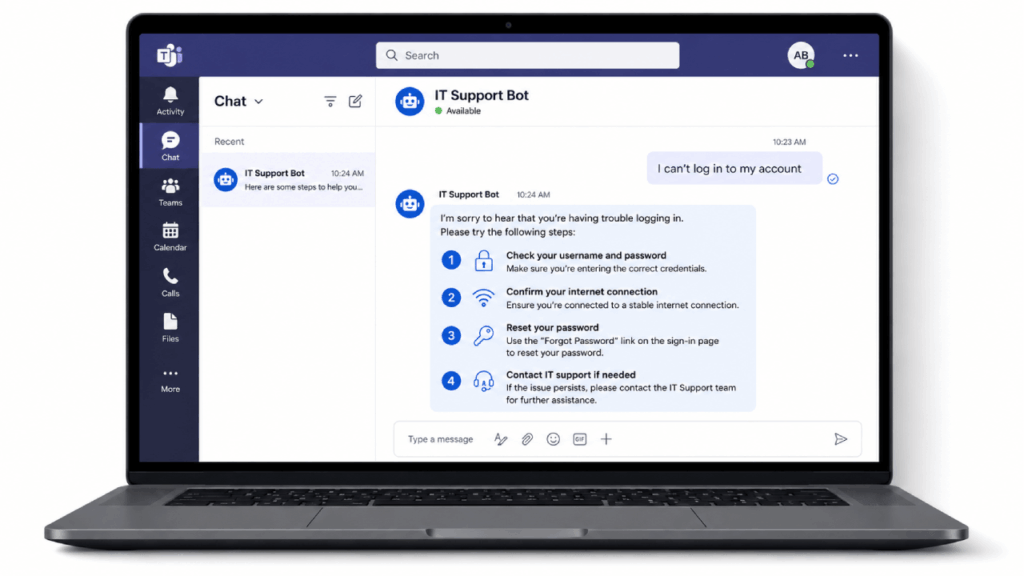
An IT help desk agent in Copilot Studio sits in front of that queue and handles the first layer.
A first-level support agent covers:
- Password reset guidance and self-service walkthroughs
- Software installation and setup instructions
- Routing tickets to the right team based on the issue
- Searching technical documentation in natural language
- Surfacing known-issue notices before a user files a ticket
The real strength here is the SharePoint knowledge source connection. Point the agent at your existing IT knowledge base and it answers from your documentation, not generic web content.
That low complexity is exactly why I’d start most teams here. The University of Hong Kong built custom bots that handle large volumes of student queries on their own.
Pick this if your help desk is understaffed and your documentation is already decent. The agent is only as good as the KB behind it.
2. HR Self-Service Bot
HR has the same problem on a different desk.
They field the same twenty questions every week: how much PTO do I have left, when does open enrollment close, what’s the parental leave policy.
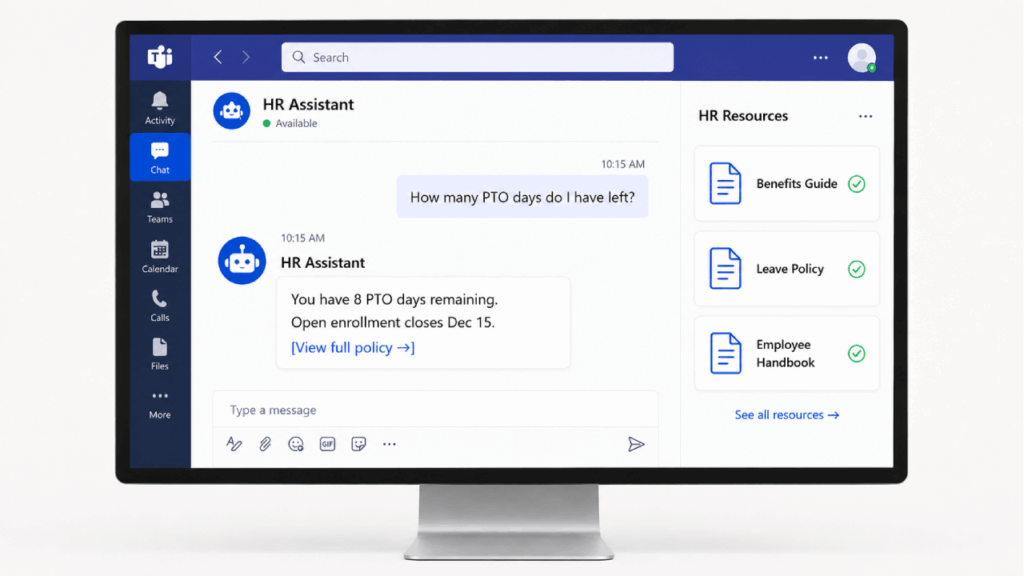
These questions are repetitive for HR and oddly stressful for employees who don’t know where to look.
A self-service bot gives people an answer in seconds and gives HR its afternoon back.
A typical HR agent handles:
- PTO balance lookups and time-off policy questions
- Benefits enrollment guidance and deadline reminders
- Policy lookup across the employee handbook
- Onboarding document delivery for new hires
- Routing sensitive cases to a real HR person
Connect it to your HR document library in SharePoint and the bot answers from approved policy, not someone’s outdated memory of the rules.
That connection raises one question worth settling early: who owns this.
In my experience the build lands with IT, but HR needs to own the content. That split works fine as long as both sides agree to it.
Virgin Money found that conversation analysts with no technical background could independently launch new features on their agents.
Pick this if your HR team is small and the same questions keep eating their week.
This one solves a problem everybody knows. The file exists, you just can’t find it.
It’s somewhere across four site collections and a folder structure nobody remembers building.
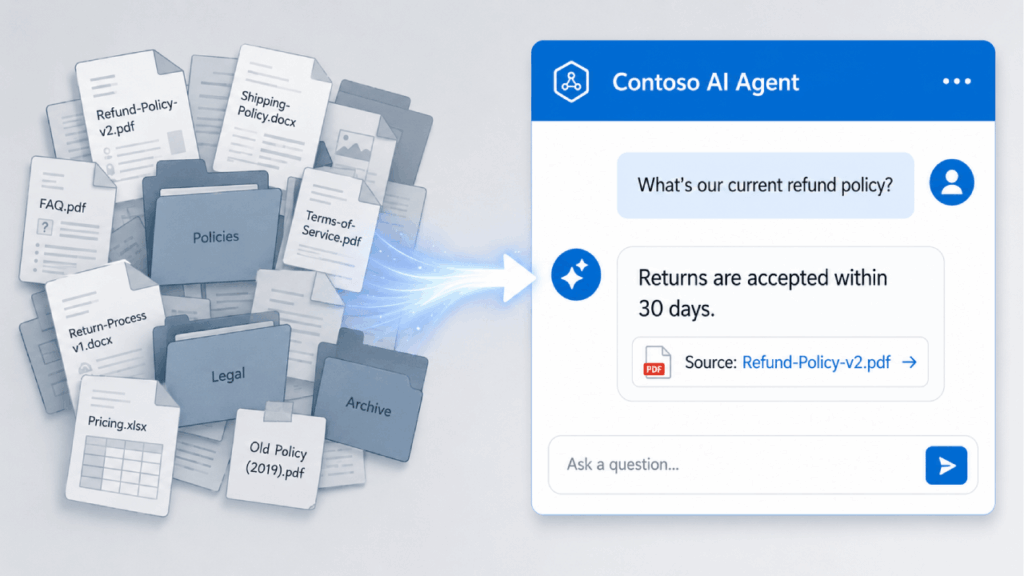
A document Q&A agent fixes that. Instead of guessing keywords, an employee asks “what’s our current refund policy” and gets the answer with a source link.
A SharePoint-connected Q&A agent typically handles:
- Natural language search across connected document libraries
- Direct answers pulled from policy and procedure docs
- Citations linking back to the source file
- Querying project files and internal documentation
- Follow-up questions within the same conversation
Here’s how the SharePoint connection works in practice. You add a site or library as a knowledge source, and the agent reads it in real time.
No copying content into the agent. No stale duplicates.
There’s a catch, though. This one exposes your data quality. A poorly structured SharePoint environment produces poor answers, so budget time for cleanup before you blame the agent.
There’s a governance angle too. Agents respect SharePoint permissions, but you still want a clear owner so this doesn’t become orphaned shelfware.
Pick this if your content is reasonably organized and people genuinely can’t find things.
4. Employee Onboarding Agent
Onboarding combines all of this. It’s repetitive and question-heavy, and every new hire needs the same accounts, policies, and “where do I find” answers in their first two weeks.
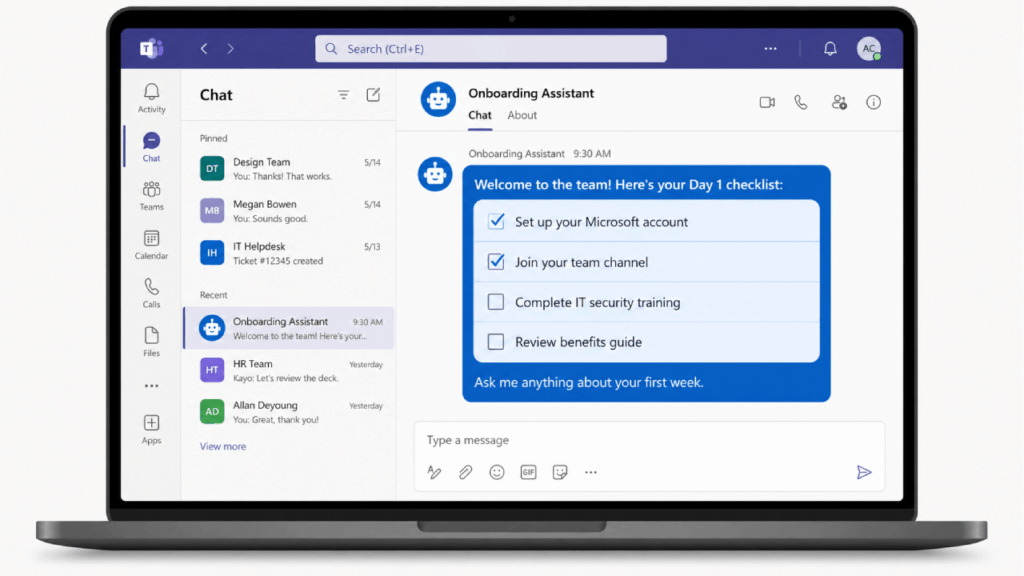
That work usually falls on a manager who has a day job.
An onboarding agent carries the repeatable part so the human time goes toward what actually needs a human.
An onboarding agent typically handles:
- IT provisioning guidance and account setup checklists
- Surfacing key policies new hires need on day one
- Welcome workflows and first-week task reminders
- Answering common “how do I” questions about internal tools
- Pointing new hires to the right people and teams
Most of this content already lives in SharePoint. The agent just surfaces it on demand.
I keep seeing managers lose hours a week to onboarding questions during a hiring push. An agent handles that so they don’t have to.
Complexity is low to medium, and IT can usually build it with HR supplying the content.
Pick this if you hire often enough that onboarding has become a recurring tax on your managers.
5. Approval Routing and Status Agent
This last one is a step up in complexity, and it earns it. Approvals stall because the process is invisible.
A request goes out, then nothing. Nobody knows whose desk it’s sitting on or whether it moved at all.
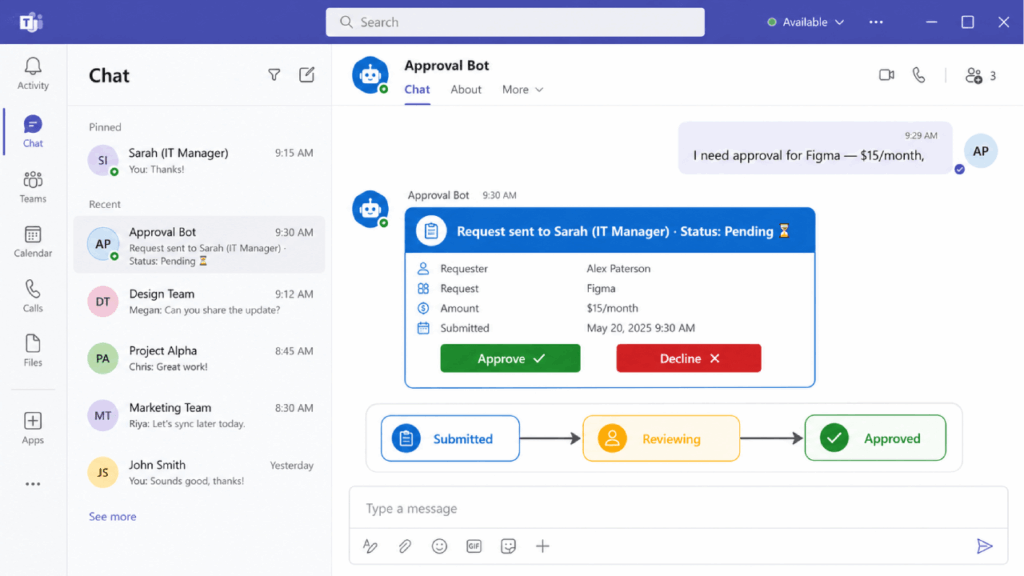
An approval routing and status agent makes that process visible and conversational. Employees ask where their request stands, and the agent tells them without anyone chasing an email thread.
An approval agent typically handles:
- Submitting expense, leave, or purchase requests through chat
- Routing each request to the correct approver
- Real-time status checks on pending items
- Reminders to approvers who are sitting on a request
- Escalation when something has stalled too long
This is where Copilot Studio and Power Automate pair up properly, exactly as described earlier.
The agent runs the conversation, and a Power Automate flow does the actual routing and writes status back to your system of record.
That pairing is also where this stops being purely an IT admin job. If approvals touch back-end systems or custom connectors, you’ll want development experience in the room.
BDO Colombia built a virtual assistant on Copilot Studio and Power Platform that cut operational workload by 50%.
Pick this if approvals are a known bottleneck and you already have someone comfortable with Power Automate.
What “Low-Code” Actually Means in Practice
Low-code is real, but it isn’t zero effort. Let’s be honest about the line.
A capable IT admin with no development background can absolutely build FAQ deflection agents, HR self-service bots, first-level help desk agents, SharePoint-connected Q&A agents, and basic approval workflows.
That covers four and a half of the five use cases above.
It gets harder fast in a few specific places:
- Custom connectors and complex multi-system API integrations
- Custom chat interfaces beyond Teams or a web embed
- AI decision-making more sophisticated than generative orchestration
Those edges are where you bring in a developer.
But most teams focus on building the agent and underestimate governance. That’s where things actually go wrong.
Take authentication. Copilot Studio defaults to “Authenticate with Microsoft” by default, but a maker can switch an agent to “No authentication” at any point.
Without a central registry and a clear owner per agent, you get sprawl. Agents nobody maintains, accessing data nobody reviewed.
Start Small, Then Scale
That governance risk is exactly why you don’t try to build all five at once. Pick the use case with the highest question volume and the best existing documentation.
Whatever you pick, a solid pilot has three things in place:
- One clearly defined use case with a measurable outcome
- A knowledge source that’s already reasonably well organized
- A named owner who’s accountable for the agent and its content
For most teams, that’s the IT help desk or the HR bot. Both are well-documented, genuinely low-code, and fast to show results.
Get the governance model right before you scale.
Authentication settings, an agent registry, and lifecycle ownership are easy to set up at the start and painful to retrofit once you have a dozen agents in the wild.
Not sure where to start with Copilot Studio, or worried the governance side will catch you off guard?
I help IT teams stand up custom agents in Microsoft 365 with the right security guardrails in place from day one. Reach out and let’s talk.




























