

Last Updated on May 26, 2026
Most organizations are overpaying for Microsoft 365, and the price increase is about to make that worse.
Microsoft’s licensing lineup is broad and layered. Between Business plans, Enterprise tiers, and Frontline Worker SKUs, the options multiply fast.
Add security add-ons, Copilot pricing, and annual price adjustments, and it’s easy to default to one-size-fits-all licensing instead of right-sizing your workforce.
Table of Contents:
- What’s Changing in July 2026
- The Full Microsoft 365 Plan Lineup at a Glance
- Business Plans: Basic, Standard, and Premium Compared
- Enterprise Plans: E1, E3, and E5 Compared
- Frontline Worker Plans: F1, F3, and F5 Add-Ons
- Copilot and AI Features by Plan
- Which Plan Is Right for Each Role?
- How to Cut Your M365 Costs Before July 2026
- Audit Your Licenses Before July 2026
What’s Changing in July 2026
Microsoft is restructuring its M365 lineup with targeted price increases rolling in on July 1, 2026. Here’s what’s driving the changes:
- Copilot Chat integration across Office apps for broader user accessibility
- Defender for Office 365 Plan 1 is now bundled into E3 (no longer a separate add-on)
- Advanced Intune device management features included in Business Premium and above
The price increases aren’t uniform. Business Premium doesn’t move at all, while Frontline Worker plans jump 25–33%.
E1 holds steady. Here’s the full picture:
| Plan | Current (2025) | July 2026 | Change |
| Business Basic | $6/user/month | $7/user/month | +16.7% |
| Business Standard | $12.50/user/month | $14/user/month | +12% |
| Business Premium | $22/user/month | $22/user/month | No change |
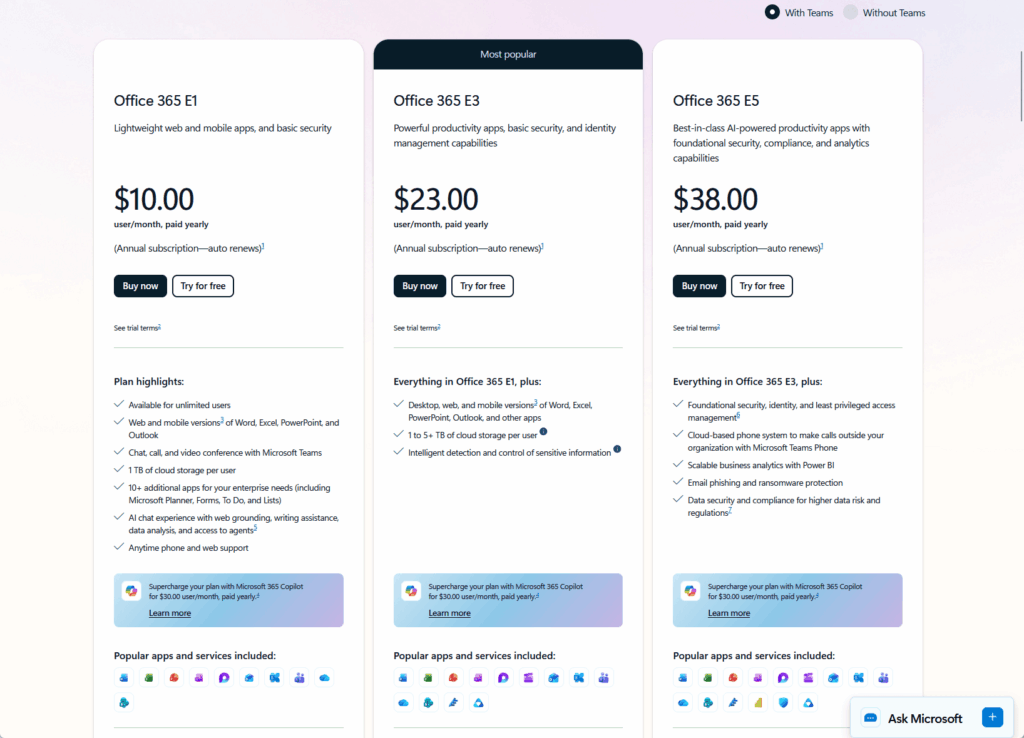
| E1 | $8/user/month | $8/user/month | No change |
| E3 | $36/user/month | $39/user/month | +8.3% |
| E5 | $57/user/month | $60/user/month | +5.3% |
| F1 | $2.25/month | $3/month | +33.3% |
| F3 | $8/month | $10/month | +25% |
A practical note: If your renewals are before July 1, lock them in now.
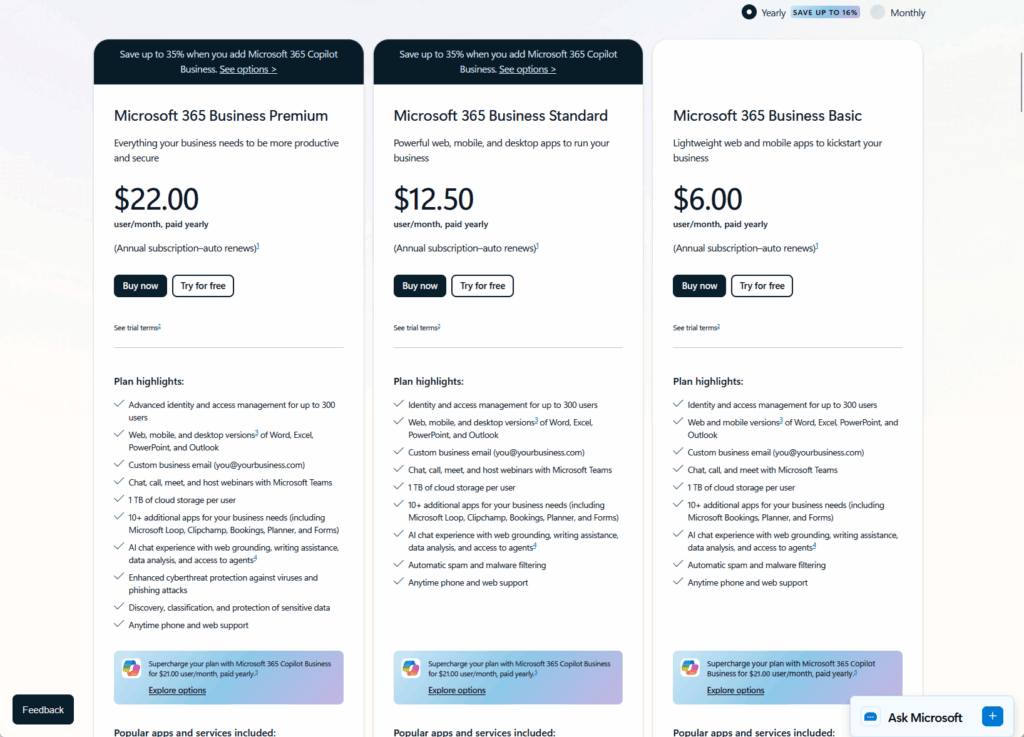
Existing customers keep current pricing until renewal, but new customers and renewals after the cutoff pay the new rates. If you’re in a quarterly or semi-annual renewal cycle, timing matters.
Sign up for exclusive updates, tips, and strategies
The Full Microsoft 365 Plan Lineup at a Glance
Microsoft organizes M365 into three families, and understanding when each applies cuts your comparison time in half.
Business plans cap at 300 users and work for small teams and startups where you want simplicity and pay-per-head economics.
Enterprise plans scale to unlimited users and are built for organizations that need compliance, device management, and security at scale.
Frontline Worker plans are purpose-built for shift-based roles: retail, hospitality, manufacturing, healthcare operations, and any team that works off-site or on the floor.
Here’s the lineup:
| Plan | User Cap | 2026 Price | Best For | Key Differentiator |
| Business Basic | 300 | $7/month | Micro-team, web-first users | Teams, SharePoint, OneDrive (1TB) |
| Business Standard | 300 | $14/month | SMBs needing desktop Office | Full Office apps, basic security |
| Business Premium | 300 | $22/month | SMBs with security requirements | Intune Plan 1, Defender for Business, Entra ID P1 |
| E1 | Unlimited | $8/month | Light or read-only workers | Web Office, Teams, Exchange (50GB) |
| E3 | Unlimited | $39/month | Enterprise standard worker | Desktop Office, Intune Plan 1, Defender P1 |
| E5 | Unlimited | $60/month | Power users, execs, security focus | Advanced security, Copilot, Entra ID P2 |
| F1 | Unlimited | $3/month | Frontline view-only users | Teams, SharePoint, no mailbox |
| F3 | Unlimited | $10/month | Frontline full access | Desktop Office, Outlook, full features |
Business Plans: Basic, Standard, and Premium Compared
The Business plan tier works best for organizations under 300 users.
If you grow beyond that cap, you’ll need to move to Enterprise plans (E1, E3, or E5).
| Feature | Basic | Standard | Premium |
| Desktop Office Apps | Web only | Yes | Yes |
| OneDrive Storage | 1TB | 1TB | 1TB |
| Teams | Yes | Yes | Yes |
| Exchange Mailbox | Cloud only | Cloud | Cloud |
| Intune Device Management | Basic Mobility | Basic Mobility | Plan 1 |
| Entra ID Tier | Free | Free | P1 |
| Defender for Business | No | No | Yes |
| Defender for Office 365 | Basic | Basic | P1 |
| DLP | No | No | Exchange/SharePoint/OneDrive |
| Copilot Chat | Coming 2026 | Coming 2026 | Coming 2026 |
Microsoft 365 Business Basic
Business Basic ($7/month after July 2026) gives you web and mobile Office apps, full Teams, SharePoint, 1TB OneDrive per user, and free Entra ID.
It’s the entry point, best for teams that rarely need desktop software or for organizations in very lean operational mode.
Add Defender for Business and you’re still under $10 per user.
Microsoft 365 Business Standard
Business Standard ($14/month) steps up to include full desktop Office applications while keeping everything else from Basic.
This is the most popular Business plan for SMBs because most teams eventually need Outlook on desktop, Excel for local work, or Word offline editing.
The price is reasonable, and it covers 80% of office worker needs.
Microsoft 365 Business Premium
Business Premium ($22/month, unchanged in 2026) adds Intune Plan 1 for device management, Defender for Business, Entra ID P1 with conditional access, and Defender for Office 365 Plan 1.
The price didn’t budge in the July 2026 update, which makes it increasingly attractive relative to Basic and Standard.
If you’re paying more for security add-ons now, Premium is worth revisiting.
Enterprise Plans: E1, E3, and E5 Compared
Enterprise plans scale without user limits, so you can license 50 people or 50,000 using the same plan.
| Feature | E1 | E3 | E5 |
| Office Apps | Web only | Desktop | Desktop |
| Exchange | 50GB | 100GB | 100GB |
| OneDrive | 1TB | Unlimited (5TB) | Unlimited (5TB) |
| Teams Phone | No | No | Yes |
| Intune Plan 1 | No | Yes | Yes |
| Entra ID Tier | Free | Free | P2 |
| Defender for Office 365 | Basic | P1 (new 2026) | P2 |
| Defender for Endpoint | No | No | P2 |
| DLP | No | Exchange/SharePoint/OneDrive | + Teams, Endpoints |
| eDiscovery | No | Search only | Search + Delete |
| Security Copilot | No | No | Included |
| Power BI Pro | No | No | Yes |
Microsoft 365 E1
E1 ($8/month, no change) is web-only Office, Teams, Exchange with a 50GB mailbox, and basic compliance.
It’s genuinely for light users: people who need Teams and email but spend most of their time in a browser or on mobile.
In practice, E1 is often assigned by accident. Many organizations oversample it by default.
Audit those assignments: downgrade to F1 for true frontline users, or upgrade to E3 for anyone who actually needs full Office.
Microsoft 365 E3
E3 ($39/month after July 2026) is the enterprise workhorse.
You get desktop Office, Exchange with 100GB mailbox, unlimited OneDrive (5TB per user), Intune Plan 1, and Data Loss Prevention (DLP).
As of 2026, Defender for Office 365 Plan 1 is also bundled in.
That Defender addition is meaningful: it covers advanced threat protection, safe links, and safe attachments without a separate license.
E3 is the plan for anyone who needs full Office desktop access and isn’t a power user requiring advanced security.
Microsoft 365 E5
E5 ($60/month after July 2026) is where advanced security lives.
On top of everything in E3, E5 adds:
- Defender for Endpoint Plan 2
- Defender for Office 365 Plan 2 (threat intelligence and automated investigation)
- Entra ID P2 (Privileged Identity Management and Identity Protection)
- Security Copilot (included at no add-on cost as of 2026)
- Power BI Pro
- Audio Conferencing and Teams Phone System
E5 is reserved for genuine power users: executives, finance and legal teams managing sensitive data, IT admins, and security professionals.
Worth calling out: 38% of enterprise E5 licenses are oversized based on actual usage patterns.
Organizations assign E5 for role-based reasons (executive tier, security team) without verifying whether the user actually leverages advanced features.
If an E5 user isn’t using Defender for Endpoint, eDiscovery, or Security Copilot, they’re paying $21 extra per month for features they don’t touch.
Frontline Worker Plans: F1, F3, and F5 Add-Ons
Frontline Worker plans are optimized for shift workers, on-site teams, and roles that operate outside a traditional office.
| Feature | F1 | F3 | F3 + F5 (Compliance) |
| Teams | Yes | Yes | Yes |
| SharePoint | Yes | Yes | Yes |
| Office Apps | No | Desktop | Desktop |
| Outlook Email | No | 2GB mailbox | 2GB mailbox |
| OneDrive | 2GB | 2GB | 2GB |
| Power Automate | No | Yes | Yes |
| Power Apps | No | Yes | Yes |
| Advanced Compliance | No | No | Yes (add-on) |
| Storage Tier | Light | Standard | Standard |
Microsoft 365 F1
F1 ($3/month after July 2026) includes Teams, SharePoint, Planner, and 2GB OneDrive, but no mailbox and no Office applications.
Use it for roles that primarily need team communication and lightweight task management: retail associates, warehouse staff, or anyone who needs to collaborate without email or document editing.
Microsoft 365 F3
F3 ($10/month after July 2026) steps up to include full desktop Office, Outlook with a 2GB mailbox, Power Automate, Power Apps, and Windows 11 Enterprise licensing.
F3 is the full-featured frontline plan; use it for shift workers who need to manage email, edit documents, or run simple automations.
If you have 10,000 frontline workers on E3 instead of F3, you’re spending $3.36 million more per year than necessary.
This is one of the fastest ways to reduce M365 spend in large organizations.
Microsoft 365 F5 Add-Ons
F5 add-ons ($8–$13/month) are security and compliance bundles for heavily regulated industries: healthcare, financial services, and government.
F5 add-ons require a base F1 or F3 license but layer on compliance features specific to your industry’s regulatory requirements.
Copilot and AI Features by Plan
Copilot is rolling out across M365 in 2026, and availability varies significantly by plan.
Copilot Chat (the conversational AI built into Teams, Word, and Excel) is coming to most plans broadly in 2026. It’s not exclusive to high tiers, so Business Basic users and E1 users will eventually have access.
Microsoft 365 Copilot is a separate add-on for enterprise-level AI features: content generation, meeting summaries, and workplace intelligence.
E5 customers pay $30/user/month. Business Premium customers in smaller organizations pay $21/user/month.
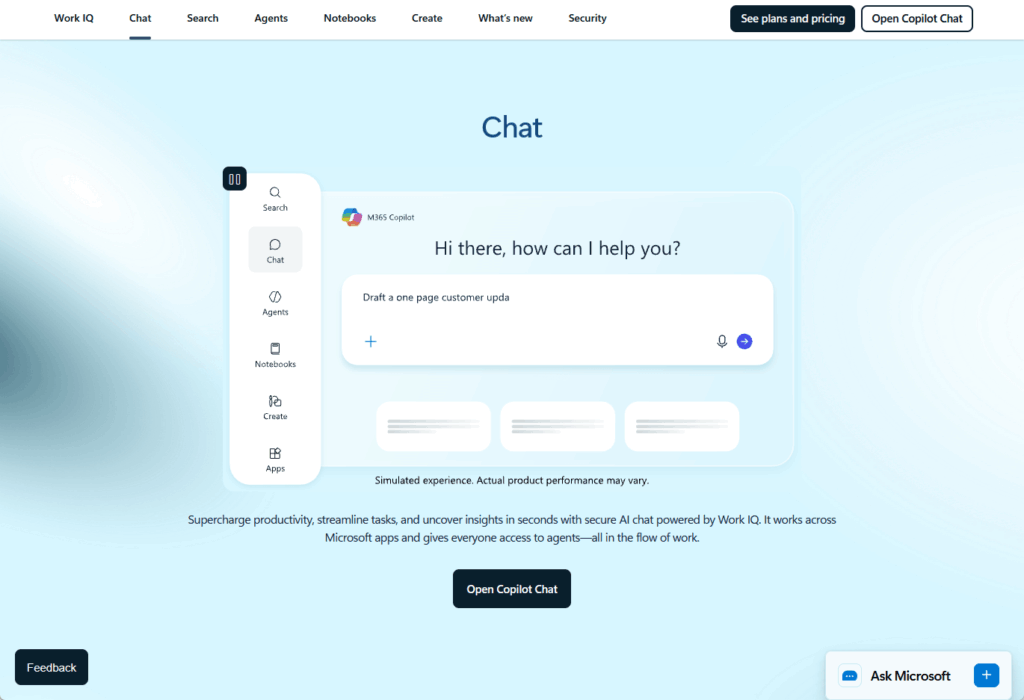
Security Copilot is E5 exclusive and included at no add-on cost as of 2026. It uses AI to analyze security events, recommend responses, and automate threat investigation.
Here’s the Copilot matrix:
| Plan | Copilot Chat | M365 Copilot (Enterprise) | Security Copilot |
| Business Basic | Coming 2026 | $21/month add-on | No |
| Business Premium | Coming 2026 | $21/month add-on | No |
| E1 | Coming 2026 | $30/month add-on | No |
| E3 | Coming 2026 | $30/month add-on | No |
| E5 | Coming 2026 | Included | Included |
| F1 | Coming 2026 | No | No |
| F3 | Coming 2026 | No | No |
If you’re budgeting for Copilot at scale, enterprise-level Copilot ($30/user/month) adds significant cost for high-volume deployments.
Copilot Chat (rolling out to most plans) is lighter-weight and more broadly accessible.
Which Plan Is Right for Each Role?
Here’s where theory meets practice. Most organizations fall into a predictable pattern: the 80/15/5 framework.
- 80% standard information workers get E3 (enterprise) or Business Premium (SMB)
- 15% light or frontline users get F1, F3, or E1
- 5% power users get E5
The 80% tier needs full Office, email, and basic compliance.
The 15% tier are either shift workers who don’t need email or light users who primarily consume Teams and SharePoint.
The 5% tier are the ones actually using advanced security, eDiscovery, or Copilot.
Here’s the assignment guide by role:
| Role | Recommended Plan | Key Decision Factor |
| Executive / C-Suite | E5 | Entra ID P2, Defender for Endpoint P2, Security Copilot |
| Finance / Legal | E5 or E3 | E5 if handling eDiscovery; E3 if basic DLP sufficient |
| IT Admin / Security | E5 | PIM, Defender for Endpoint P2, Security Copilot |
| HR (recruiting, payroll) | E3 or Business Premium | E3 in enterprise; Business Premium in SMB |
| Marketing / Sales (standard) | E3 or Business Premium | Full Office, Teams, moderate compliance |
| Retail Manager / Supervisor | F3 | Full Office, Outlook, task tracking |
| Warehouse / Logistics | F1 or F3 | F1 if Teams/Planner only; F3 if order entry/email |
| Help Desk / Support | E1 or E3 | E1 if web-based ticketing; E3 if document handling |
| Contractor / Temporary | E1 | Web Office, Teams, no long-term device management |
Most oversizing happens at two points: the E5 tier (too many executives who don’t use advanced features) and the E3 tier (light users who should be on E1 or F1).
Frontline worker misclassification is the second biggest cost leak.
How to Cut Your M365 Costs Before July 2026
The scale of license waste across enterprise M365 deployments is significant:
- 56% of enterprise M365 licenses are inactive, underutilized, oversized, or unassigned
- Organizations lose an average of $7.4 million per year to underutilized subscriptions
- 20–30% cost reduction is achievable through right-sizing
- An engineering firm saved $4.5 million over three years through systematic license auditing
- A manufacturing company achieved 200% ROI by reallocating underutilized licenses
Here’s a four-step audit process you can run before July 1:
Step 1: Inventory Active vs. Inactive Users
Export your M365 usage reports by mailbox activity, SharePoint login activity, and Teams activity over the last 90 days.
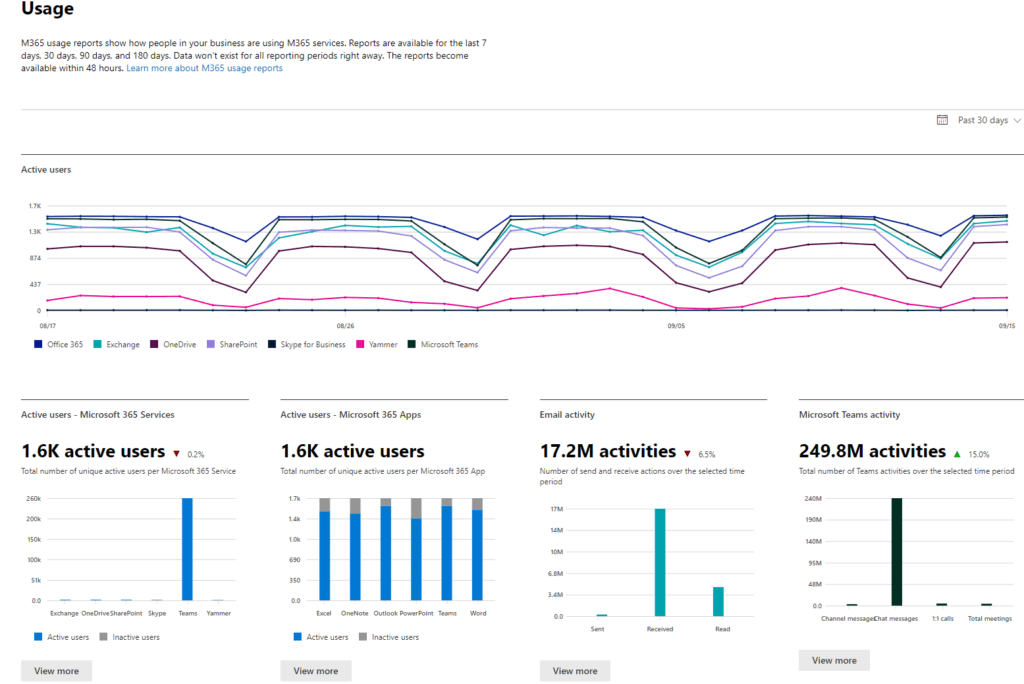
Flag any user with zero activity for potential deactivation or right-sizing.
Step 2: Right-Size by Role
Cross-reference your inventory against the role-based plan recommendations above. If a light user is on E3, downgrade to E1 or F1. If a supervisor is on F1, upgrade to F3.
This is where the bulk of savings live.
Step 3: Audit E5 Assignments
Review every E5 license against the features they actually use. If an executive isn’t using eDiscovery, Security Copilot, or Entra ID P2, downgrade to E3.
This alone can recover 10–15% in many organizations.
Step 4: Review Guest and Contractor Access
External users on full E3 licenses are common waste. Use E1 for guests or contractors who need only Teams and email.
If you’re working with a Microsoft Cloud Solution Provider (CSP) partner, now’s a good time to push for competitive quotes on the new July 2026 rates.
CSPs can sometimes negotiate volume discounts or bundle services that reduce effective per-seat cost.
Audit Your Licenses Before July 2026
Most organizations haven’t reviewed their M365 license mix in years.
Roles change, products evolve, and the plan that made sense three years ago no longer matches your current workforce.
The July 2026 price increases make this review more financially consequential than ever.
Signs your license mix needs attention:
- E5 licenses assigned to users who only need Teams and email
- Frontline or partner users paying for plans they don’t use
- No clear owner tracking which licenses go to which roles
- Renewal dates approaching without a documented audit trail
- Unused features driving plan cost (Power Apps, advanced compliance, etc.)
A proper audit typically surfaces 10–15% in savings quickly. If you’re facing an 8.3% jump on E3 and a 25% jump on F3, the numbers justify the time investment.
What’s your biggest M365 licensing challenge right now: oversized E5 assignments, misclassified frontline workers, or just figuring out where to start before July? Drop a comment below.
I help mid-size organizations right-size their M365 plan mix every week.
The changes are usually simpler than expected, but you need someone who knows the licensing grid inside out. Reach out and let’s talk.