

Table of Contents:
- 1. Market Growth: SharePoint Sits in a $110B+ Tech Market
- 2. Cloud is Standard: Over 85% of SharePoint is Now Online
- 3. The AI Takeover: 1 Million AI Agents Now Run on SharePoint
- 4. The Ecosystem: Powering 320 Million Teams Users
- 5. The User Base: From Small Business to Global Enterprise
- 6. The Governance Problem: AI Raises the Stakes
- 7. The Bottom Line: A 223% ROI for Businesses
- What These Numbers Mean for the Future
Last Updated on August 18, 2025
Is SharePoint just a digital filing cabinet?
In this article, let’s talk about SharePoint statistics and its role as the content engine for Microsoft 365.
Let’s get started.
SharePoint’s continued importance is tied to the massive and growing demand for the tools it provides.
It operates within the enterprise content management (ECM) and collaboration markets, which together represent a huge segment of the tech industry.
The Enterprise Content Management (ECM) Boom
The ECM market, SharePoint’s home turf, is thriving.
In 2025, it’s valued between $49 billion and $69 billion. And it’s not slowing down.
Projections show data security and efficiency needs will drive steady growth for SharePoint over the next decade.
Here’s a look at what different market researchers predict for the ECM market’s future.
| Research Firm | 2025 Market Size (USD) | Projected Future Size (Year) |
| Fortune Business Insights | $49.57 Billion | $150.97 Billion (2032) |
| Mordor Intelligence | $69.72 Billion | $145.51 Billion (2030) |
| Dimension Market Research | $52.9 Billion | $134.3 Billion (2034) |
A Unique Spot in the Market
SharePoint doesn’t really have a single, direct competitor.
Its biggest advantage is its deep integration into the Microsoft 365 ecosystem.
For the approximately 80% of Fortune 500 companies that use SharePoint, this tight integration:
- Simplifies their tech stack
- Reduces costs
- Provides a single, secure platform for their content
It’s a comprehensive solution that’s “good enough” at many things, making it a practical choice for most large organizations.
Sign up for exclusive updates, tips, and strategies
The move from on-premise SharePoint servers to the cloud is no longer a trend; it’s the standard.
The data shows a clear and decisive shift to SharePoint Online, driven by better security, more features, and a strategic push from Microsoft.
The Numbers Behind the Cloud Shift
The statistics speak for themselves.
By 2025, between 85% and 86% of all SharePoint instances are cloud-based.
For any new deployment, SharePoint Online is the default choice. Other data supports this:
- 60% of all SharePoint installations are now SharePoint Online.
- 75% of organizations use SharePoint as part of their Office 365 subscription.
The conversation is no longer about if companies should move to the cloud, but how they can best manage their cloud environment.
Why On-Premise Servers Are Fading
Two main factors are accelerating the decline of on-premise servers:
- Security risks
- Planned obsolescence
First, on-premise servers are a prime target for cyberattacks.
Microsoft frequently releases critical security patches for vulnerabilities (like CVE-2025-49704) that are actively being exploited.
SharePoint Online’s secure, auto-updating environment significantly reduces the burden of managing threats for companies.
Second, Microsoft is officially ending support for older products:
- Support for SharePoint 2016 and 2019 will end in July 2026.
- Key workflow and customization tools are also being retired.
This means any company that wants to stay secure and use modern features has no real choice but to move to the cloud.
The biggest change to SharePoint in 2025 is the integration of artificial intelligence.
AI is changing SharePoint from a passive file storage to an active, content-aware system.
Copilot and Agents Change How We Work
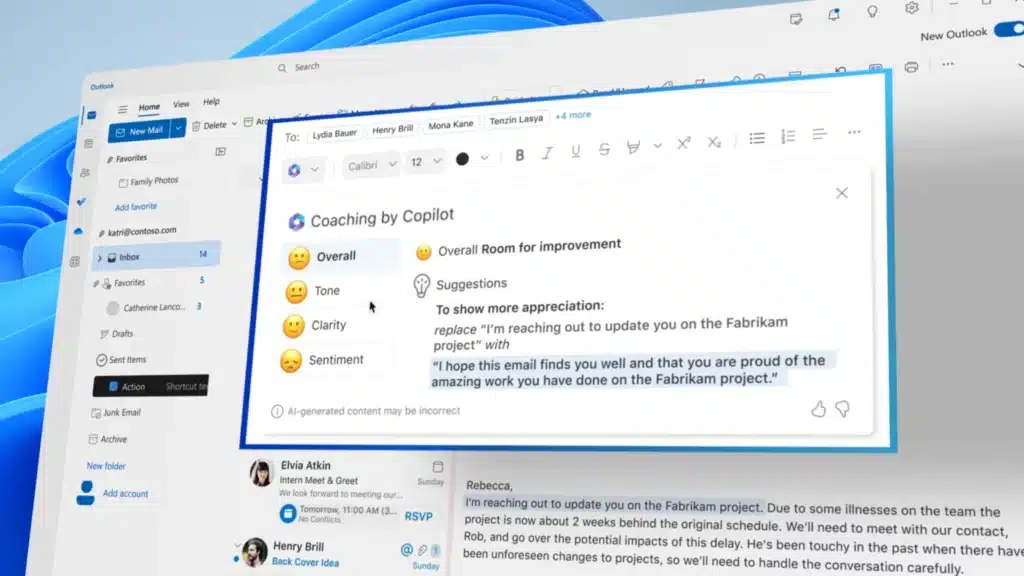
Microsoft Copilot is an AI assistant that lets you use plain language to interact with your files.
You can ask it to summarize a long report, draft a new webpage, or find specific information buried in your documents.
A powerful new feature is SharePoint Agents.
These are small, specialized AI assistants that you can create without any technical skill.
For example, you could create an “HR Benefits Agent” trained only on official HR documents.
An employee could then ask it, “What is our parental leave policy?” and get a secure, accurate answer.
This technology is catching on fast, with 1 million AI agents already running on SharePoint content.
AI is also making routine content management much more efficient through SharePoint Premium (the new name for Microsoft Syntex).
It automates high-volume tasks that used to require hours of manual work.
Here are a few practical examples of how different departments are using it:
| Department | Use Case | How SharePoint AI Helps |
| Finance | Expense Report Automation | Scans receipts, extracts vendor and price, and flags expenses that violate policy. |
| Human Resources | Employee Onboarding | An AI agent on the new hire site answers common questions about benefits and company policies. |
| Legal | Contract Management | Automatically classifies new contracts, extracts key dates, and applies retention labels. |
| Sales | Proposal Generation | Copilot helps draft a new proposal by pulling details from past successful proposals. |
The main reason companies are organizing their data today is to get it ready for AI.
Modernizing information is no longer just about saving costs – it’s about creating a strategic advantage.
4. The Ecosystem: Powering 320 Million Teams Users
SharePoint’s most important role is one that many users don’t even see.
It has become the content backbone for the entire Microsoft 365 suite.
With its usage driven by the huge growth of other apps like Microsoft Teams and the Power Platform.
The Content Engine for Microsoft Teams
The connection between Teams and SharePoint is direct and essential.
When you share a file in a Teams channel, that file is automatically stored in a SharePoint document library.
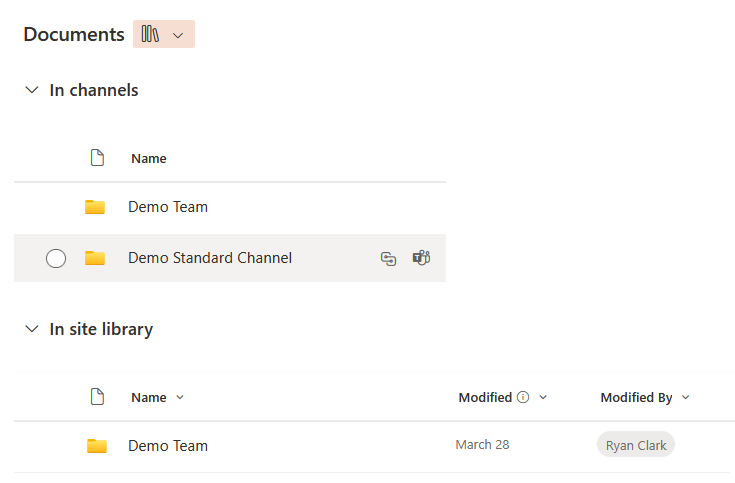
This makes SharePoint the official content system for over 320 million monthly active Teams users.
SharePoint’s robust security, governance, and compliance features are automatically applied to all files shared in Teams due to tight integration.
It creates a seamless and secure experience, bringing structured content directly into the flow of daily collaboration.
Fueling Automation with the Power Platform
SharePoint is also a key driver of business process automation.
An incredible 2 billion Power Automate flows use SharePoint data every single week.
These automations range from simple document approvals to complex, multistep business processes.
Additionally, many business users – or “citizen developers” – use SharePoint lists as a simple database to build custom apps with Power Apps.
This allows people without coding skills to create solutions for their teams, like project trackers or event registration forms.
That in turn drives deeper reliance on the underlying SharePoint infrastructure.
5. The User Base: From Small Business to Global Enterprise
The SharePoint user base is incredibly diverse, ranging from small local businesses to the world’s largest corporations.
Each segment uses the platform in very different ways.
Small Businesses are the Majority of Users
The numbers show that the vast majority of Microsoft 365 customers are small businesses.
- 74% of all Microsoft 365 customers have fewer than 50 employees.
- Another 19% are medium-sized businesses.
This huge segment of users primarily relies on SharePoint’s simple, out-of-the-box features.
For them, SharePoint is the seamless file storage and sharing tool that works in the background of Microsoft Teams and Office apps.
They get its value without needing any deep technical knowledge.
Large Companies Drive Deep Customization
On the other end of the spectrum, large enterprises are SharePoint’s power users.
Data shows that 71% of SharePoint developers work in companies with over 1,000 employees.
These organizations use SharePoint’s deep customization capabilities to build complex, tailored solutions.
They develop systems for enterprise knowledge, compliance, records, and specific business applications.
For them, SharePoint is a powerful platform they can build on, not just a simple tool to use.
6. The Governance Problem: AI Raises the Stakes
For all its power, getting the most out of SharePoint comes with challenges.
The biggest one in 2025 is governance – managing the platform effectively.
With the rise of AI, the need for good governance has become more urgent than ever.
How AI Magnifies Old Risks
AI tools like Copilot are incredibly powerful, but they only know what they can access.
They strictly follow the permission settings of your files.
This means a small, existing governance mistake can become a big problem.
For example, imagine a folder with sensitive financial projections was accidentally shared with the entire company.
Before AI, someone would have to find that folder to see the data.
Now, anyone can ask Copilot a related question, and the AI will readily serve up that sensitive information.
As one report noted, “AI does not fix bad governance; it scales it.”
Governance is Now a Business Strategy, Not an IT Chore
Because of this, information governance is no longer just an IT cleanup task.
It’s a core business function.
The quality of your data and the strength of your access controls directly impact how safely and effectively you can use AI.
The top concerns for companies adopting Copilot are data quality and access controls.
Microsoft now includes advanced governance tools with Copilot licenses, directly linking the new technology with necessary controls.
7. The Bottom Line: A 223% ROI for Businesses
Investing in a modern workplace built on SharePoint and Microsoft 365 provides a clear financial return.
Studies from Forrester show that the ROI comes from saving money, improving productivity, and reducing IT workload.
Direct Cost Savings
One of the quickest financial wins is consolidating software.
By using the tools included in Microsoft 365, companies can cancel subscriptions for other single-purpose apps.
- Companies save an average of $15.13 per user, per month by replacing other file-sharing tools with OneDrive and SharePoint.
- They save another $14.52 per user, per month by using Teams for chat and meetings.
More Productivity and Less IT Workload
The biggest benefit comes from making employees more efficient.
A study of small and medium-sized businesses found that each user saves an average of 1.5 hours per week thanks to better collaboration and file access.
For a 150-person company, that time savings adds up to a financial benefit of over $519,000 over three years.
The total projected three-year ROI for a small business adopting Microsoft 365 is 223%.
What These Numbers Mean for the Future
The statistics show SharePoint’s future is in the cloud and driven by AI.
It has moved beyond simple storage to become the intelligent content layer for the modern digital workplace.
For businesses to get the most from their investment, the path forward is clear.
The focus must be on organizing and governing company data to prepare for an AI-driven world.
Do you have any questions about SharePoint adoption or the statistics in this article? Let me know!
For any business-related queries or concerns, contact me through the contact form. I always reply. 🙂




























