

Turn on Power Platform and every licensed user becomes a maker, free to build apps against production data and route information to external services.
They can share both before IT even knows the app exists.
I see the same three problems in almost every new engagement:
- Unlicensed users running premium apps no one approved
- Environments multiplying across the tenant with no owner in sight
- DLP policies either missing or so tight they’ve broken the flows makers depend on
Those aren’t separate issues. They’re symptoms of the same thing: governance got turned on after the damage was already done.
Good governance is the guardrails that let the platform scale safely, without restricting the people who depend on it.
These are the twelve strategies I walk through with every new client before we touch a single setting.
| Strategy | What It Covers | Priority |
|---|---|---|
| Lock Down the Default Environment | DLP baseline + environment creation rights | Do this first |
| Layered DLP Architecture | Tenant-wide + environment-level policies | High |
| Environment Strategy | Hierarchy, creation control, request workflow | Foundational |
| Native Admin Center Tools | Inventory, Managed Environments, analytics | High |
| Center of Excellence | People, process, organizational model | Medium-High |
| Connector Governance | Action control, endpoint filtering, custom connectors | Often missed |
| ALM and Solution-Aware Development | Managed solutions, Pipelines, auditable deployments | Medium |
| License Governance | License audits, unlicensed user enforcement, storage | Do before June 2026 |
| Maker Onboarding | Welcome Content, intake workflow, certification gating | Medium |
| Copilot Studio and AI | DLP for agents, kill switch, RBAC, AI Builder credits | High and growing |
| Monitoring and Alerting | Four logging surfaces, capacity alerts, Weekly Digest | Often skipped |
| Abandoned Resource Cleanup | Inactivity timelines, quarantine, orphaned apps | Low urgency, high value |
Table of Contents:
- 1. Lock Down the Default Environment First
- 2. Build a Layered DLP Policy Architecture
- 3. Define Your Environment Strategy Before Anything Else
- 4. Use the Power Platform Admin Center’s Native Governance Tools
- 5. Set Up a Center of Excellence: The People and Process Layer
- 6. Govern Connectors, Not Just Apps
- 7. Implement ALM With Solution-Aware Development
- 8. Govern Your Licenses Before the Deadline
- 9. Onboard Makers Deliberately
- 10. Govern Copilot Studio and AI Features
- 11. Build a Monitoring and Alerting Layer
- 12. Clean Up Abandoned Resources Proactively
- Build Governance Before You Need It
1. Lock Down the Default Environment First
If I could only fix one thing on a new tenant, it’d be this. The Default environment is the single highest-risk point in your footprint.
It’s risky by design. Out of the box, every licensed user holds the Environment Maker role there, and no DLP policy stands between them and your data.
Anyone can build, connect, and share before IT even knows the app exists. Microsoft documents this openly in its governance considerations.
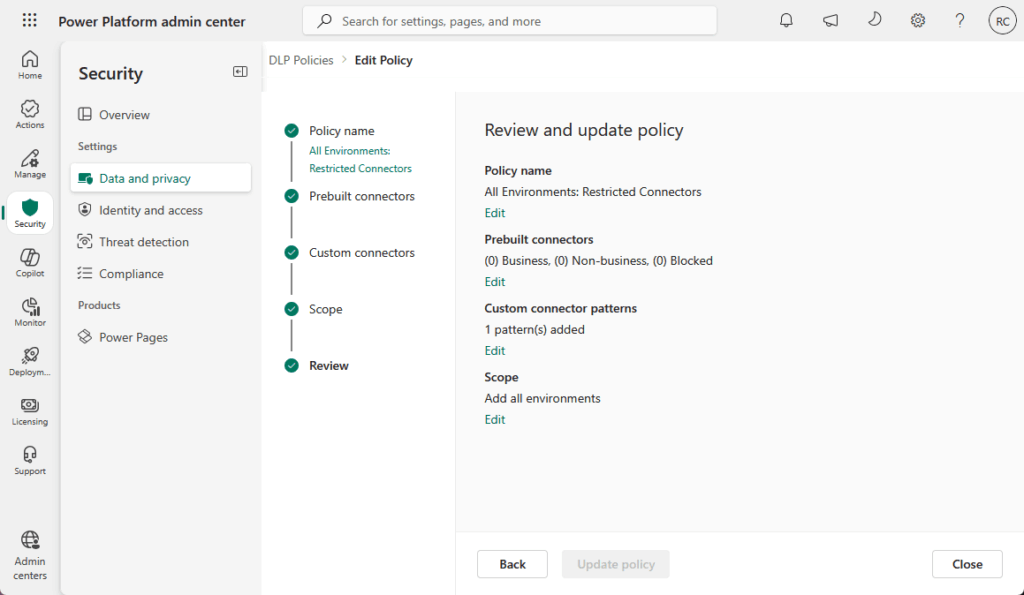
So two moves, immediately. Apply your most restrictive DLP policy to the Default environment, then strip environment creation rights from everyone who isn’t a Power Platform admin.
By default, any licensed user with 1GB of capacity available can create a new environment. That’s how you end up with sprawl.
Close that door early and you’ve removed the most common way governance quietly falls apart. These are the first two things I do on every engagement.
Not because they’re clever, but because skipping them means everything else you build sits on sand.
Sign up for exclusive updates, tips, and strategies
2. Build a Layered DLP Policy Architecture
One DLP policy for the whole tenant doesn’t work. I’ve seen teams try, and it always ends one of two ways.
It goes too loose to protect anything, or so tight that makers start hunting for workarounds.
Layering is what makes DLP sustainable. The structure I recommend has two layers.
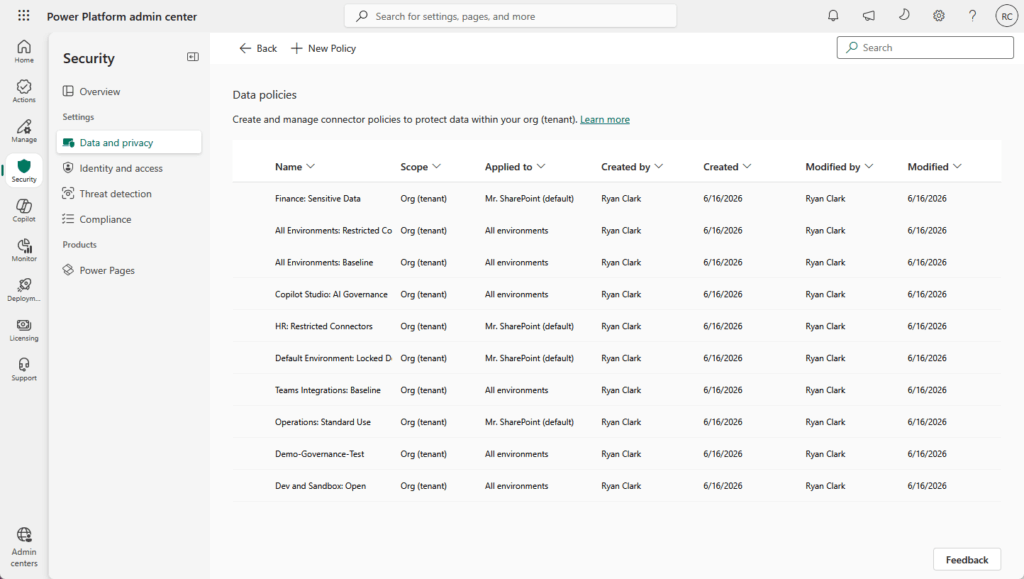
A tenant-wide blanket policy sets the baseline for every environment. Then environment-level policies open up the specific connectors a business unit actually needs.
The rule to remember: environment policies can’t override tenant policies. The most restrictive setting always wins.
Inside any policy, every connector lands in one of three buckets.
| Classification | What It Means | Can Combine With |
|---|---|---|
| Business | Approved for business data | Other Business connectors only |
| Non-Business | Allowed, but isolated | Other Non-Business connectors only |
| Blocked | No use permitted | Nothing |
Data can’t cross between groups. A flow can’t pull from a Business connector and push to a Non-Business one, which is exactly the leak you’re preventing.
A couple of traps live in here that catch even experienced admins. The HTTP connector is the big one.
Child flows share an internal dependency on it, so if you block HTTP without thinking it through, you can silently break child flows across the tenant.
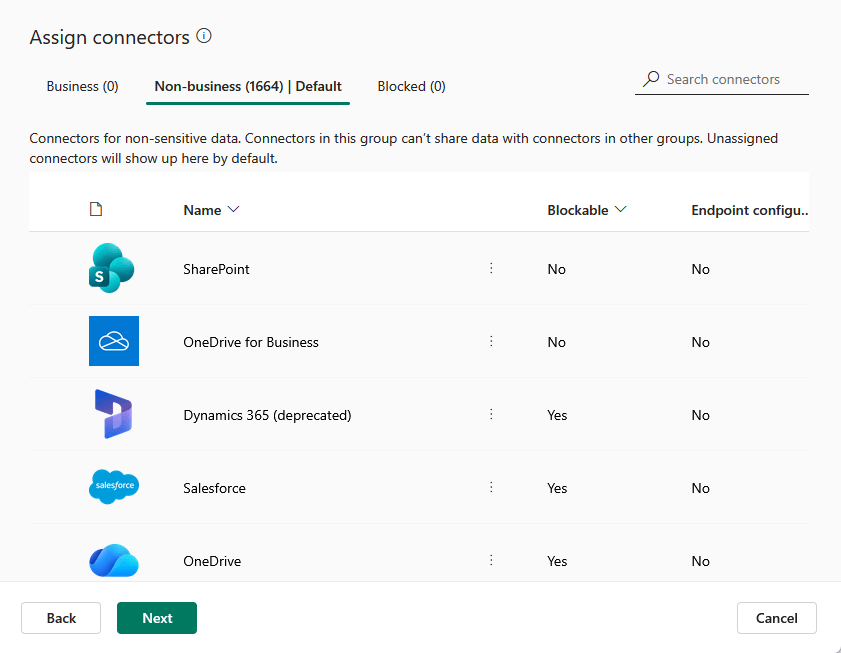
Custom connectors are the other. They default to “Ignore,” which means they’re ungoverned until you explicitly classify them.
And whatever you do, run an impact analysis before changing a policy on a live environment. Reclassifying a connector breaks every resource that depends on it.
Microsoft’s broader DLP strategy guidance walks through how to layer this properly, and there’s solid practitioner advice in Matthew Devaney’s eight DLP best practices too.
3. Define Your Environment Strategy Before Anything Else
DLP policies attach to environments. CoE tooling reports on environments.
Pretty much every governance control you’ll build assumes you’ve already decided how environments are structured. So this is the foundation, and I’d sort it early.
A clean hierarchy keeps experimentation away from live systems. Production runs live work, UAT or Test validates, and Development or Sandbox handles proof-of-concept and training.
Makers get a place to break things that isn’t your production tenant.
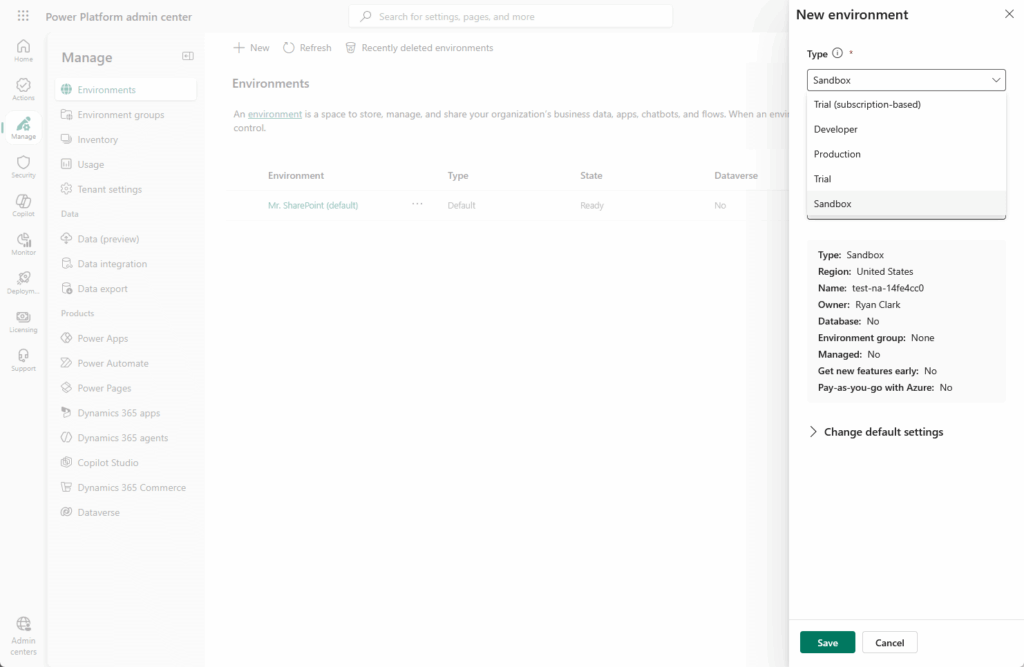
Then control who can create environments. By default that’s anyone with a license, which is how sprawl starts.
Restrict creation to admin roles, and pair it with a request-and-approval workflow. Makers can still get an environment when they genuinely need one, just with a checkpoint.
Don’t forget Teams environments. They get auto-created the moment someone builds an app inside Teams, which makes them an easy blind spot.
| Environment Type | Who Can Create | Default DLP | Best Use |
|---|---|---|---|
| Default | All licensed users | None (lock this down) | Nothing production-grade |
| Developer | Per-maker | Inherits tenant policy | Personal sandbox |
| Sandbox | Admins | Per environment | Dev and test |
| Production | Admins | Dedicated policy | Live business apps |
| Teams | Auto-created by Teams | Inherits tenant policy | Lightweight Teams apps |
Get this layer right and the rest of your governance has something solid to attach to.
Get it wrong, and you’ll be retrofitting policies onto a mess of environments nobody planned. I’ve done both, and the first way is a lot less painful.
4. Use the Power Platform Admin Center’s Native Governance Tools
Quick but important update if your knowledge here is a year old. The CoE Starter Kit was deprecated through 2025 and 2026.
Microsoft now points you to the native admin center as the starting point. Most of the Starter Kit’s core capabilities, like inventory, usage, and monitoring, now live natively.
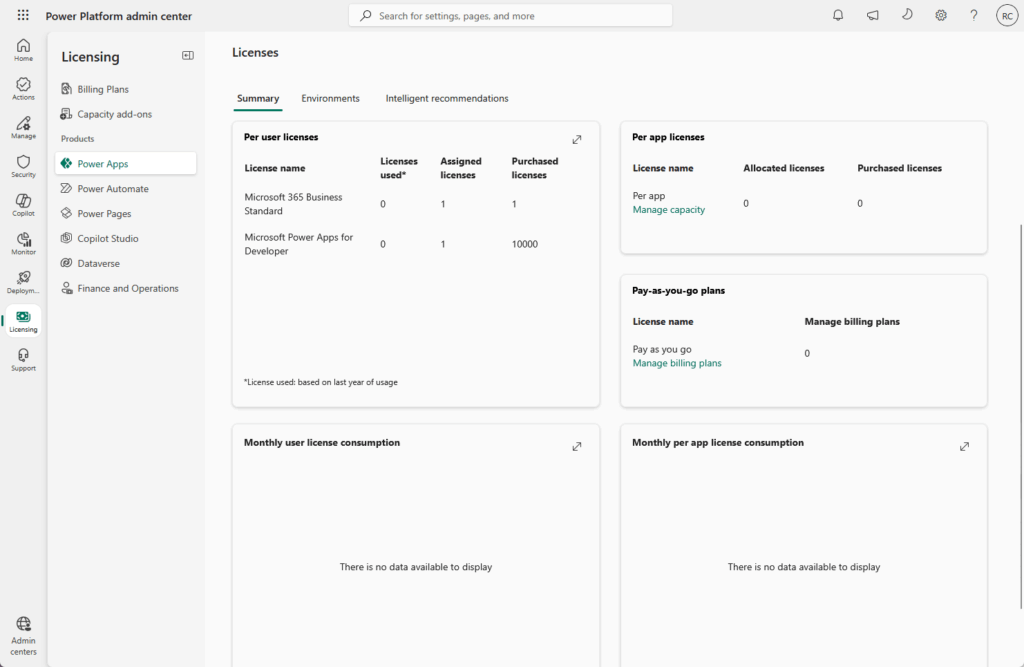
So what do you get without installing anything? Quite a lot, actually.
- Tenant-wide inventory across every environment
- Usage analytics and resource monitoring
- Managed Environments, the premium governance layer
- License and capacity analytics
- Copilot governance policies
Managed Environments is where the real teeth are. It unlocks sharing limits, an IP firewall, solution checker enforcement, weekly usage digests, and conditional access on individual apps.
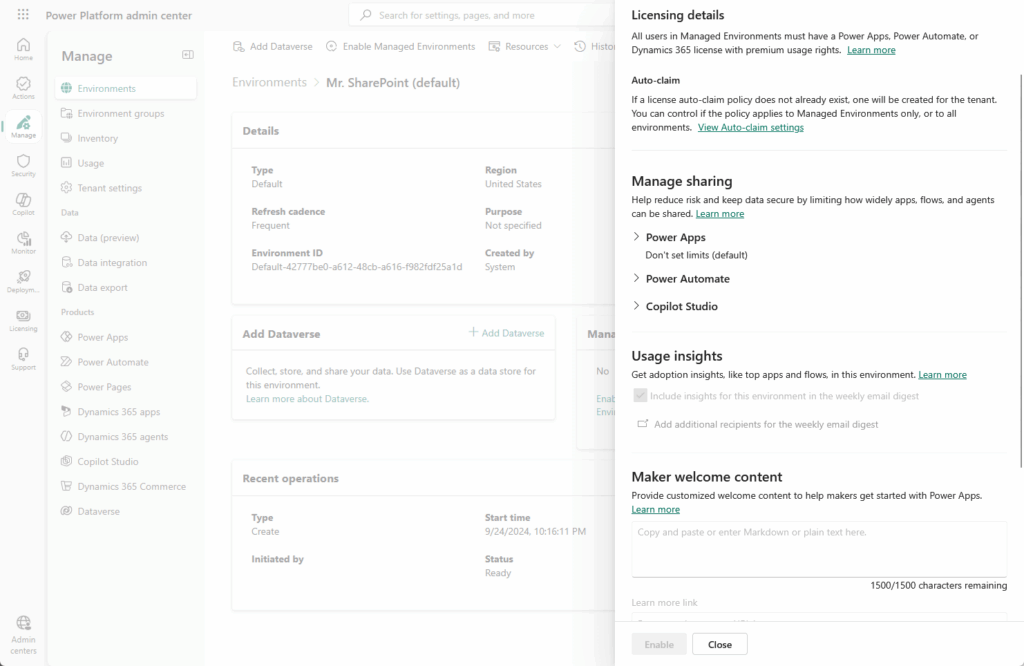
The full feature list lives in Microsoft’s Managed Environments overview.
One more thing worth flagging on the compliance side. Starting June 2026, unlicensed users in Managed Environments start receiving in-app notifications.
That’s a built-in license compliance trigger you get for free, no custom tracking required.
If you’ve already deployed the CoE Starter Kit, don’t rip it out. It still has unique value.
Things like bulk permission updates and abandoned resource cleanup aren’t fully replicated by native tooling yet.
What I tell clients: run both in parallel and migrate feature by feature as the native side catches up.
5. Set Up a Center of Excellence: The People and Process Layer
Here’s a misconception I run into constantly. People hear “Center of Excellence” and think it’s a toolkit you install.
It isn’t.
A CoE is a team and a set of processes. The tooling just supports it.

That distinction matters because the hard part of a CoE was never technical. It’s deciding who owns governance, how decisions get made, and how makers get supported.
Most CoEs run on five core roles.
- CoE leadership to set direction
- A governance architect to own policy
- A security specialist for risk and compliance
- A training coordinator to keep makers sharp
- A community manager to run the maker community
How you structure all that depends on your org. There are three common models.
| Model | How It Works | Best For |
|---|---|---|
| Centralized | IT owns all governance decisions | Regulated industries needing tight control |
| Federated | IT and business units share responsibility | Orgs balancing control with agility |
| Hub and Spoke | Central CoE plus departmental champions | Large, distributed organizations |
When do you actually need one? A reasonable trigger is 50 or more active makers, or any handling of sensitive data.
Below that you can often manage with policies alone. Above it, you need people.
Microsoft governs over a million citizen development assets in its own program, sorted by risk tier rather than blanket rules. Simple apps move fast; sensitive data gets scrutiny.
And it pays off: organizations with mature CoEs report stronger security posture and compliance outcomes, with 72% citing improvements.
6. Govern Connectors, Not Just Apps
Most admins I meet govern apps and stop there. They review who built what, who it’s shared with, whether it’s in the right environment.
All good.
But connectors are where data actually moves, and they get governed far less often than they should. Two controls do most of the heavy lifting here.
Connector Action Control lets you allow specific actions within a connector while blocking others. You can permit SQL Server Read, for instance, but block Delete.
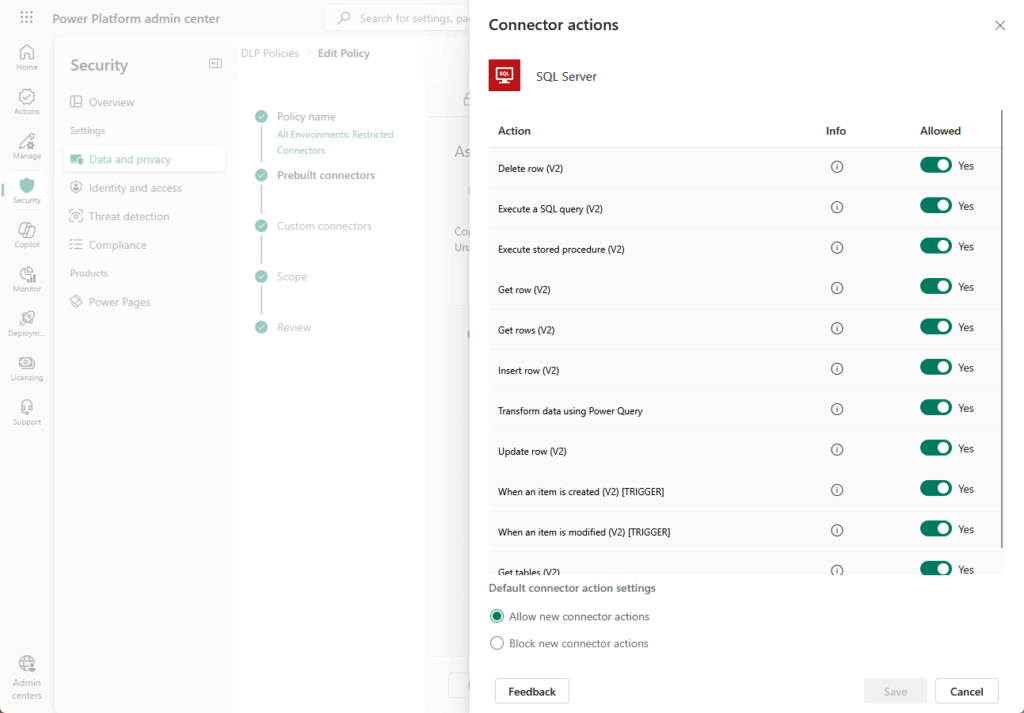
Endpoint Filtering goes a step further and restricts which endpoints makers can connect to at all, for connectors like HTTP, SQL Server, and Azure Blob Storage.
There’s a SharePoint angle here I care about especially, given what I do. Regulated data tends to live in SharePoint.
A Power Platform flow can extract that data and route it outward without ever tripping SharePoint’s own access controls.
If your sensitive content sits in SharePoint and your connectors are wide open, you have a gap most audits won’t catch until it’s too late.
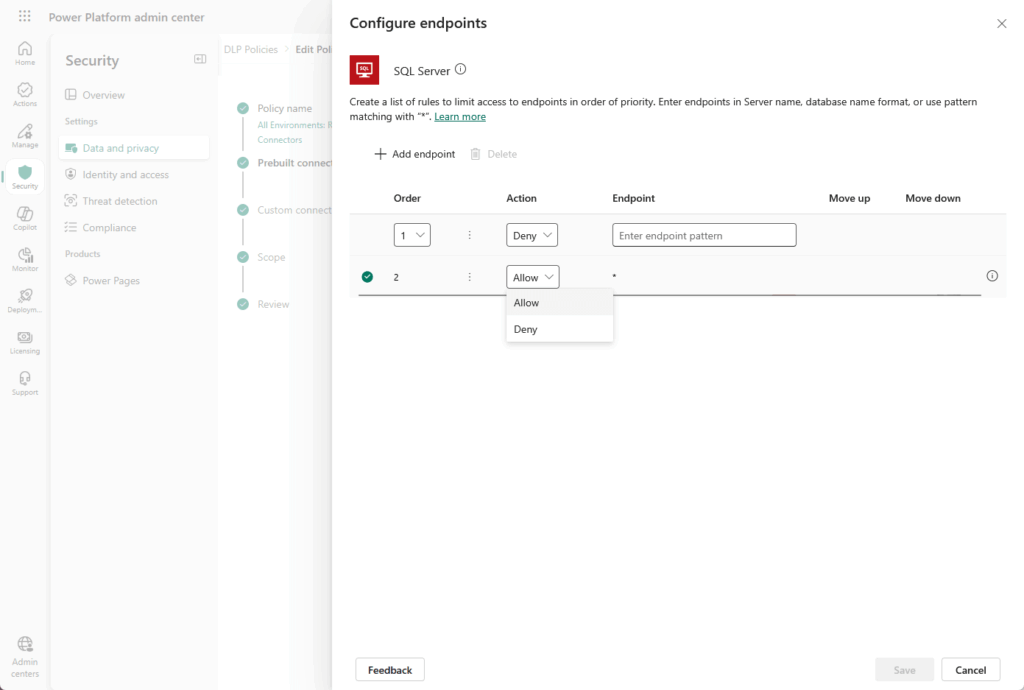
Custom connectors deserve a deliberate decision too. Classification runs on URL-pattern rules.
The wildcard “*” rule at the end governs every custom connector that doesn’t match anything more specific.
Set that on purpose. Left on its default, it’s a quiet hole in an otherwise tight policy.
7. Implement ALM With Solution-Aware Development
ALM is the part that turns ad-hoc app building into something IT can actually track and control.
Without it, makers ship changes straight to production and you find out when something breaks. With it, every change moves through a structured chain that leaves a record.
Solutions are the foundation. Unmanaged solutions are for development environments only, where makers actively build and edit.
Managed solutions are the deployment artifact for every other environment. You export an unmanaged solution as managed to generate the build artifact.
Then you check the unmanaged source into source control.
Power Platform Pipelines is Microsoft’s native, no-code ALM tool. It lets makers self-service deployments from Dev through Test, UAT, and into Production without Azure DevOps or deep ALM knowledge.
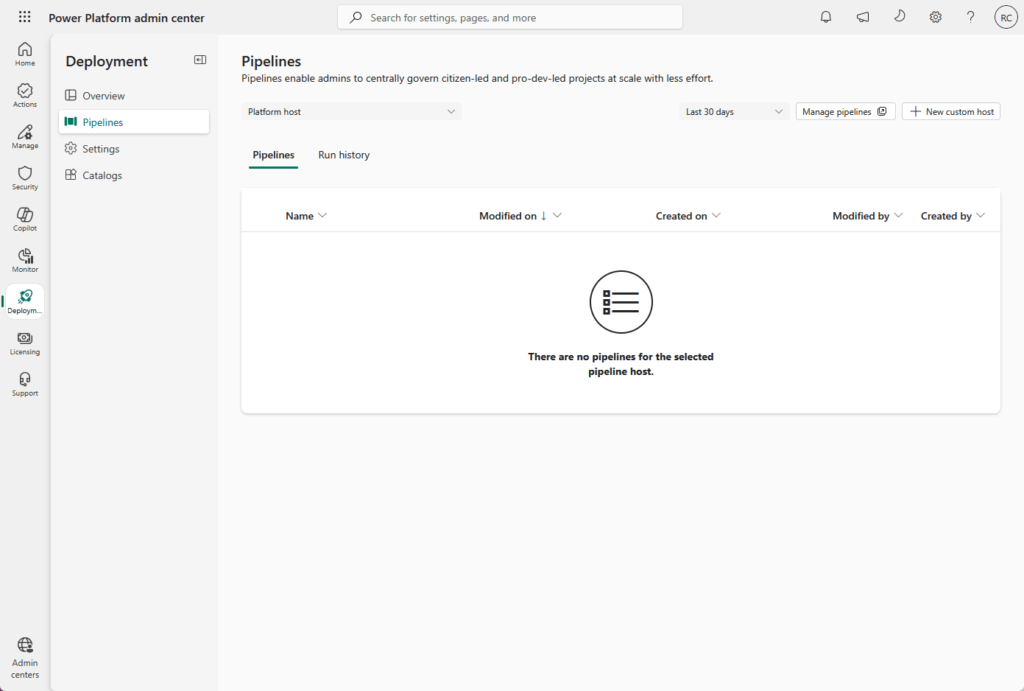
For governance, the value is the auditable deployment chain. Target environments must be Managed Environments, and as of February 2026 Pipelines auto-enables that on the target.
| Stage | What It Holds | What Changes |
|---|---|---|
| Dev | Unmanaged solution | Makers build and edit freely |
| Test / UAT | Managed solution | Imported as read-only, validated |
| Production | Managed solution | Direct unmanaged edits blocked |
Here’s the gap I keep flagging for clients: not everything is solution-aware. Dataverse rows aren’t packaged in solutions, and some Copilot Studio settings need manual post-deployment steps.
The goal is auditability. Every promotion from Dev to Prod leaves a record you can go back and read.
8. Govern Your Licenses Before the Deadline
Licensing is the most underestimated governance gap in any tenant. It’s not self-enforcing.
You have to build the audit step in yourself, because nothing stops an unlicensed user from quietly running a premium app until Microsoft decides to act.
That decision is coming. The per-app plan was discontinued in January 2026, so there are no new purchases of that tier going forward.
Microsoft 365 seeded licenses only cover limited “within app context” use. They don’t license standalone custom apps, which is where most teams accidentally fall out of compliance.
The enforcement clock is real. Admin notifications started in March 2026, and end-user in-app notifications for unlicensed users begin in June 2026.
To get ahead of it, run three audits:
- PPAC Recommendations: go to Actions > Recommendations to surface unlicensed users inside Managed Environments
- Entra ID cross-reference: compare license assignments in Entra ID against actual usage in PPAC Analytics
- Add-on capacity: check PPAC > Capacity > Add-ons for API call consumption against entitlement
One change worked in your favor. As of December 2025, Power Apps Premium now includes 20 GB of database storage, up from 10 GB, with add-on capacity at $40/GB.
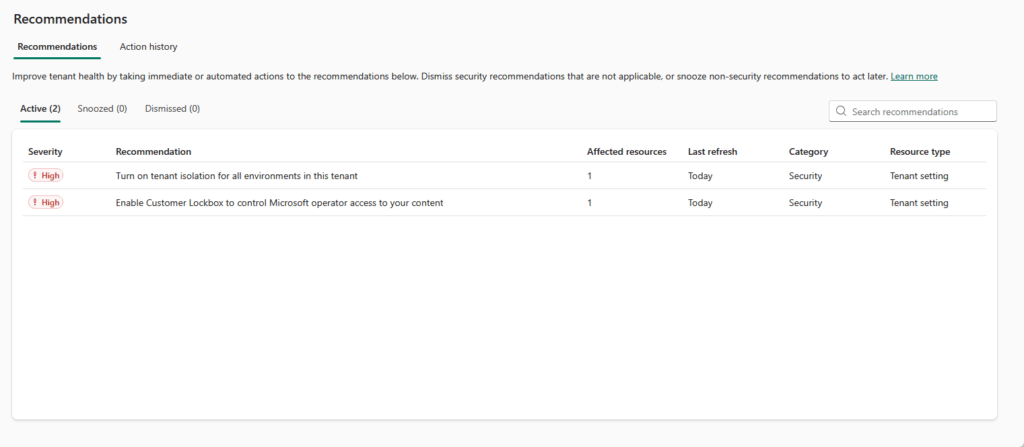
I’d get ahead of the June deadline rather than let users discover it through an in-app warning. Finding out from a popup isn’t a good look for IT.
9. Onboard Makers Deliberately
The fastest way to create shadow IT is to make the official process harder than just building something yourself.
When the sanctioned path means a two-week wait and three approval forms, people route around you. They build in the default environment, on personal connections, with zero oversight.
That’s the gap.
Managed Environments now ship with Maker Welcome Content, the native replacement for the old CoE welcome emails. Makers see customized getting-started guidance before they build anything.
You configure it in PPAC > Managed Environments > Welcome Content.
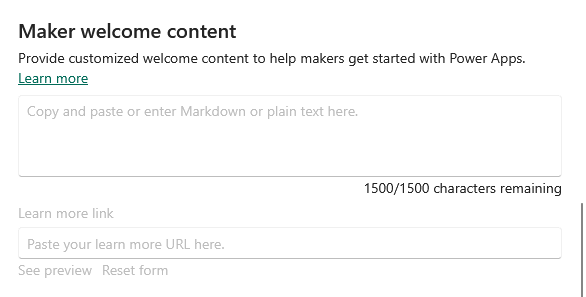
Pair that with a real intake workflow. Build a Power Platform Hub, a Power Apps portal or SharePoint site, that centralizes training, templates, approvals, and your policies.
I tell clients to commit to a two-business-day response on intake. Provision a dev environment fast, connect the maker to a champion, and the legitimate path wins.
Certifications make a clean gating mechanism for production access or premium connectors:
| Cert | Role | What It Signals |
|---|---|---|
| PL-900 | Fundamentals | Baseline platform literacy |
| PL-100 | App Maker | Can build canvas apps responsibly |
| PL-200 | Functional Consultant | Dataverse and solution design |
| PL-400 | Developer | Custom code and extensibility |
| PL-500 | RPA Developer | Automation and desktop flows |
The governance overhead goes down when makers are trained, not scared.
10. Govern Copilot Studio and AI Features
This surface area is newer and moves fast. The DLP rules that cover your connectors don’t extend cleanly to agents.
So don’t assume your existing policies have it handled.
As of February 2025, DLP is mandatory for all Copilot Studio agents by default. The old Set-PowerVirtualAgentsDlpEnforcement cmdlet is deprecated, and there are no per-agent DLP exemptions anymore.
That has a side effect worth knowing. Third-party Copilot plugins inherit their connector’s DLP classification, so a misclassified connector will cause agents to fail after enforcement kicks in.
You also have a tenant kill switch. Under PPAC > Environments > [Env] > Settings > Features > Generative AI features, you can disable generative AI publishing tenant-wide.
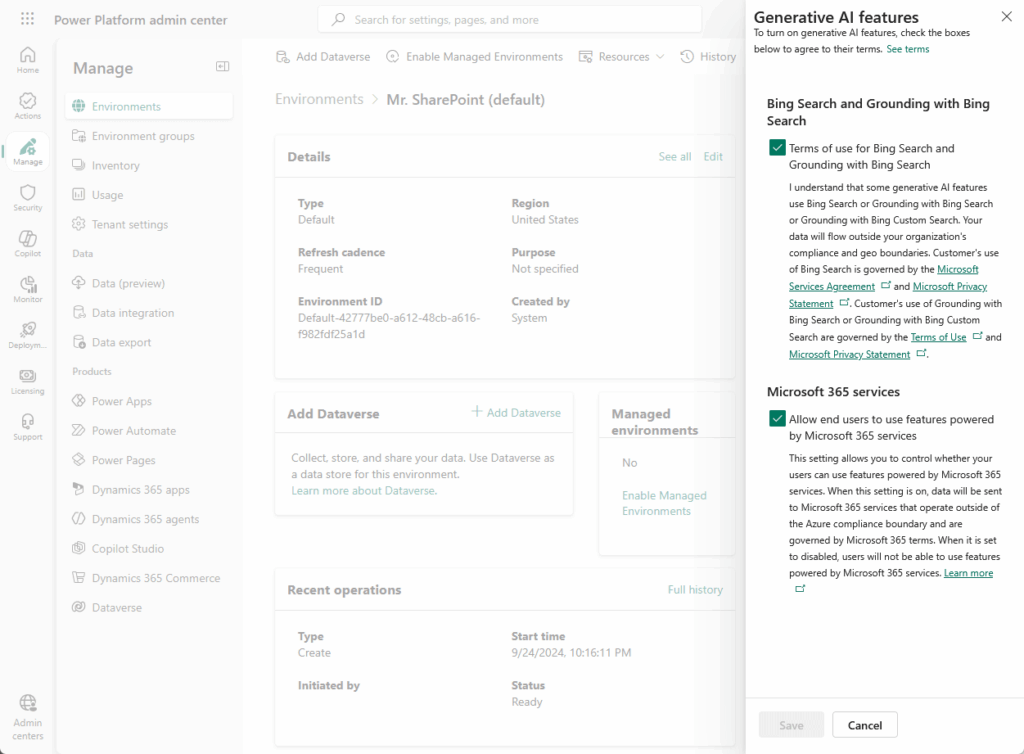
Control got more granular in April 2026. Admins can now assign, block, remove, or scope agents to specific users or groups at the individual action level.
That’s proper RBAC for what an agent is allowed to do.
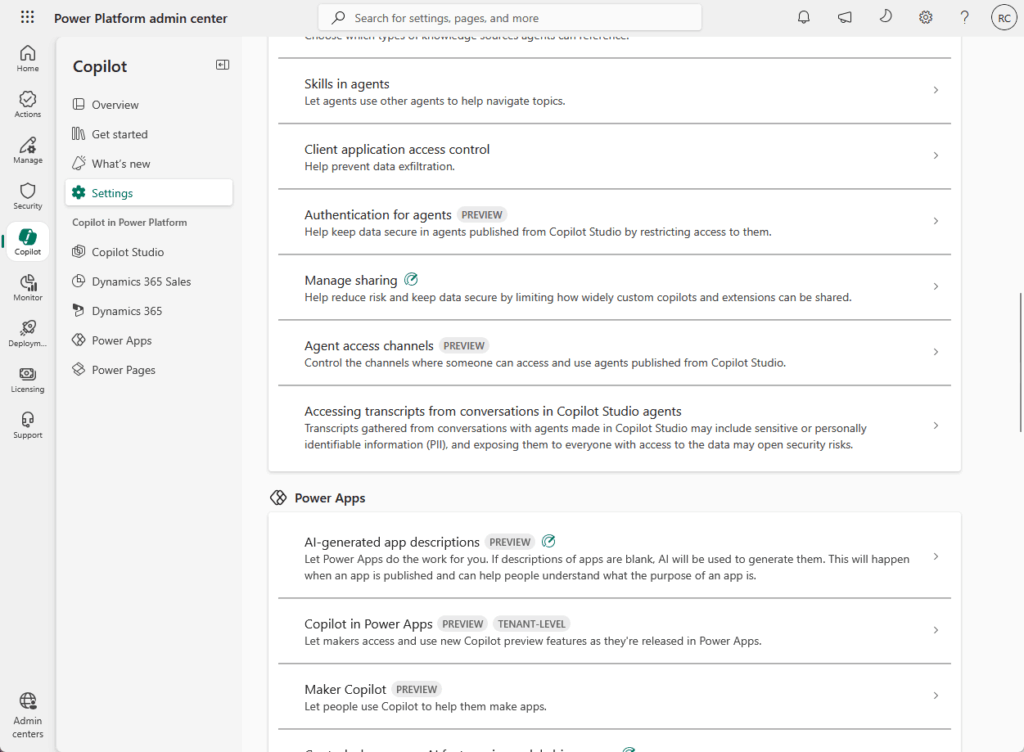
One item belongs on your roadmap now. Seeded AI Builder credits, the ones bundled with Power Apps Premium and Power Automate Premium, are being discontinued in November 2026.
You’ll need dedicated credit purchases or a workload migration before that date. I’d start that conversation early, because budget cycles are slow and the deadline isn’t.
This is the part of the platform where governance debt is accumulating fastest.
11. Build a Monitoring and Alerting Layer
You can’t govern what you can’t see. Most tenants light up PPAC Analytics, glance at it occasionally, and stop there.
That’s a thin layer for something this big. There are four logging surfaces, and each one answers a different question.
| Surface | What It Covers | When To Use It |
|---|---|---|
| PPAC Analytics | 28-day rolling usage for Apps and Flows | Quick adoption and usage checks |
| Dataverse Audit Logs | Change tracking and user access | Investigating who changed what |
| Microsoft Purview | Power Platform and DLP activity | Compliance and admin audit trail |
| Microsoft Sentinel | Streamed Dataverse and admin events | SIEM-grade threat and anomaly detection |
A few things worth knowing about that table. Dataverse Audit Logs aren’t on by default.
You enable them at the environment level, then per-table and per-column. AI-assisted agent event tracking was added in September 2025.
Purview is enabled by default for production environments and logs activity in the PowerPlatformAdminActivity table. Sentinel goes further, streaming that data via an Azure Monitor DCR for cross-platform correlation.
Set up capacity alerts under PPAC > Settings > Email Notifications. They auto-trigger when any storage pool (database, file, or log) drops below 15% of your entitlement.
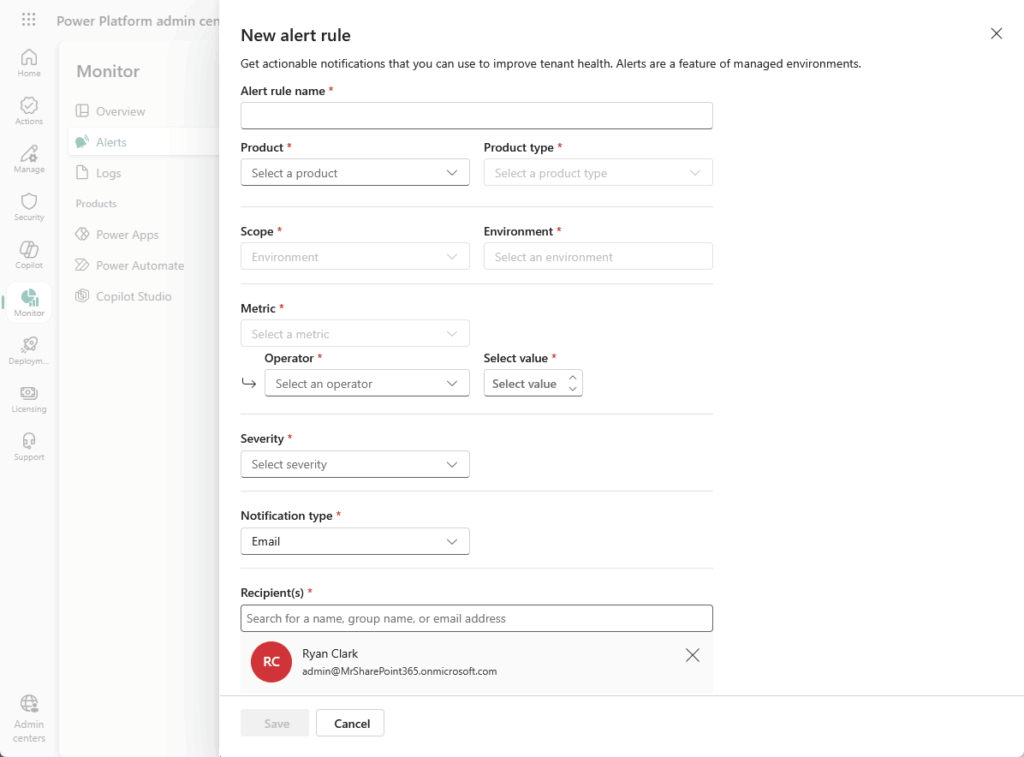
The Managed Environments Weekly Digest is the native replacement for CoE inactivity notifications. It surfaces inactive apps, sharing violations, and usage anomalies on a weekly cadence.
The goal is knowing about problems before your users file a ticket.
12. Clean Up Abandoned Resources Proactively
Apps don’t just sit idle harmlessly. They hold licenses, consume capacity, and widen your attack surface every day they linger.
Microsoft already cleans some of this up automatically, and the timelines depend on the environment type:
| Environment Type | Disabled After | Deleted After |
|---|---|---|
| Developer (standard) | 30 days inactive | 15 days after disable |
| Developer (Managed) | 60 days inactive | Per managed policy |
| Dataverse for Teams | 90 days inactive | 30 days after disable (120 total) |
| Default (no flows) | n/a | 120 days inactive |
| Default (with flows) | n/a | 402 days inactive |
One change in April 2025 caught a lot of teams off guard. CoE Starter Kit queries no longer count as activity for developer environments.
If you’ve been relying on CoE polling to keep dev environments alive, those environments now enter the inactivity clock. You’d be surprised how many orgs leaned on that quietly.
For the manual side, start with PPAC Operational Efficiency Recommendations. It surfaces apps unused for 60+ days, with app name, environment, last used date, and owner.
When you find a candidate, you have options short of deletion. You can quarantine a canvas app so users can’t launch it but makers can still edit.
Flows don’t support quarantine, so you stop the flow manually instead.
Orphaned apps need their own attention. When a maker leaves, reassign their app ownership before the Entra ID account is deleted.
Afterward, reassignment requires PowerShell or admin API calls.
Cleanup is governance in maintenance mode. The work doesn’t stop once you’ve built the framework.
Build Governance Before You Need It
Here’s what I tell every new client at the start of an engagement: the teams that build governance late almost always build it reactively.
The first audit almost always surfaces the same three problems:
- 40 to 60 unmanaged environments nobody knew existed
- Apps running on unlicensed users, with Microsoft’s enforcement already underway
- Connectors routing sensitive data out of SharePoint without anyone’s approval
By then you’re not building a framework. You’re cleaning up a mess, and it doesn’t have to go that way.
Gartner now treats governance as a baseline expectation, with 75% of new enterprise apps forecast to land on low-code and no-code platforms.
The platform’s value and its risk come from the same place: it lets anyone build. Start with the Default environment, layer your DLP, and build out from there.
Worried your Power Platform setup has turned into a sprawl of ungoverned apps and connectors?
I help IT teams design governance that protects your data without blocking your people. Reach out and let’s talk.