Ryan Clark

As the Modern Workplace Architect at Mr. SharePoint, I help companies of all sizes better leverage Modern Workplace and Digital Process Automation investments. I am also a Microsoft Most Valuable Professional (MVP) for SharePoint and Microsoft 365.

A man with short curly hair and a beard is smiling. He is wearing a dark plaid suit jacket, a black shirt, and a dark tie. The background is softly blurred.
[Guide] How to Check Your SharePoint Online Usage Report

How to Check Your SharePoint Online Usage Report (Guide)

Do you want to know how your SharePoint site is doing in terms of usage? Fortunately, it’s quite easy to check the usage report in SharePoint Online. In fact, you may have already seen the buttons for it. In this article, I’ll share with you some of the methods you can use to check your SharePoint Online usage report. Let’s get started. What will you find in the SharePoint usage report? Basically, the usage report contains information on how site users interact with the site. In terms of access, almost everyone can view the site usage data. However, visitors can’t […]

How to Check Your SharePoint Online Usage Report (Guide) Read More »

How to Use SharePoint as Project Management Office (PMO) Portal

How to Use SharePoint as Project Management Office (PMO) Portal

Are you planning on using SharePoint as your project management office portal? That’s actually a great plan, especially when your organization mainly uses the Microsoft ecosystem of apps. In this article, I’ll walk you through creating a project management office portal in SharePoint Online and all the steps you need to take. Let’s get started. Why use SharePoint as a project management office portal? Since you’re here, it’s likely that your organization has its own PMO team that defines and maintains project management standards. Now, there are many apps out there that can help you create a portal for your

How to Use SharePoint as Project Management Office (PMO) Portal Read More »

[Guide] How to Create a Hub Site in Sharepoint Online

How to Create a Hub Site in SharePoint Online (Guide)

Do you want to bring together related sites in your intranet? Well, you may already have heard about the interesting hub sites feature announced way back in 2017. In this article, let’s talk about how to create a hub site and all the various things you need to know about it. Let’s get started. What is a hub site? To better understand this new feature, you need to understand first what a hub is in SharePoint: Basically, you can group various sites together that have similar characteristics, themes, or branding into “hubs”. Within that hub, the “hub site” will be

How to Create a Hub Site in SharePoint Online (Guide) Read More »

Keyword Query Language in SharePoint Online [Ultimate Guide]

Keyword Query Language Syntax SharePoint Online (Guide)

Did you know that you can refine your search queries in SharePoint? That’s possible with the use of the Keyword Query Language. Unfortunately, not too many people know about this awesome feature. In this article, I’ll walk you through the important bits of using the Keyword Language Query or KLQ in SharePoint. Let’s get started. What is the Keyword Query Language (KQL)? According to Microsoft: KQL is the default query language for building search queries. Using KQL, you specify the search terms or property restrictions that are passed to the SharePoint search service. Basically, it’s a language you can use

Keyword Query Language Syntax SharePoint Online (Guide) Read More »

[Guide] How to Create a Drop-Down Menu in Modern SharePoint

How to Create a Drop-Down Menu in Modern SharePoint (Guide)

Do you want to add a drop-down menu to your modern SharePoint site? Fortunately, it’s super easy now to add a drop-down menu. On the downside, there’s really only one option to do this. In this quick guide, I’ll walk you through creating a dropdown menu in modern SharePoint in only a few steps. Let’s get started. Step 1: Edit the navigation menu Whether you’re on a team site or in a communication site, you will see an edit button on the navigation bar. For this step, simply click on that “Edit” button: Note: If you’re new to SharePoint, check

How to Create a Drop-Down Menu in Modern SharePoint (Guide) Read More »

[Comparison] Microsoft Teams Wiki vs Microsoft OneNote

Microsoft Teams Wiki vs Microsoft OneNote (Comparison)

Not sure whether to use Teams Wiki or OneNote? This makes sense as both tools have their own advantages in terms of note-taking. On a side note, one is always bound to be superior to the other. In this article, I’ll compare Microsoft Teams Wiki and Microsoft OneNote in terms of notes-taking and which one is better. Let’s get started. Microsoft Teams Wiki for taking notes When you create a new team (like opening it for the first time via SharePoint), the wiki tab appears next to the tabs for posts and files. From the name itself, the main point

Microsoft Teams Wiki vs Microsoft OneNote (Comparison) Read More »

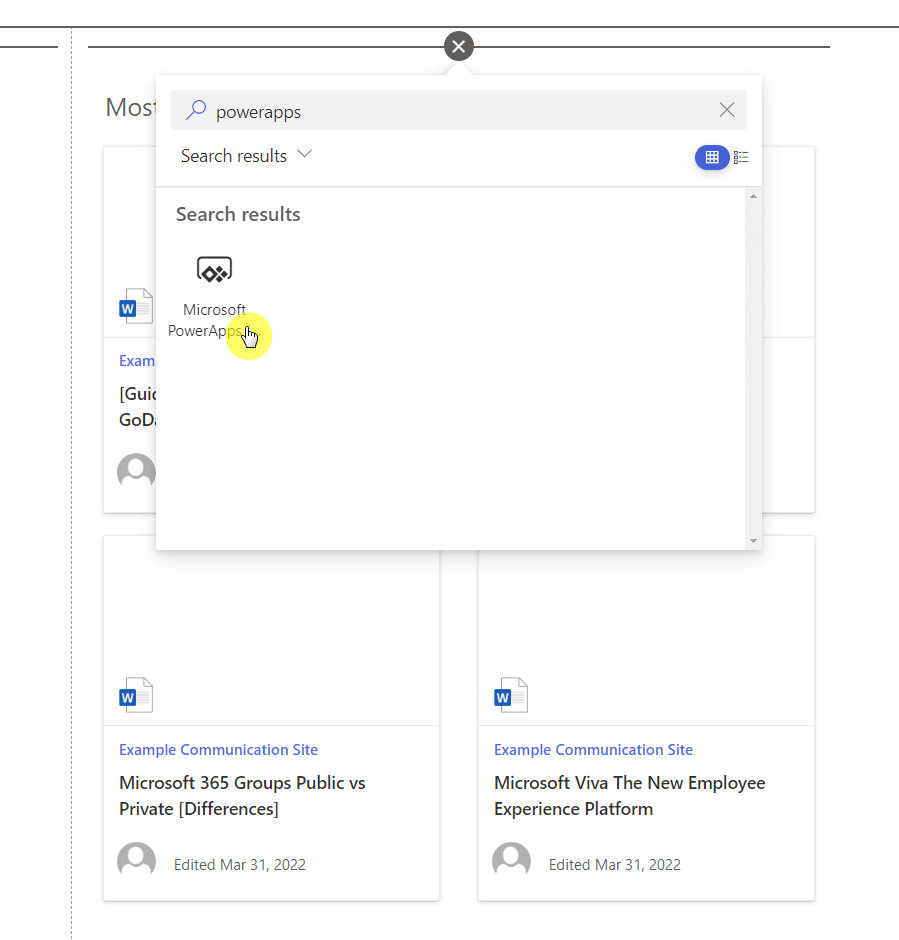
Search for the Microsoft PowerApps web part

Power Apps in SharePoint Online: Get Started (Tutorial)

Do you fancy creating an app out of your list in SharePoint? If so, I’ve got good news for you. With the help of Power Apps, it’s now extremely easy to create an app even without knowledge of coding. In this article, I’ll discuss Power Apps in SharePoint Online, what you can do with it, and how much it costs to use this feature. Let’s get started. What is Power Apps in SharePoint Online? Microsoft Power Apps is a tool that enables you to create custom business apps even without any app development or coding skills. Basically, you can build

Power Apps in SharePoint Online: Get Started (Tutorial) Read More »

Microsoft Onenote for Project Management: The Ultimate Guide

Microsoft OneNote for Project Management: The Ultimate Guide

Do you use Microsoft OneNote for Project Management? If not, you may be missing a lot of things that might make your project management flow smoother and easier. In this article, I’ll share how to use Microsoft OneNote for project management, including integrating it with various Microsoft apps. Let’s get started. How to use OneNote effectively for project management Like SharePoint and Teams, Microsoft OneNote also has its own features that support project management — although it’s still better used together with other apps. Here are ways you can use OneNote for project management: 1. Store and share various information on OneNote

Microsoft OneNote for Project Management: The Ultimate Guide Read More »

How to Create SharePoint Document Sets: The Ultimate Guide

How to Create SharePoint Document Sets: The Ultimate Guide

Did you know that SharePoint has a feature that seems like a blend of folders and metadata columns? Well, you guessed it, it’s called “document sets”. It’s a cool feature in SharePoint that you may not know about unless someone tells you about it. In this article, I’ll share with you everything I know about document sets in SharePoint, how to create one, and many others. Let’s get started. What is a document set in SharePoint? Microsoft defines a document set in a simple manner: A Document Set is a group of related documents that you can manage as a

How to Create SharePoint Document Sets: The Ultimate Guide Read More »

[Guide] How to Export From SharePoint to Microsoft Excel

[Guide] How to Export From SharePoint to Microsoft Excel

Do you need to export your list from your SharePoint Online site to Microsoft Excel? Fortunately, with the recent updates from SharePoint Online, exporting a list is easy. In fact, you may have already seen its button in the command bar. In this article, I’ll show you how to easily export from SharePoint Online to Microsoft Excel, how to refresh the data, and even break the connection. Let’s get started. How exporting from SharePoint to Microsoft Excel works Basically, you can export any data inside a list in SharePoint to Microsoft Excel. This also includes: Any list created from a

[Guide] How to Export From SharePoint to Microsoft Excel Read More »

Scroll to Top