
Table of Contents:
This isn’t a feature shootout. It’s a decision about three things:
- Where your structured data lives
- Who owns it
- How it connects to your Microsoft 365 environment
Most organizations already pay for SharePoint through their M365 license.
So the real question is simple: Does Airtable solve a problem that SharePoint can’t? Or does it introduce a governance gap you don’t need?
If you’re an IT leader, operations manager, or power user inside M365, this choice affects cost, user adoption, and data control.
Let’s get started.
Before we get into specifics, here’s how these two platforms compare across the areas that matter most.
| Category | SharePoint / Microsoft Lists | Airtable Enterprise Scale |
| Data model | Flat list with lookup columns (soft relationships) | Relational database with linked records (strict relationships) |
| Record capacity | 30M items/list, but 5,000-item view threshold limits filtering | 500K records/base standard; 100M+ via HyperDB |
| Automation | Power Automate (1,000+ connectors, no hard cap on flows) | Native automations, capped at 50 per base on all plans |
| Governance | Purview DLP, retention labels, legal holds, eDiscovery | Third-party DLP required; 180-day audit logs on Enterprise |
| External sharing | Entra ID guest access (free, functional, not elegant) | Portals ($120–$150/month per 15 guests) |
| AI capabilities | Copilot Agents across the full M365 Graph | Airtable AI scoped to the individual base |
| Annual cost (100 users) | $0–$18K (included in M365 E3/E5) | $70K–$100K+ (additive cost) |
Cost alone doesn’t tell the full story.
A cheaper tool that nobody uses wastes more money than a premium one that drives adoption. The sections below break down where each platform actually earns its place.
Sign up for exclusive updates, tips, and strategies
Where Airtable Wins
Airtable isn’t “shadow IT” anymore. With HyperDB, Enterprise Hub, and Portals, it has real enterprise capabilities in 2026.
Here’s where it earns its premium price tag:
1. Relational Data Modeling
Airtable treats relationships as first-class features.
Linked records act as true foreign keys between tables. Rollup and lookup fields pull related data automatically, with no formulas or flows required.
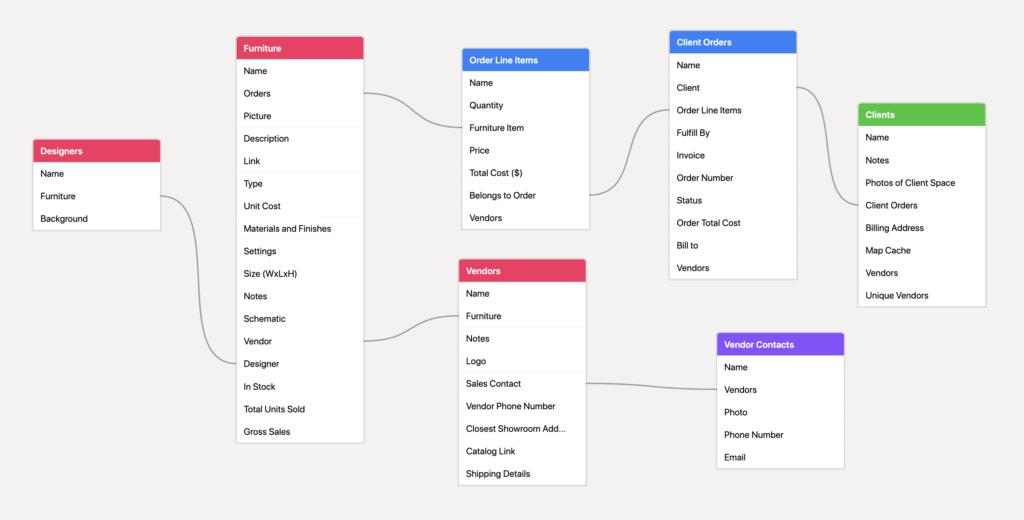
On the other hand, SharePoint handles this differently. Lookup columns reference other lists, but they don’t enforce referential integrity.
For example, if someone deletes a parent record, the child records become orphans. Cleaning that up requires a Power Automate flow.
For workflows that connect multiple tables, like CRM pipelines, product roadmaps, or campaign tracking, Airtable’s relational engine is a clear advantage.
2. Visual Interface Design
Airtable’s Interface Designer lets teams build role-specific dashboards, forms, and boards without writing code.
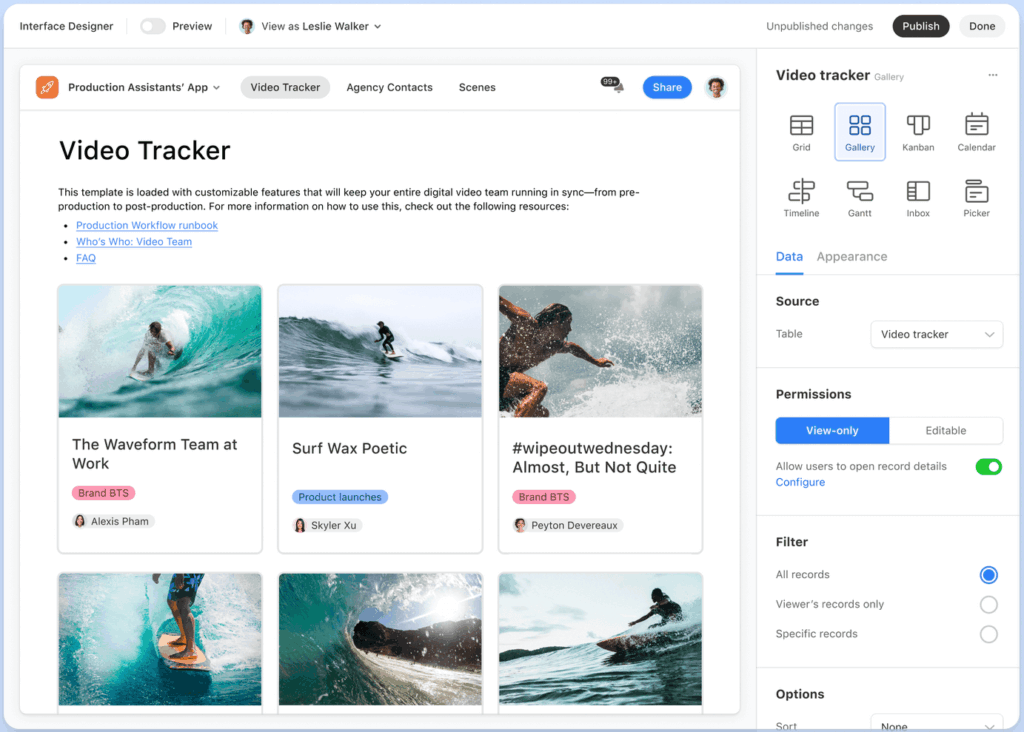
Some examples:
- A marketing manager can create a campaign tracker in an afternoon
- A project lead can build a team dashboard without submitting an IT ticket
- An HR coordinator can manage candidate pipelines without needing developer support
SharePoint takes a different approach.
Basic views like grid, board, and gallery work out of the box. But anything beyond that, like color-coded rows, progress bars, or custom layouts, often requires SharePoint JSON formatting.
Well, that gap matters for adoption.
- In Airtable, a “power user” is someone who knows how to group and filter fields.
- In SharePoint, a “power user” is someone comfortable writing JSON.
For creative and operations teams, that difference drives which tool people actually open every day. This habitual use ultimately dictates the efficiency and success of their project management efforts.
3. External Collaboration Through Portals
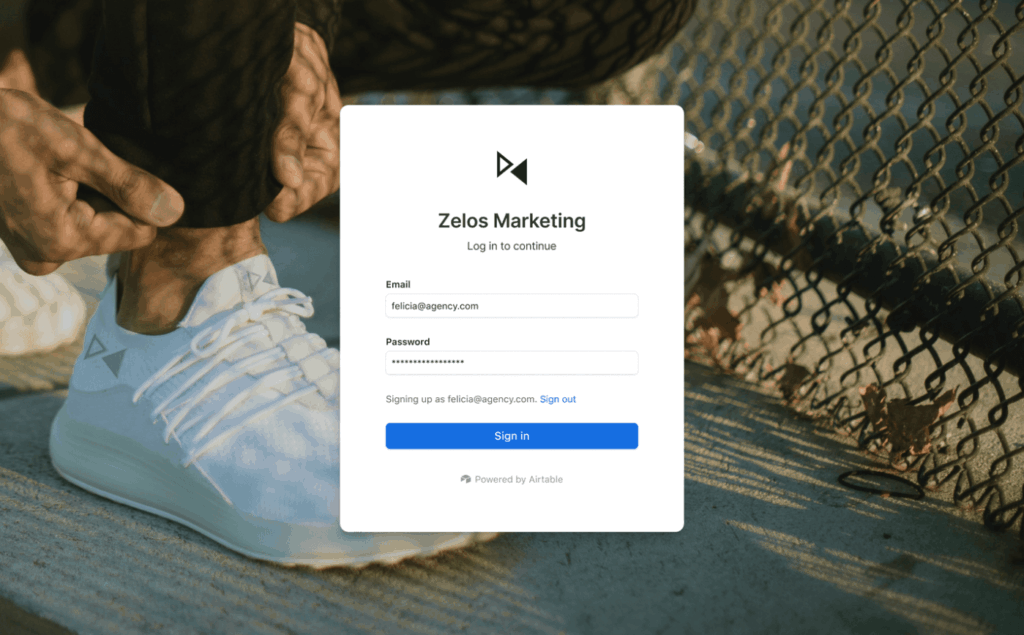
Airtable Portals give external users a branded login experience.
Freelancers, vendors, or clients see only the interface you share. They never touch the underlying base or its data.
SharePoint handles external access through Entra ID guest accounts (here’s a walkthrough on guest access in SharePoint).
It’s secure and free, but the experience feels clunky. IT teams are often hesitant to grant guest access broadly, which slows down collaboration.
The trade-off here is cost.
Portals run $120 to $150 per month for every 15 external guests. That adds up fast, but for teams managing dozens of freelancers or client-facing status dashboards, the experience justifies the spend.
4. Mobile and Offline Access
Airtable still offers native iOS and Android apps with offline sync support. Field workers can capture data without a signal and sync it later.

Microsoft retired the standalone Lists mobile app in November 2025. The replacement is a Progressive Web App (PWA) accessed through the browser.
It works, but it depends on browser caching for offline use. That’s less reliable than a native app, especially for teams working in basements, warehouses, or remote sites.
For most Microsoft 365 organizations, SharePoint is the default. And in many cases, it should stay that way. Here’s where it holds the advantage:
1. Zero Additional Licensing Cost
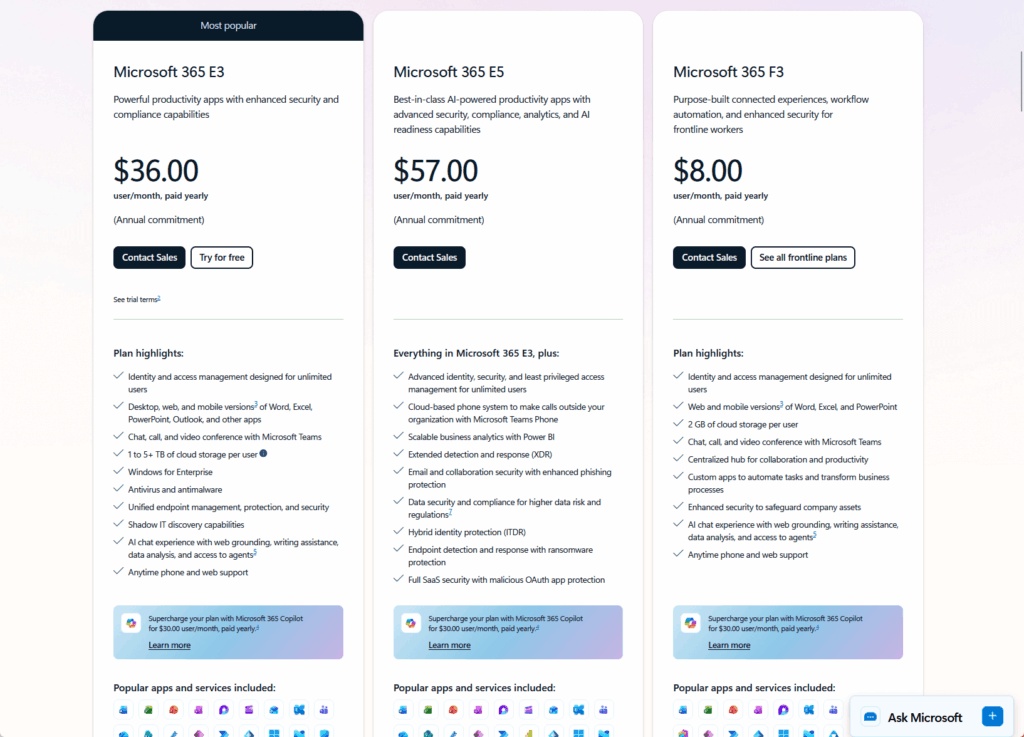
SharePoint Lists comes included with every M365 E3 and E5 license.
For 100 users, that’s $0 in added platform cost. Airtable Enterprise runs roughly $54,000 to $72,000 per year for the same group.
Microsoft 365 Archive adds another layer of savings. Admins can move inactive sites and lists to cold storage at $0.05 per GB per month. That’s a fraction of active storage costs.
For organizations watching budgets closely, this gap is hard to ignore. SharePoint doesn’t just compete on features here, but competes on the fact that you’ve already paid for it.
2. Governance, Compliance, and Security
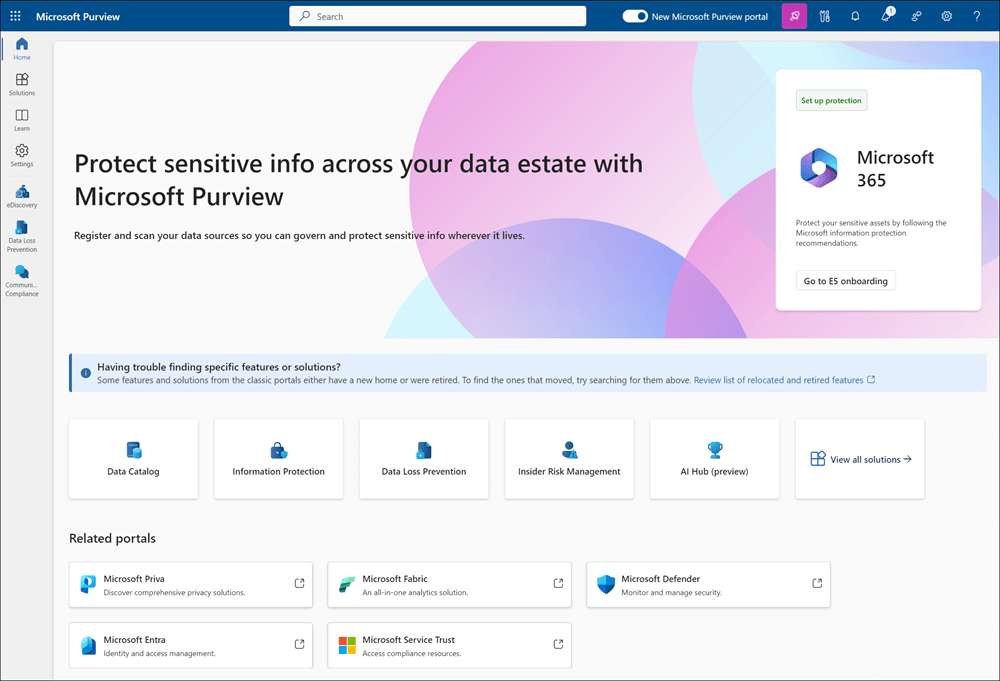
SharePoint inherits the full Microsoft Purview compliance stack.
This includes a range of compliance features:
- Data Loss Prevention (DLP) policies
- Retention labels
- Legal holds
- eDiscovery
These features work out of the box with no extra configuration.
Row-level security is built in too.
Admins can set item-level permissions so users only see records they created. At the same time, managers see everything. (Btw, this happens at the query level, not through a workaround.)
Airtable’s governance story is improving, but gaps remain:
- DLP requires a third-party tool like Nightfall
- Audit logs on Enterprise plans only retain 180 days of data
- Base collaborators still get broad access to all data unless you route them through Interfaces only
For organizations with strict compliance requirements, these gaps matter. They add cost, complexity, and potential risk that SharePoint handles natively.
3. Automation Depth Through Power Automate
Power Automate connects SharePoint to over 1,000 services.
That includes SAP, Salesforce, Intune, Entra ID, and the full Microsoft stack. A single list can trigger a flow that touches five different systems.

Airtable caps automations at 50 per base, regardless of plan tier. Trust me, that ceiling gets hit fast.
For example, a marketing base handling campaigns, approvals, scheduling, etc. can easily need 60 or more automation rules.
When teams hit that wall, they turn to scripting extensions or external tools like Make and Zapier, which adds cost and complexity.
Well, it’s also true that Power Automate is harder to build.
It demands an understanding of loops, variables, and OData queries. But it has no hard cap on automation count, and its reach across enterprise systems is unmatched.
4. AI Integration Across the M365 Graph
Copilot Agents in SharePoint can reason across lists, Outlook, Teams, and the org directory in a single query.
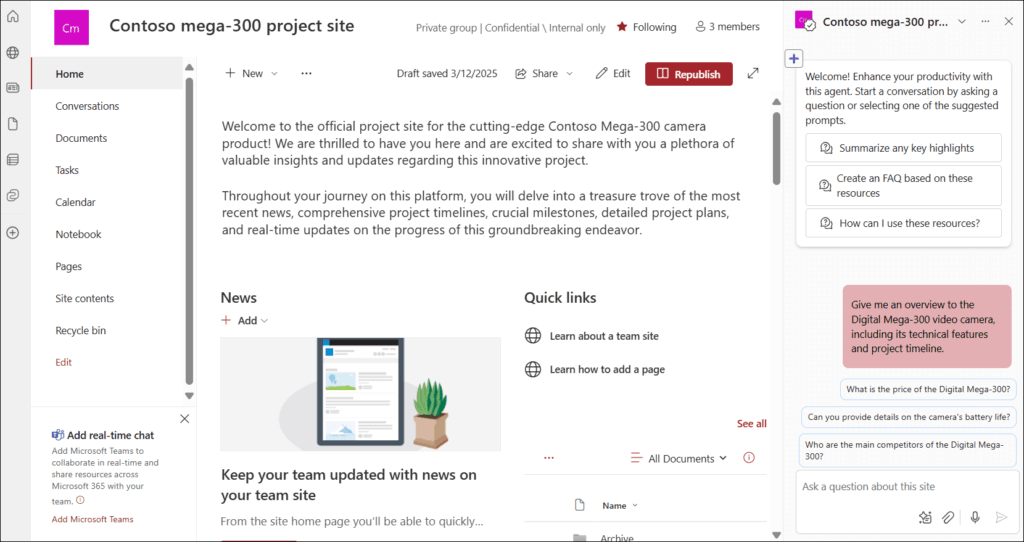
A user can ask, “Show me all high-priority contracts expiring in Q3,” and Copilot pulls the answer from structured list data combined with email and calendar context.
Airtable AI is fast and practical for in-base tasks like categorizing feedback, drafting replies, or summarizing records. But it’s scoped to the base.
It can’t directly pull context from email, calendar, or files that live outside Airtable.
Limits and Gotchas at Scale
Both platforms have ceilings. Knowing them before you build saves painful rework later.
Here are the constraints that matter most:
- SharePoint’s 5,000-item view threshold: Filtering or sorting on unindexed columns breaks above 5,000 items.
- SharePoint’s lookup columns: No referential integrity as deleted parent records leave orphaned child records.
- Airtable’s 50-automation cap: Hard limit across all plans, which forces teams toward scripting or third-party tools.
- HyperDB field limitations: Supports 100M+ records but only text, number, date, and single select fields.
- Airtable’s row-level security: Collaborators see everything unless routed through Interfaces.
SharePoint’s view threshold is the most common trap. Architects often split data across multiple lists to work around it.
For Airtable, the automation cap hits teams faster than expected, especially for marketing and operations workflows that rely on heavy automation.
Let me be clear on this: Both platforms scale well within their design limits. The key is knowing those limits exist before committing to a structure that can’t grow.
Common Use Cases, Mapped to the Right Platform
Here’s a practical breakdown of common use cases and which platform fits best.
| Use Case | Best Fit | Why |
| IT asset tracking | SharePoint | Intune/Entra ID integration, zero added cost |
| Marketing campaign management | Airtable | Visual calendars, gallery views, creative review workflows |
| Contract and legal matter tracking | SharePoint | DLP, sensitivity labels, row-level security, legal holds |
| Product roadmap planning | Airtable | Relational linking between features, teams, and timelines |
| Employee onboarding tracker | SharePoint | Teams integration, low complexity, no extra license needed |
| Creative production and proofing | Airtable | Image handling, portal access for freelancers |
| Procurement and vendor management | SharePoint | Power Automate + SAP/ERP integration |
| Event planning and logistics | Depends | SharePoint if internal-only; Airtable if external portal needed |
| Customer feedback tracking | Airtable | AI categorization, relational linking to accounts |
| Policy and compliance tracking | SharePoint | Purview retention policies, legal holds, eDiscovery |
The pattern is clear.
SharePoint fits best for governed, compliance-driven, internal workflows. Airtable fits best for visual, relational, team-owned work where adoption depends on the user experience.
Choosing Your Platform: Framework and Integration Strategy
Not every decision needs a 50-page evaluation. Use these four questions to find your starting point.
- Is the data highly relational, with multiple linked tables? → Leans Airtable.
- Do users need a visual, app-like experience to stay engaged? → Leans Airtable.
- Does governance, DLP, or legal retention drive the decision? → Leans SharePoint.
- Is the work primarily internal and browser-based? → Leans SharePoint.
If two or more answers point toward Airtable, evaluate a pilot with one team. Otherwise, start with SharePoint.
But the smartest approach is often using both: SharePoint as the system of record for governed data, Airtable as the system of engagement for visual workflows.
Power Automate can bridge the two, keeping SharePoint as the compliance anchor.
If SharePoint is the right fit, here’s what to set up first:
- Lists and metadata: Define your columns, content types, and managed metadata before building views. Clean structure upfront prevents painful rework six months later.
- Column indexing: Index any column that users will filter or sort on. This is the only way to keep performance stable as lists grow past the 5,000-item view threshold.
- Permissions: Set item-level permissions if data sensitivity varies by row. Use SharePoint groups tied to Entra ID for manageable access control.
- Governance basics: Establish naming conventions, assign list ownership, and set a review cycle. Decide which lists get archived and when.
Column indexing is non-negotiable. Skip this step and you’ll hit slowdowns fast when lists grow.
Take note that index creation takes seconds now but saves hours of troubleshooting later, and you can also reindex a SharePoint list when changes don’t seem to apply.
These decisions are easier to make now than after 200 lists exist across your tenant. Build the foundation right and SharePoint scales without constant firefighting.
Not sure where your workflows fit? A short architecture review can map your use cases to the right platform and set up the governance to support both.
What’s the first workflow you’d evaluate, SharePoint or Airtable? Drop a comment below.
Need help mapping your workflows to the right platform? I work with M365 teams on this every week. Reach out and let’s talk through your setup.





























Great article. I’m bedded into M365 but AirTable sounds great if you want relational database experiences for end users and freelancers.