SharePoint vs OneDrive: Differences and Comparison

SharePoint vs OneDrive: Differences and Comparison (2026)

Table of Contents:SharePoint vs OneDrive: OverviewKey Differences Between SharePoint and OneDriveStorage CapacityCollaboration FeaturesDocument ManagementUser Interface and Ease of UseCan you transfer files from one to the other?How about resource management?How much do they cost?SharePoint vs OneDrive: Other Alternatives1. Google Drive and Google Workspace2. Dropbox Business3. Box Not sure which one to use? In this post, we will compare SharePoint and OneDrive, their differences, and some alternatives. Let’s get started. SharePoint vs OneDrive: Overview If you are a heavy user of Microsoft products you may have noticed overlapping features across their services and apps. But OneDrive and SharePoint, while similar, are […]

SharePoint vs OneDrive: Differences and Comparison (2026) Read More »

Microsoft Teams vs Slack: Comparing the Two Giants (Updated)

Microsoft Teams vs Slack: Comparing the Two Giants (Updated)

Table of Contents:Competition Complaint Against MicrosoftMicrosoft Teams vs Slack: OverviewMicrosoft Teams vs Slack: Key FeaturesHow the messaging features differ?How about voice or video chat?Differences in their collaboration capabilities?How about integrations?Microsoft Teams vs Slack: Security and ComplianceMicrosoft Teams vs Slack: Pricing ModelsWhich app wins? Not sure which one to go with? In this guide, let’s talk about Slack and Microsoft Teams, their key features, and how they stack up against each other. Let’s get started. Competition Complaint Against Microsoft The two made the news earlier in 2020 when Slack filed a competition complaint against Microsoft. The bulk of the report was

Microsoft Teams vs Slack: Comparing the Two Giants (Updated) Read More »

How to Enable External Forwarding in Microsoft 365

How to Enable External Forwarding in Microsoft 365 (2026)

Table of Contents:What is external forwarding in Microsoft 365?The Problem With External ForwardingEnabling External Forwarding for All UsersStep 1: Go to Microsoft DefenderStep 2: Navigate to anti-spam policiesStep 3: Edit the default policyStep 4: Enable forwardingEnabling External Forwarding for Specific Users or GroupsStep 1: Create a new policyStep 2: Configure the policyStep 3: Enable automatic external forwardingTroubleshooting IssuesBalance Functionality With Security Getting problems related to external forwarding? In this guide, I will walk you through enabling external forwarding in Microsoft 365, and my predicament that led to this. Let’s get started. What is external forwarding in Microsoft 365? If you’ve

How to Enable External Forwarding in Microsoft 365 (2026) Read More »

How to Access SharePoint Online Data [With the Postman Tool]

How to Access SharePoint Online Data [With the Postman Tool]

Table of Contents:What is the Postman tool?Step #1: Enable Grant App PermissionStep #2: Register Postman to SharePoint Add-InStep #3: Grant Permissions to the Add-InStep #4: Tenant ID retrievalStep #5: Generate access tokenStep #6: Access SharePoint Online with PostmanHow to generate a code snippet in Postman?What you can do with SharePoint API It’s certainly possible to access SharePoint data using the postman tool and SharePoint REST API. This tutorial will teach you how to do that — though it may get a little technical. Rest assured, however, that you can straightaway follow the steps outlined in this guide. Although it’s not

How to Access SharePoint Online Data [With the Postman Tool] Read More »

SharePoint’s External Sharing vs Azure AD B2B Collaboration

SharePoint’s External Sharing vs Azure AD B2B Collaboration

Table of Contents:What is external sharing in SharePoint?How does it work?How does the invited user experience feel like?What is Azure AD B2B collaboration?How does it work?How does the invited user experience feel like?What are the differences between SharePoint’s external sharing and Azure AD B2B collaboration?1. The redemption experience2. User directory3. Licensing requirementsAt this moment, Azure AD B2B collaboration wins Some users are confused about the difference between SharePoint’s external sharing and Azure AD B2B collaboration. When the SharePoint Online external sharing came into being, there were additional features introduced. Which is better of the two? Which is easier to use?

SharePoint’s External Sharing vs Azure AD B2B Collaboration Read More »

How to Download Multiple Files From SharePoint [Tutorial]

How to Download Multiple Files From SharePoint Online (Tutorial)

** This article is for SharePoint Online only ** Before SharePoint introduced the new experience, it was a bit hard to download multiple files at once. That’s why if you haven’t modernized your SharePoint sites, you’re actually missing out on a lot of things. With the new user interface, downloading multiple files at once from SharePoint is as easy as copying files using Windows Explorer. Let me show you… How to download files from SharePoint To start, simply navigate to your SharePoint site’s files folder. Then, select all the files you want to download by ticking the radio boxes on

How to Download Multiple Files From SharePoint Online (Tutorial) Read More »

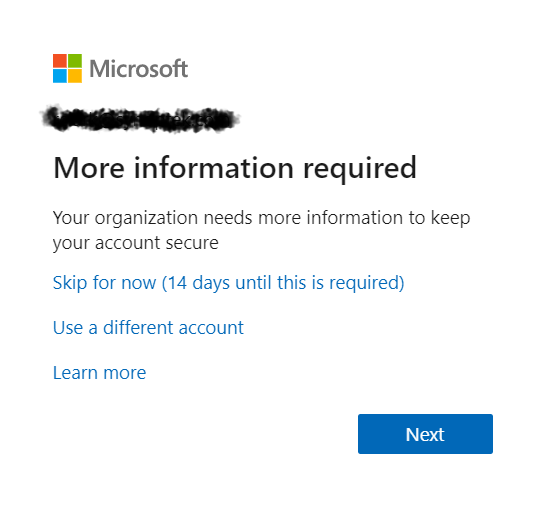
A Microsoft login screen displays More information required with options to skip for 14 days, use a different account, or learn more, and a blue Next button at the bottom.

Disable “More information required” MFA Prompt for Guests

Table of Contents:Create A Dynamic Distribution GroupDisable Security DefaultsConfigure MFA Registration Policy If you’ve seen this image before then you may feel my pain. All employees and guests in my client’s Microsoft 365 tenant were getting this prompt. The client wanted to leave this on for employees but keep it disabled for guests. If this is something you want to do too, let me show you how to do it. Create A Dynamic Distribution Group The first step is to create a dynamic distribution list called “All Users Except Guests” (or something similar). To start, log in to Azure as

Disable “More information required” MFA Prompt for Guests Read More »

SharePoint Modern Pages: How to Transform Classic Sites

SharePoint Modern Pages: How to Transform Classic Sites

Table of Contents:What are SharePoint modern pages?What are the differences between classic and modern pages in SharePoint?How to convert classic pages to modern pages in SharePoint?Administrator Windows PowerShellAdministrator Windows PowerShell ISEHow to create a classic site or page in SharePoint online?Why is it best to use modern pages? It’s been years since Microsoft rolled out modern pages in SharePoint. But it’s only recently that companies and organizations have started modernizing their classic sites — and this is where the problem lies. Transforming a SharePoint site that uses the old “classic” user interface design to the modern experience requires a little

SharePoint Modern Pages: How to Transform Classic Sites Read More »

Five people sit in a circle in a modern office space, engaged in conversation. Colorful sticky notes are on the wall behind them, and shelves with books and decor are visible in the background.

Office 365 Profile Picture Not Displayed Inside SharePoint Online Webparts

From time to time you may notice that SharePoint Online does not display updated user photos in webparts. You may see or experience something like this: There is a simple solution to this. Navigate to this URL in your SharePoint tenant: This list stores three photos for each user in your Office 365 tenant. The photos have the following naming convention and dimension requirements: If my username was ryanclark, my tenant name was mrsp1, my TLD (top-level domain) was .com (could be .net, .org, .co, etc.), then we’d have the following: Save (and possibly overwrite) the three images in the

Office 365 Profile Picture Not Displayed Inside SharePoint Online Webparts Read More »

Six colleagues gather around a laptop in a bright office, cheering and smiling excitedly, suggesting they have received good news or achieved a goal together. A notepad and tablet are on the table.

Migrating from Skype for Business to Microsoft Teams

On August 2, 2019 Microsoft officially announced the end of life for Skype for Business. The end of life program will conclude on July 31, 2021. When the program concludes, the integration of Skype for Business with third-party audio conferencing providers will stop working and the following changes will be observed on that date (July 31, 2021): Read the full announcement here: “End of life program for the integration of Skype for Business with third-party audio conferencing providers.” Related: Skype for Business vs Teams: Only One Remains Migrating from Skype for Business to Microsoft Teams Skype for Business will be

Migrating from Skype for Business to Microsoft Teams Read More »

Scroll to Top