
Ryan Clark

As the Modern Workplace Architect at Mr. SharePoint, I help companies of all sizes better leverage Modern Workplace and Digital Process Automation investments. I am also a Microsoft Most Valuable Professional (MVP) for SharePoint and Microsoft 365.

A man with short curly hair and a beard is smiling. He is wearing a dark plaid suit jacket, a black shirt, and a dark tie. The background is softly blurred.
Microsoft Teams vs Slack: Comparing the Two Giants (Updated)

Microsoft Teams vs Slack: Comparing the Two Giants (Updated)

Not sure which one to go with? In this guide, let’s talk about Slack and Microsoft Teams, their key features, and how they stack up against each other. Let’s get started. Competition Complaint Against Microsoft The two made the news earlier in 2020 when Slack filed a competition complaint against Microsoft. The bulk of the report was about how Microsoft was “illegally tying” Teams to Office 365 (which is now Microsoft 365): Their history runs deeper when a few years ago, Microsoft was thinking of buying the SaaS giant for about 8 billion USD. But instead of going through, they […]

Microsoft Teams vs Slack: Comparing the Two Giants (Updated) Read More »

How to Enable External Forwarding in Microsoft 365

How to Enable External Forwarding in Microsoft 365 (2026)

Getting problems related to external forwarding? In this guide, I will walk you through enabling external forwarding in Microsoft 365, and my predicament that led to this. Let’s get started. What is external forwarding in Microsoft 365? If you’ve been using email platforms before, then you must already be familiar with external forwarding. Basically, it’s a feature that allows emails from a Microsoft 365 mailbox to be automatically sent to an external email address. It works like this: It’s useful for smooth communication across different platforms or ensuring important messages reach external contacts. Unfortunately, as you would later see, it’s

How to Enable External Forwarding in Microsoft 365 (2026) Read More »

How to Access SharePoint Online Data [With the Postman Tool]

How to Access SharePoint Online Data [With the Postman Tool]

It’s certainly possible to access SharePoint data using the postman tool and SharePoint REST API. This tutorial will teach you how to do that — though it may get a little technical. Rest assured, however, that you can straightaway follow the steps outlined in this guide. Although it’s not required, having a working knowledge about SharePoint REST API and how it works will definitely help you understand this guide better. But nevertheless, you will still be able to successfully access your SharePoint Online data through the Postman Tool if you follow closely the steps and commands shared in this guide.

How to Access SharePoint Online Data [With the Postman Tool] Read More »

SharePoint’s External Sharing vs Azure AD B2B Collaboration

SharePoint’s External Sharing vs Azure AD B2B Collaboration

Some users are confused about the difference between SharePoint’s external sharing and Azure AD B2B collaboration. When the SharePoint Online external sharing came into being, there were additional features introduced. Which is better of the two? Which is easier to use? To cut this long story short, it’s becoming apparent that using SharePoint’s external sharing is a bit more confusing to most users. Let’s explore these two and see how they differ from each other. What is external sharing in SharePoint? Basically, external sharing makes your content available to others outside of your organization. With it, you can share your

SharePoint’s External Sharing vs Azure AD B2B Collaboration Read More »

How to Download Multiple Files From SharePoint [Tutorial]

How to Download Multiple Files From SharePoint Online (Tutorial)

** This article is for SharePoint Online only ** Before SharePoint introduced the new experience, it was a bit hard to download multiple files at once. That’s why if you haven’t modernized your SharePoint sites, you’re actually missing out on a lot of things. With the new user interface, downloading multiple files at once from SharePoint is as easy as copying files using Windows Explorer. Let me show you… How to download files from SharePoint To start, simply navigate to your SharePoint site’s files folder. Then, select all the files you want to download by ticking the radio boxes on

How to Download Multiple Files From SharePoint Online (Tutorial) Read More »

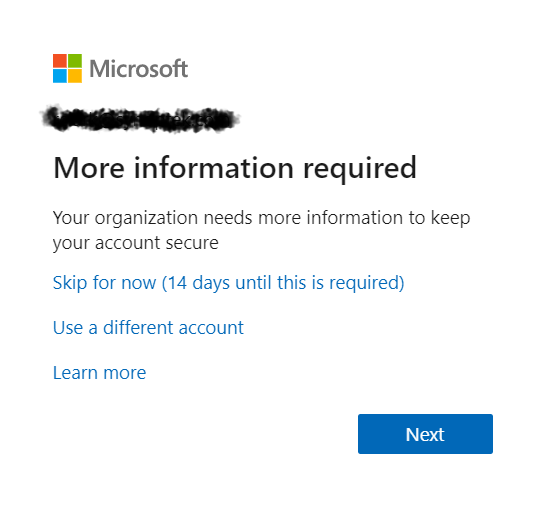
A Microsoft login screen displays More information required with options to skip for 14 days, use a different account, or learn more, and a blue Next button at the bottom.

Disable “More information required” MFA Prompt for Guests

If you’ve seen this image before then you may feel my pain. All employees and guests in my client’s Microsoft 365 tenant were getting this prompt. The client wanted to leave this on for employees but keep it disabled for guests. If this is something you want to do too, let me show you how to do it. Create A Dynamic Distribution Group The first step is to create a dynamic distribution list called “All Users Except Guests” (or something similar). To start, log in to Azure as a Global Admin. Then, search for “Azure Active Directory” and click on

Disable “More information required” MFA Prompt for Guests Read More »

SharePoint Modern Pages: How to Transform Classic Sites

SharePoint Modern Pages: How to Transform Classic Sites

It’s been years since Microsoft rolled out modern pages in SharePoint. But it’s only recently that companies and organizations have started modernizing their classic sites — and this is where the problem lies. Transforming a SharePoint site that uses the old “classic” user interface design to the modern experience requires a little bit of technical know-how. But that doesn’t mean it’s hard to do. In fact, you can do it all within a few minutes. Before we go through it, let’s discuss first what a modern page is and how it differs from the classic experience. Let’s start! What are

SharePoint Modern Pages: How to Transform Classic Sites Read More »

Five people sit in a circle in a modern office space, engaged in conversation. Colorful sticky notes are on the wall behind them, and shelves with books and decor are visible in the background.

Office 365 Profile Picture Not Displayed Inside SharePoint Online Webparts

From time to time you may notice that SharePoint Online does not display updated user photos in webparts. You may see or experience something like this: There is a simple solution to this. Navigate to this URL in your SharePoint tenant: This list stores three photos for each user in your Office 365 tenant. The photos have the following naming convention and dimension requirements: If my username was ryanclark, my tenant name was mrsp1, my TLD (top-level domain) was .com (could be .net, .org, .co, etc.), then we’d have the following: Save (and possibly overwrite) the three images in the

Office 365 Profile Picture Not Displayed Inside SharePoint Online Webparts Read More »

Six colleagues gather around a laptop in a bright office, cheering and smiling excitedly, suggesting they have received good news or achieved a goal together. A notepad and tablet are on the table.

Migrating from Skype for Business to Microsoft Teams

On August 2, 2019 Microsoft officially announced the end of life for Skype for Business. The end of life program will conclude on July 31, 2021. When the program concludes, the integration of Skype for Business with third-party audio conferencing providers will stop working and the following changes will be observed on that date (July 31, 2021): Read the full announcement here: “End of life program for the integration of Skype for Business with third-party audio conferencing providers.” Related: Skype for Business vs Teams: Only One Remains Migrating from Skype for Business to Microsoft Teams Skype for Business will be

Migrating from Skype for Business to Microsoft Teams Read More »

Five people sit around a table with laptops, focused on work or discussion, in a room with large windows and a modern chandelier overhead. Some wear headphones; natural light fills the space.

New SharePoint home sites headline Microsoft 365 innovations for the intelligent workplace

Attendees (in-person and virtual) at the recent SharePoint Conference were introduced to recent and upcoming features and innovations within SharePoint, including Home Sites. Home Sites bring together personalized news, events, conversations, content, and video on a single SharePoint communications site. SharePoint home sites are an intelligent, integrated employee experience—a landing page—for your organization that: Connects the workplace with Microsoft Search and megamenu navigation. Shares relevant news and content to each user based on their role and place in the organization. Engages employees with conversation and compelling video powered by Yammer and Microsoft Stream. Powers individual productivity with personalized content, information,

New SharePoint home sites headline Microsoft 365 innovations for the intelligent workplace Read More »

Scroll to Top